Affiliate Disclosure: This article contains affiliate links. If you choose to sign up for WordPress.com through these links, I may earn a small commission at no additional cost to you.
Are you trying to decide between WordPress.com and WordPress.org but keep finding conflicting advice?
I don’t blame you.
A lot of the comparisons ranking on Google are outdated and still describe a version of WordPress.com that no longer exists.
In 2026, the platform looks very different. You can now install plugins on every paid plan, customize your site’s design with Global Styles, use custom fonts, and even add custom CSS without jumping to expensive tiers.
That changes the conversation.
If you’re launching a blog, business website, portfolio, or online store, the choice isn’t as obvious as it was a few years ago.
After reviewing both options closely, I’ve found that one platform makes far more sense for most people, while the other remains the better choice for users who want maximum control.
Let’s figure out which one deserves your money in 2026.
The Quick Verdict
If you’re looking for the shortest possible answer, here’s my recommendation:
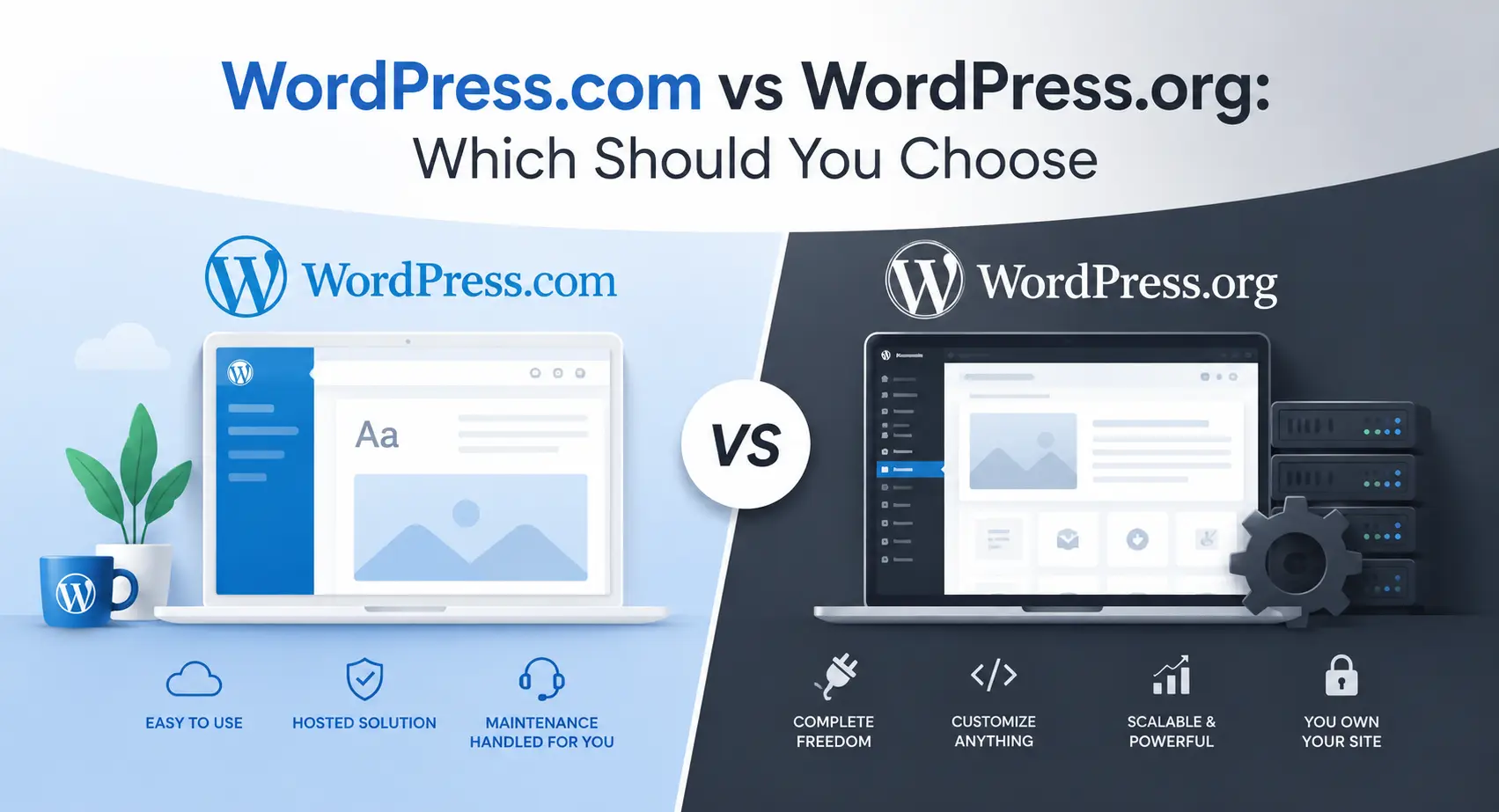
Choose WordPress.com if you want to focus on building your website instead of managing it.
For most bloggers, freelancers, creators, consultants, and small business owners, that’s the better deal in 2026.
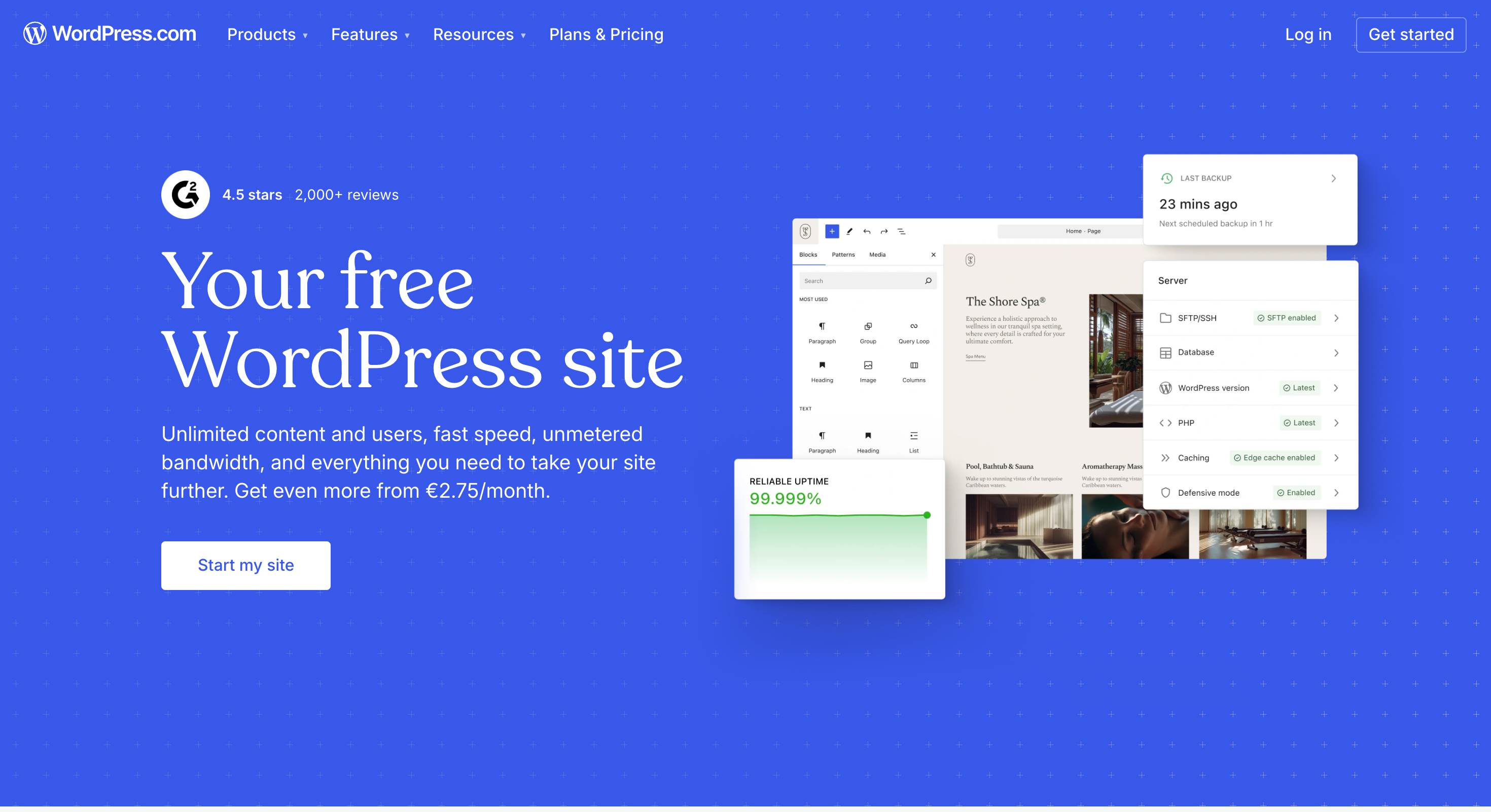
WordPress.com takes care of hosting, software updates, security, backups, and much of the technical maintenance that comes with running a website.
Instead of worrying about whether a plugin update broke something or whether your hosting environment is configured correctly, you can spend your time creating content, attracting visitors, and growing your business.
WordPress.org is still an excellent platform. In fact, it’s the option I’d recommend to developers, agencies, and power users who want complete control over every aspect of their site. But that freedom comes with responsibility. You’re responsible for choosing hosting, managing updates, handling security, troubleshooting conflicts, and maintaining the site over time.
For many people, that’s a tradeoff they don’t actually need.
Quick Decision Table
| If You Want… | Choose |
|---|---|
| The fastest path to launching a website | WordPress.com |
| Hosting included | WordPress.com |
| Automatic updates and security management | WordPress.com |
| Less technical maintenance | WordPress.com |
| Full server-level control | WordPress.org |
| Advanced custom development | WordPress.org |
| Complete hosting flexibility | WordPress.org |
| Maximum control over every technical detail | WordPress.org |
My Recommendation for Most People
If I were helping a friend launch a blog, portfolio, coaching website, local business site, or content-focused project today, I’d point them toward WordPress.com first.
The reason is simple: most website owners don’t wake up excited to manage hosting, security settings, backups, and software updates. They want a website that works.
WordPress.com handles the technical side so you can focus on publishing, marketing, and growing your audience.
Verdict: For the majority of website owners in 2026, WordPress.com is the easier and more practical choice.
WordPress.org remains the better option for users who genuinely need complete technical control.
Why This Comparison Looks Very Different in 2026
One of the biggest problems with researching WordPress.com vs WordPress.org is that many of the articles ranking on Google were written years ago and never properly updated.
As a result, readers often come away with an outdated view of what WordPress.com can actually do.
For years, the standard advice went something like this:
- WordPress.com is for beginners.
- WordPress.org is for serious website owners.
- You need WordPress.org if you want plugins or meaningful customization.
In 2026, that advice is far too simplistic.
The Biggest Change: Plugin Access
Historically, plugin access was one of the strongest reasons to choose WordPress.org.
That gap has narrowed significantly.
WordPress.com now allows plugin installation on every paid plan. That means users can access the same massive WordPress plugin ecosystem that has helped make WordPress the most popular website platform in the world.
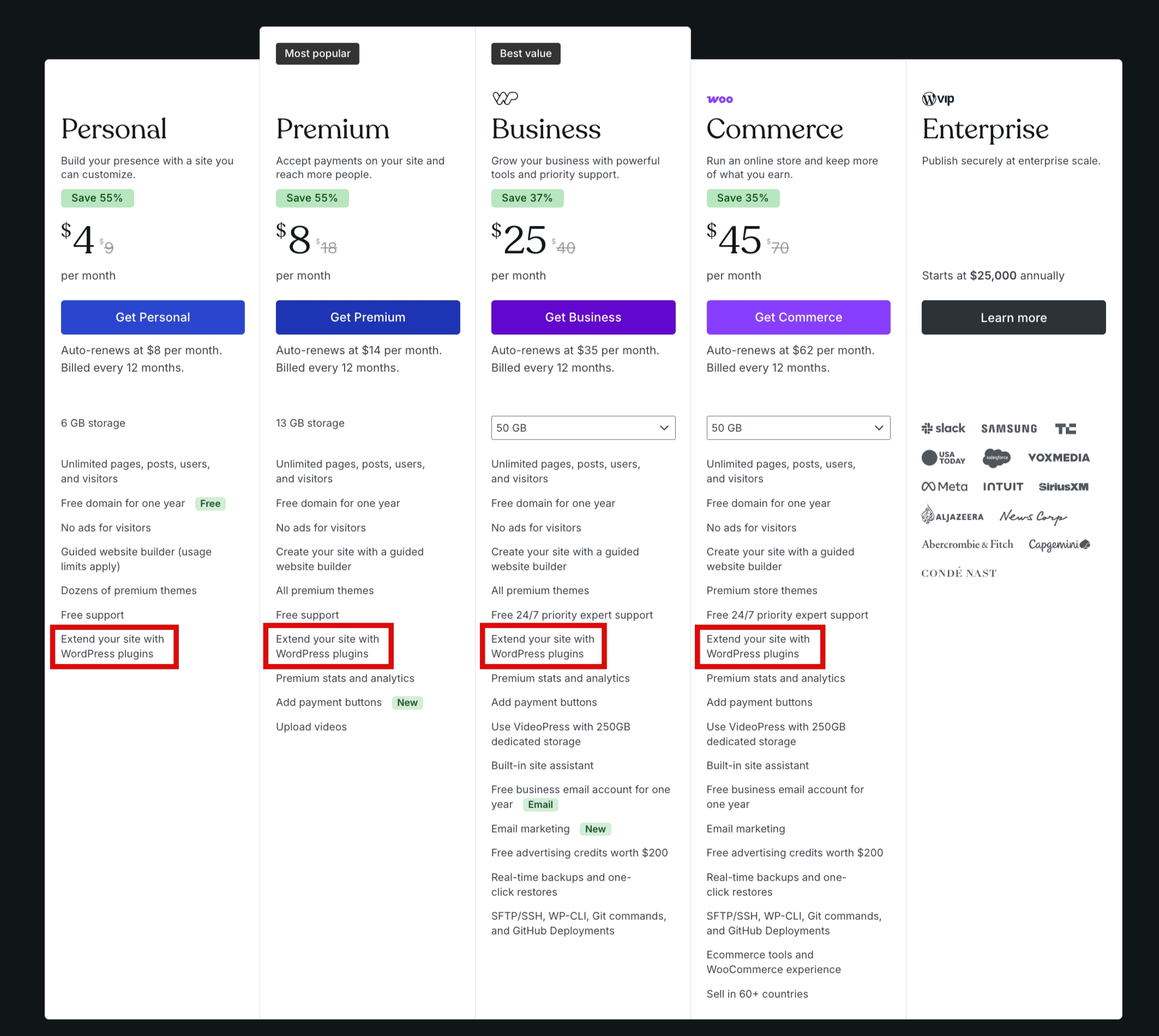
For many website owners, this removes what used to be the biggest limitation of WordPress.com.
Design Flexibility Is No Longer the Problem It Once Was
Another criticism you’ll still see repeated online is that WordPress.com doesn’t give users enough control over their site’s design.
That might have been a fair criticism years ago.
Today, WordPress.com includes tools such as:
- Full Site Editing
- Global Styles
- Custom fonts
- CSS customization
- Access to themes across paid plans
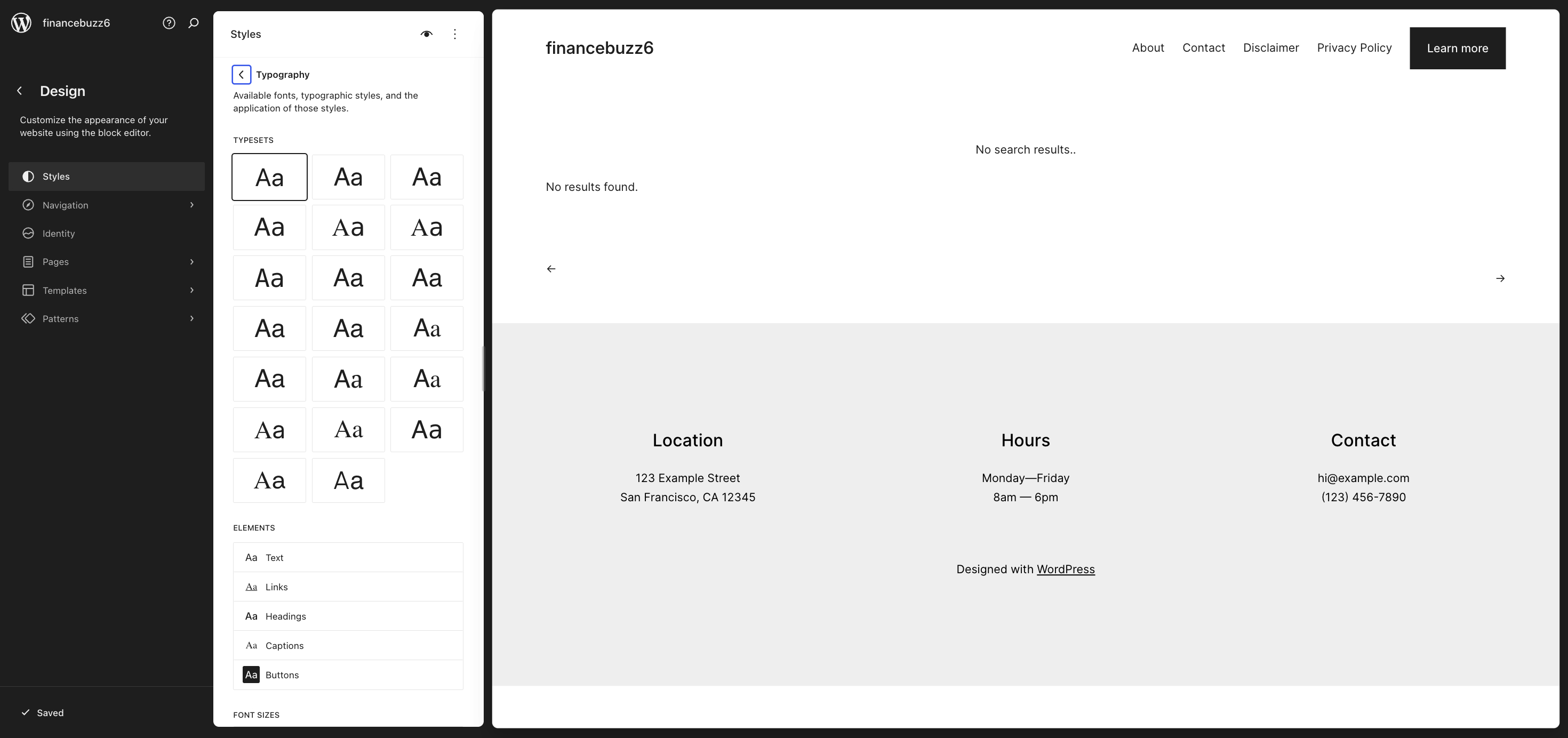
In practical terms, users can now customize headers, footers, navigation menus, typography, colour palettes, spacing, templates, and site-wide design settings without needing advanced technical knowledge.
The result is a platform that feels much more flexible than many people expect.
What Hasn’t Changed
Despite all these improvements, the core difference between the two platforms remains the same.
WordPress.com is built to handle the technical side of running a website for you.
WordPress.org gives you complete control over everything, but also makes you responsible for everything.
That distinction matters more than plugins, themes, or design settings.
The real question isn’t:
“Which platform has more features?”
The real question is:
“Do you want to manage your website’s infrastructure yourself, or would you rather focus on building the website?”
Your answer to that question will often determine which platform is the better fit.
Verdict
Many of the traditional arguments against WordPress.com are based on limitations that no longer exist.
In 2026, the choice is less about customization and more about how much technical responsibility you want to take on. If your goal is simply to build and grow a website, WordPress.com deserves far more consideration than most older reviews give it.
What It’s Like to Build a Site on WordPress.com
The easiest way to describe WordPress.com is this: it takes care of most of the technical work that usually comes with running a website.
When I created a site on WordPress.com, I didn’t have to search for hosting, install WordPress, configure security tools, or worry about software updates before publishing my first page. I signed up, followed the setup process, and started building.
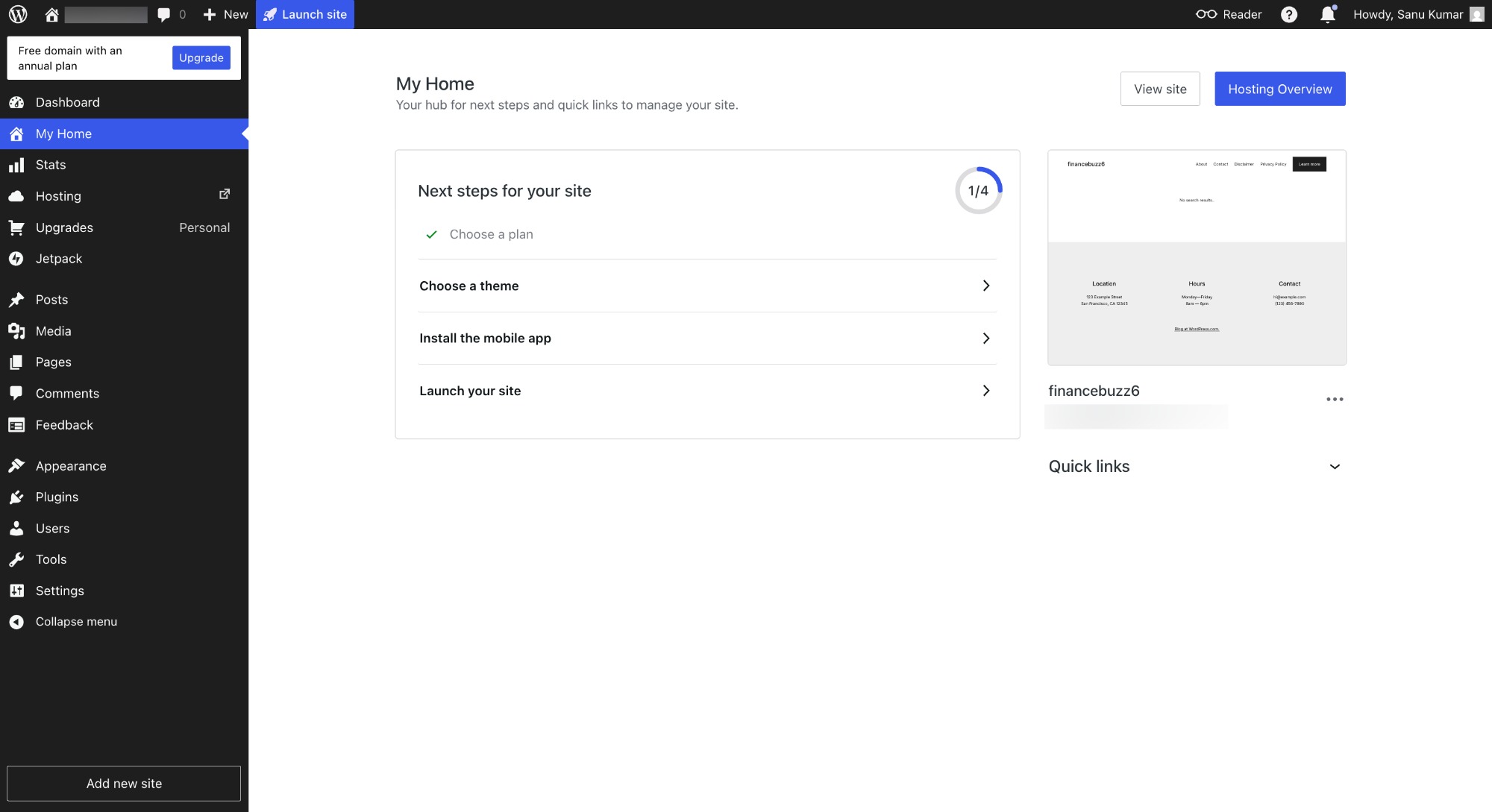
For many people, that’s a major benefit.
Getting Started Takes Very Little Effort
The setup process walks you through the key decisions most website owners need to make:
- Choosing a domain name
- Selecting a plan
- Picking a theme
- Configuring basic site settings
Rather than bouncing between multiple services, everything happens from a single account and dashboard.
If you’re launching your first website, this removes a lot of the confusion that often comes with self-hosted WordPress.
The Custom Domain Process Is Built In
One thing many beginners underestimate is how annoying domain setup can become when different companies handle your hosting and domain registration.
With WordPress.com, the process is integrated directly into the setup flow.
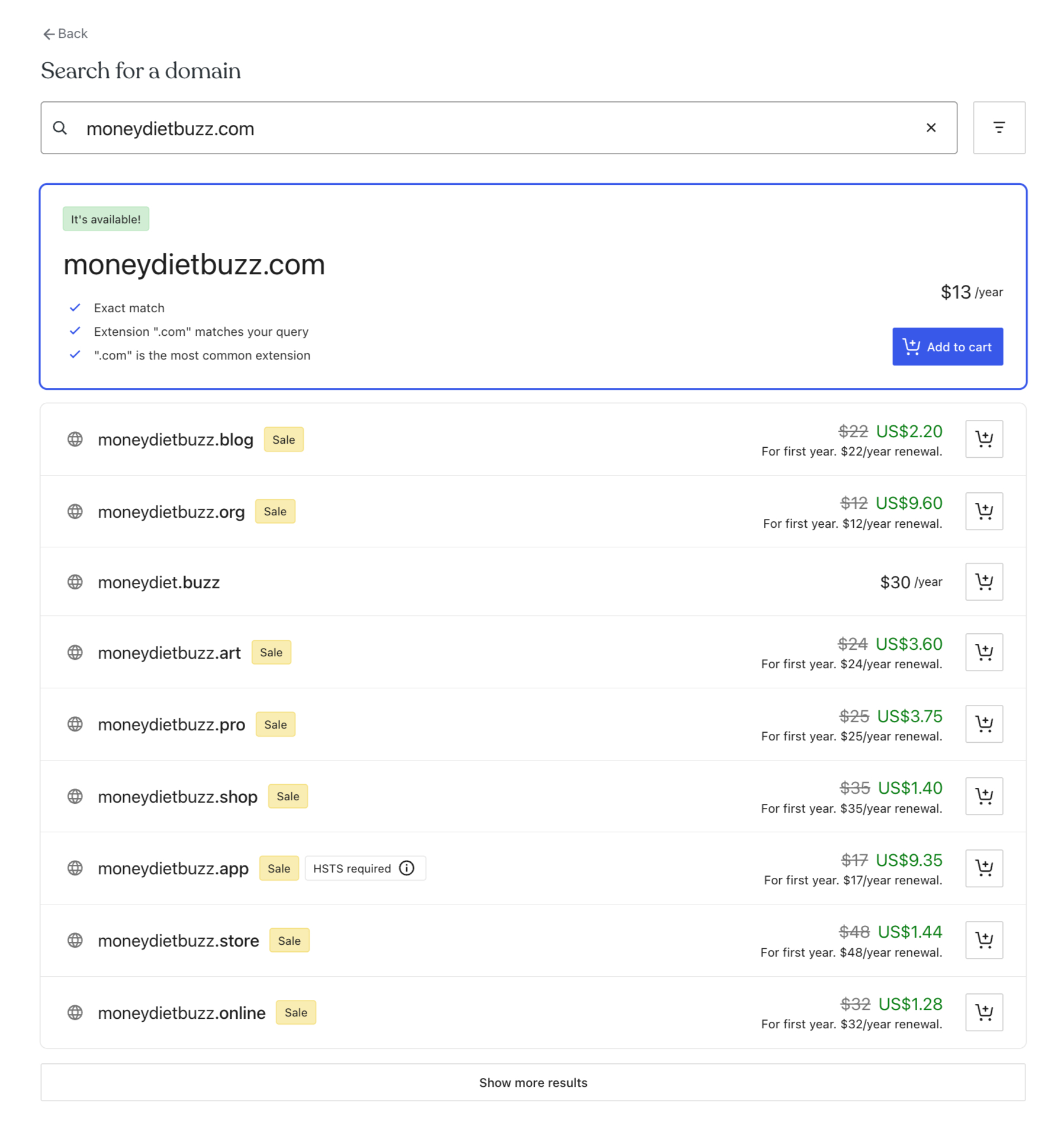
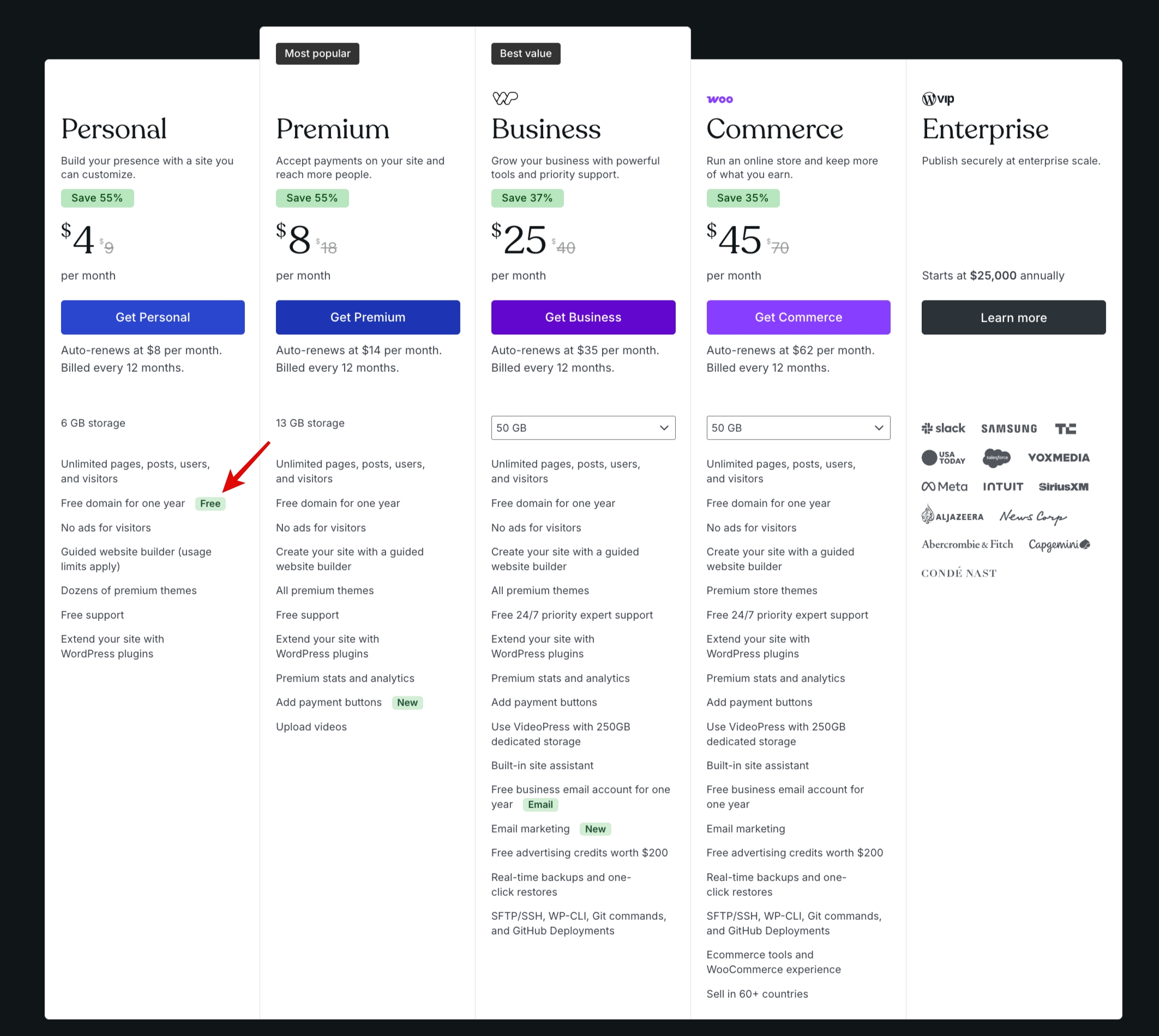
The Personal plan includes a custom domain, which means many users can get their website, hosting, and domain managed under one roof.
That may not sound exciting, but reducing moving parts often means fewer headaches later.
Managing Your Site Feels More Centralized
After setup, most of your day-to-day tasks happen inside a single dashboard.
You can:
- Create pages and posts
- Manage site settings
- Install plugins
- Customize themes
- Review analytics
- Manage domains
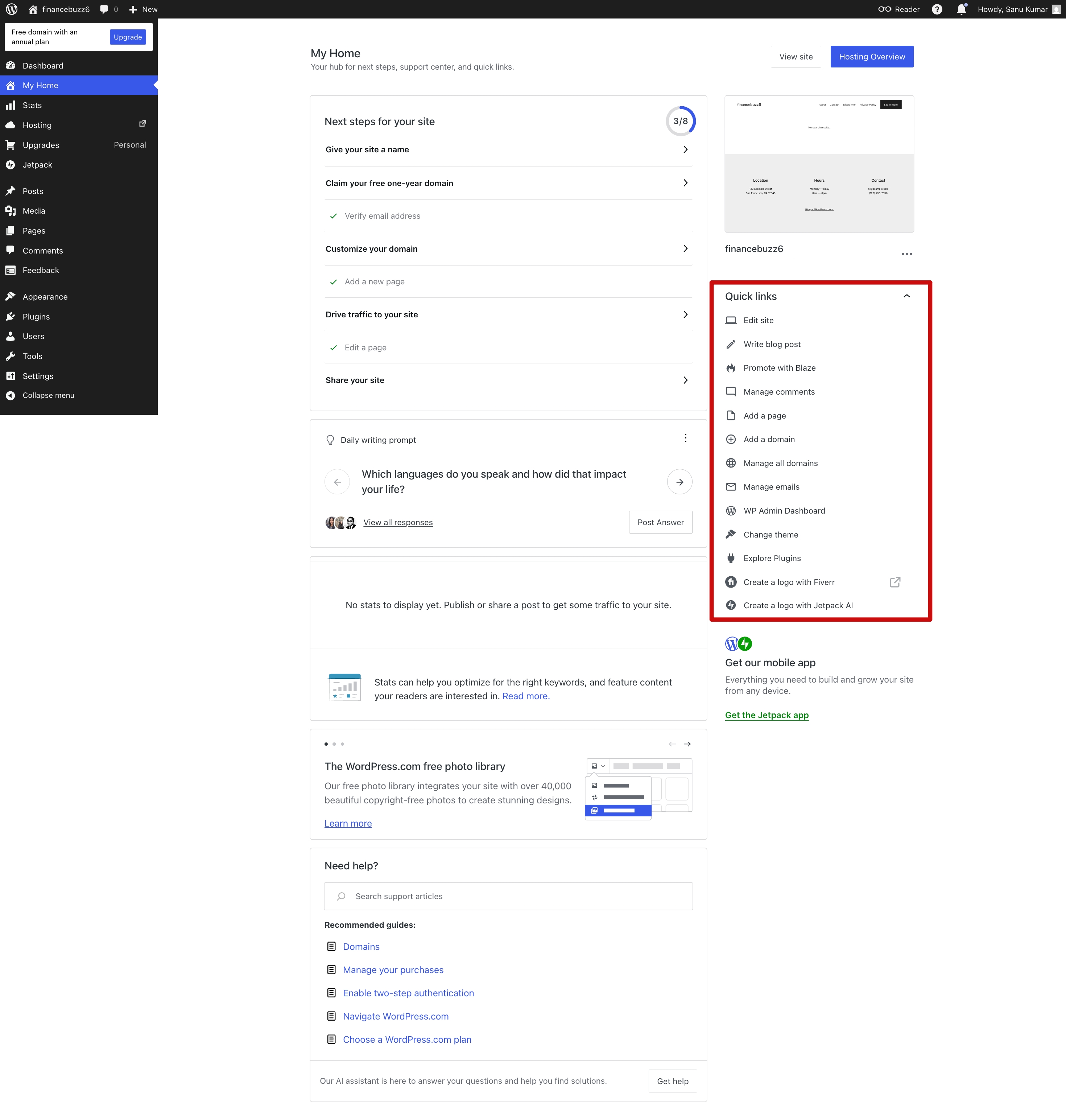
The experience feels less fragmented than a typical self-hosted setup, where you may regularly jump between your hosting provider, WordPress dashboard, backup tools, security plugins, and performance services.
Design Customization Is Better Than Many People Expect
This is where many outdated reviews fall apart.
Modern WordPress.com sites use the same block-based editing experience that powers the broader WordPress ecosystem.
Using Full Site Editing and Global Styles, you can customize major parts of your site without touching code.
That includes:
- Site-wide colors
- Typography
- Layout settings
- Headers
- Footers
- Navigation menus
- Templates
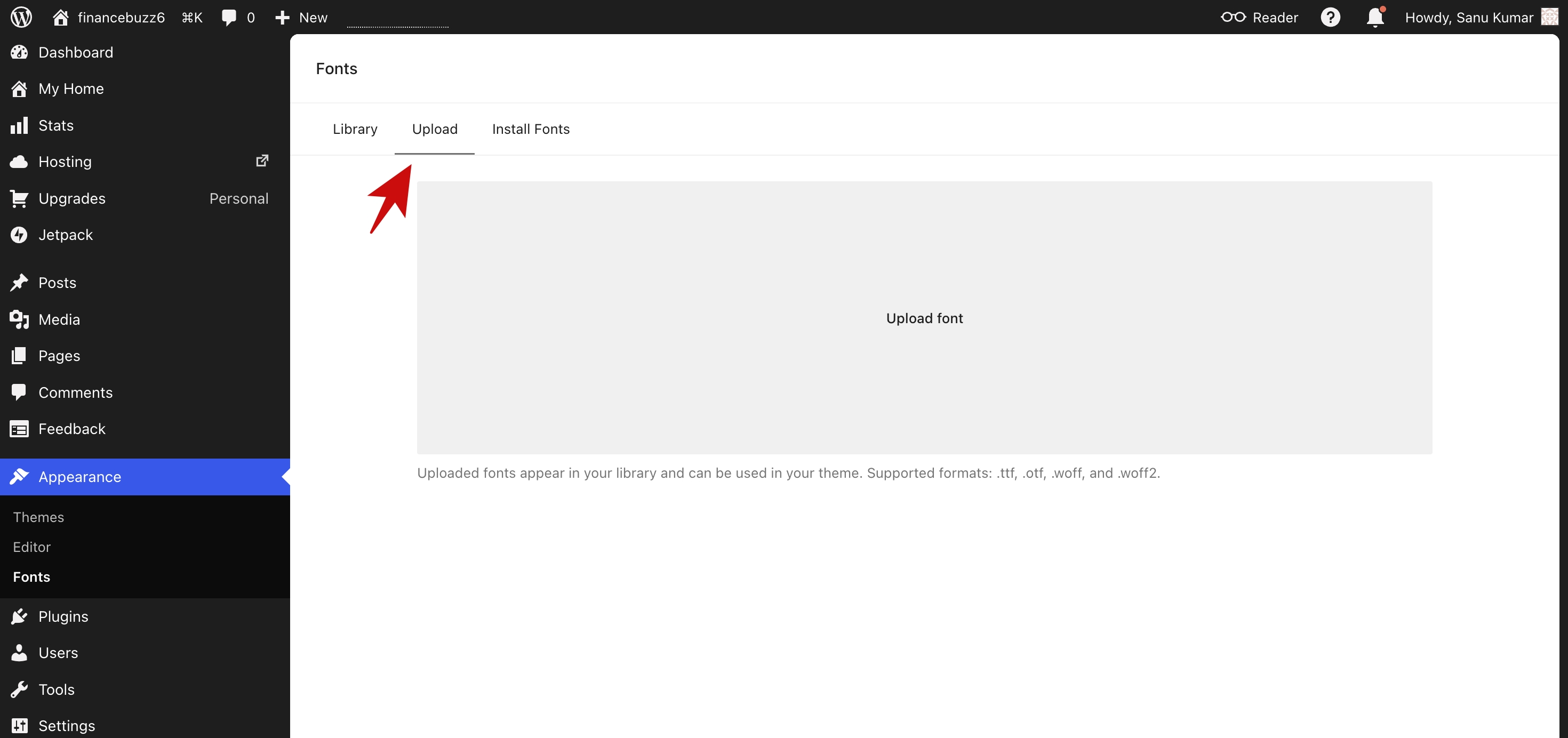
You can also upload custom fonts and add custom CSS on paid plans.
For bloggers, creators, freelancers, and small businesses, that’s enough flexibility to build a professional-looking website without hiring a designer.
Plugins Are No Longer a Major Limitation
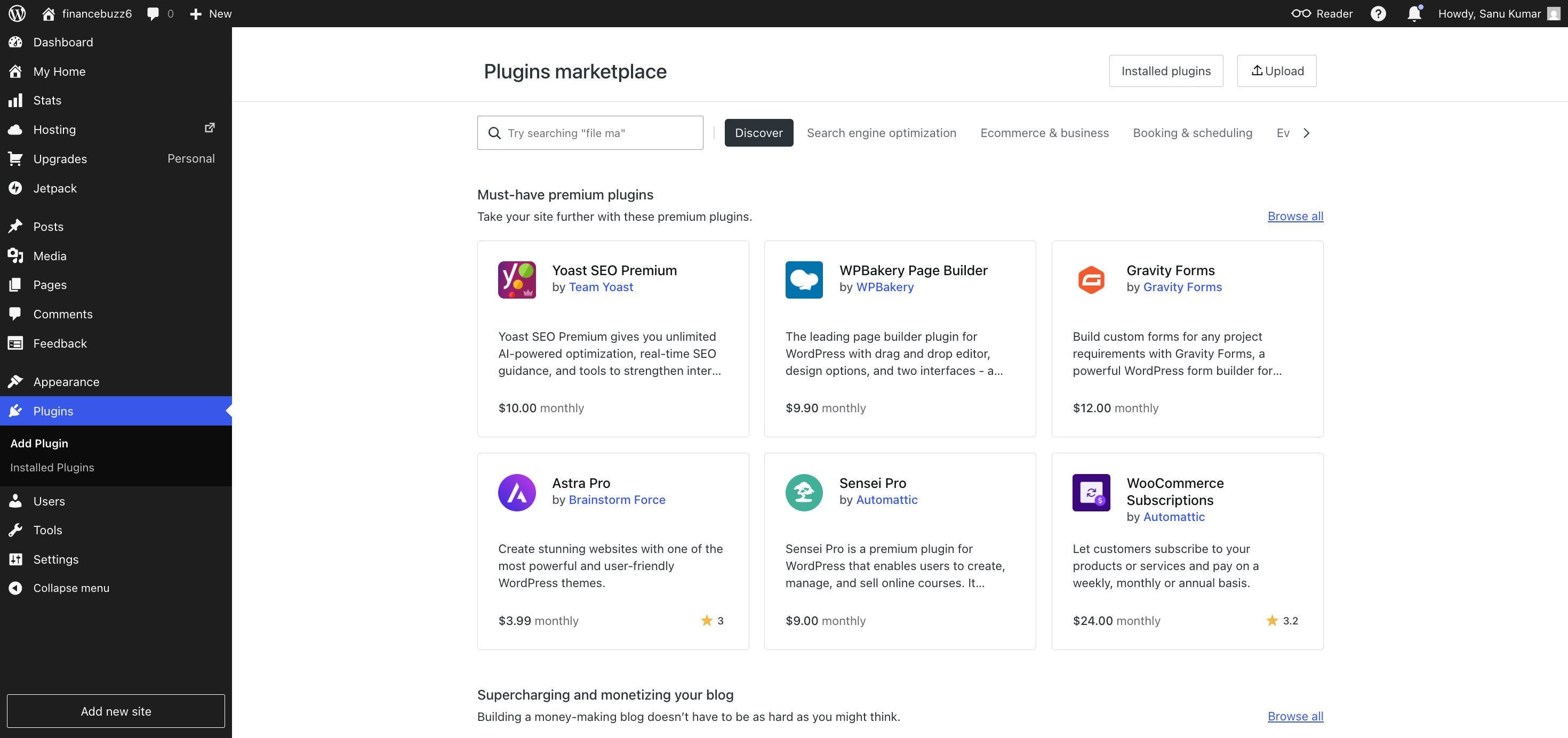
One of the biggest reasons people historically chose WordPress.org was access to plugins.
Today, WordPress.com offers plugin installation on all paid plans.
That opens the door to thousands of tools for:
- SEO
- Lead generation
- Ecommerce
- Forms
- Memberships
- Analytics
- Performance optimization
For many users, this removes one of the strongest arguments that used to favour WordPress.org.
The Biggest Benefit
The biggest advantage isn’t any single feature.
It’s the fact that WordPress.com handles the behind-the-scenes work for you.
Hosting, updates, security, and platform maintenance are managed as part of the service. Instead of spending time maintaining your website, you can spend that time publishing content, improving your products, or growing your audience.
That’s ultimately why so many website owners are reconsidering WordPress.com in 2026.
Verdict
If your primary goal is to build and grow a website—not manage web hosting—WordPress.com delivers a compelling experience. The platform has evolved well beyond its old reputation and now offers enough flexibility for most bloggers, creators, freelancers, and small businesses while handling much of the technical work in the background.
What It’s Like to Build a Site with WordPress.org
WordPress.org offers something WordPress.com never fully can:
Complete control.
For some website owners, that’s exactly what they want. For others, it’s more responsibility than they bargained for.
Your First Decision Is Hosting
Before you can even start building your site, you’ll need to choose a hosting provider.
That means comparing plans, understanding storage and bandwidth limits, setting up billing, and deciding where your website will live.
It’s not difficult, but it’s another decision that simply doesn’t exist on WordPress.com.
If you’re new to websites, this is often the first point where things start feeling more technical.
Installing WordPress Is Easy—But It’s Still One More Step
Most hosting companies offer one-click WordPress installations today.
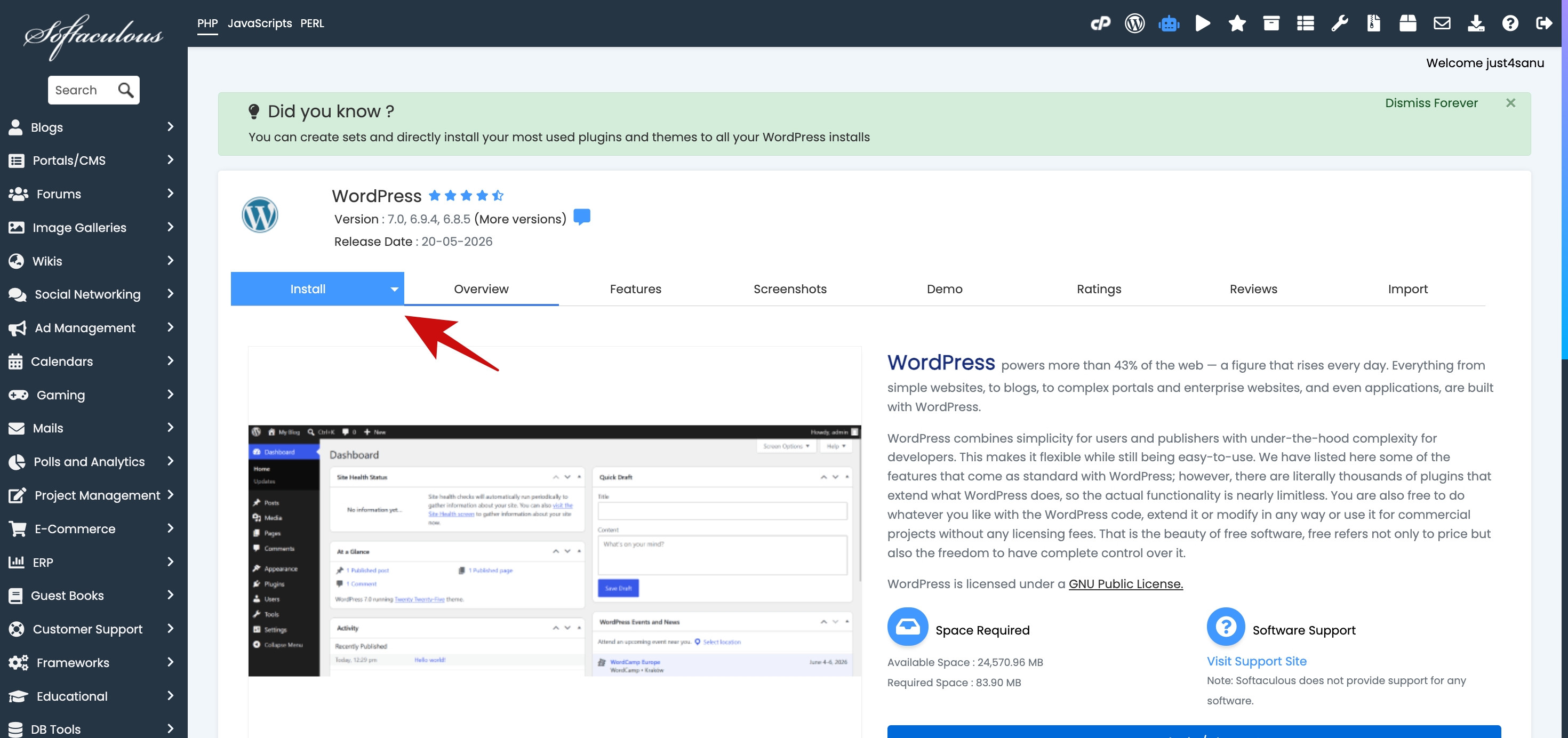
The process is much easier than it was years ago, but you’re still responsible for setting everything up correctly.
Once WordPress is installed, you’ll need to:
- Configure site settings
- Install a theme
- Set up security measures
- Configure backups
- Add essential plugins
None of these tasks is particularly hard, but they do take time.
You’re Responsible for Updates
This is where the difference between the two platforms becomes much more noticeable.
With WordPress.org, you’re responsible for keeping:
- WordPress itself updated
- Themes updated
- Plugins updated
Most updates go smoothly.
Sometimes they don’t.
A plugin update can create conflicts. A theme update can affect design elements. An outdated plugin can introduce security risks.
Again, these aren’t daily problems, but they’re part of owning a self-hosted website.
Security Is in Your Hands
One of the biggest hidden costs of WordPress.org isn’t money.
It’s attention.
Someone needs to make sure:
- Security measures are in place
- Backups are running properly
- Vulnerabilities are addressed
- The site remains stable
For businesses that rely on their websites, this often means additional tools, services, or maintenance routines.
With WordPress.com, much of this work happens behind the scenes.
With WordPress.org, you’re the one making sure everything stays healthy.
The Freedom Is Real
Despite the extra work, WordPress.org remains incredibly powerful.
You can:
- Choose any hosting provider
- Modify server configurations
- Use virtually any WordPress plugin
- Create custom themes
- Build highly specialized websites
- Integrate advanced third-party tools
- Scale using the infrastructure of your choice
For developers, agencies, and advanced users, that level of freedom can be invaluable.
It’s one of the reasons WordPress.org continues to power such a large portion of the web.
The Trade-Off Most People Don’t Think About
When people compare these platforms, they often focus on features.
The more important question is where you want to spend your time.
Do you want to spend your time creating content, marketing your business, and serving customers?
Or do you want to spend some of that time managing the technology behind your website?
Neither answer is wrong.
But many website owners discover they care far less about complete control than they initially thought.
Verdict
WordPress.org remains the best option for developers, agencies, and users who need maximum flexibility. But that flexibility comes with ongoing responsibility. If you genuinely need full control over your hosting environment and website infrastructure, WordPress.org is hard to beat.
If you simply want a professional website without the maintenance burden, WordPress.com will often be the more practical choice.
WordPress.com vs WordPress.org: The Differences That Actually Matter
Most comparison articles spend thousands of words listing features.
I think that’s the wrong approach.
In 2026, both WordPress.com and WordPress.org can build excellent websites. Both support themes. Both support plugins. Both can rank in Google. Both can run online stores.
The real question is this:
Do you want to manage your website, or do you want to manage the technology behind your website?
That’s where the decision gets easier.
Hosting, Security, and Updates
This is the biggest advantage WordPress.com has over WordPress.org.
When you use WordPress.com, hosting is included. Security is handled for you. Software updates are managed for you.
You don’t have to think about server maintenance, security patches, backup solutions, or whether a plugin update might break your site.
You simply log in and work on your website.
With WordPress.org, you’re responsible for all of that yourself or you’ll need to pay a hosting provider and additional services to help manage it.
For developers, that level of control is valuable.
For most business owners and bloggers, it’s simply another thing to worry about.
Winner: WordPress.com
Design and Customization
A lot of people still believe WordPress.com is restrictive.
That information is outdated.
Today, every paid WordPress.com plan includes access to plugins and themes. You can also use Global Styles, customize typography, upload custom fonts, edit templates, and add custom CSS.
For most bloggers, creators, consultants, and small businesses, that’s more customization than they’ll ever need.
WordPress.org still wins if you’re building something highly specialized or need unrestricted access to every part of the stack.
But for the average website owner, the gap is much smaller than it used to be.
Winner: Tie for Most Users
Winner for Advanced Users: WordPress.org
Ecommerce
Both platforms can support online stores.
The question is how much control you need.
If you’re running a standard online business, WordPress.com’s Commerce plan will be more than sufficient for many use cases.
If you’re building a highly customized e-commerce operation with unique functionality, WordPress.org offers greater flexibility.
Winner: Depends on Complexity
Plugins
This used to be the easiest category to score.
WordPress.org won.
Not anymore.
One of the most important changes to WordPress.com is that plugins are now available on all paid plans.
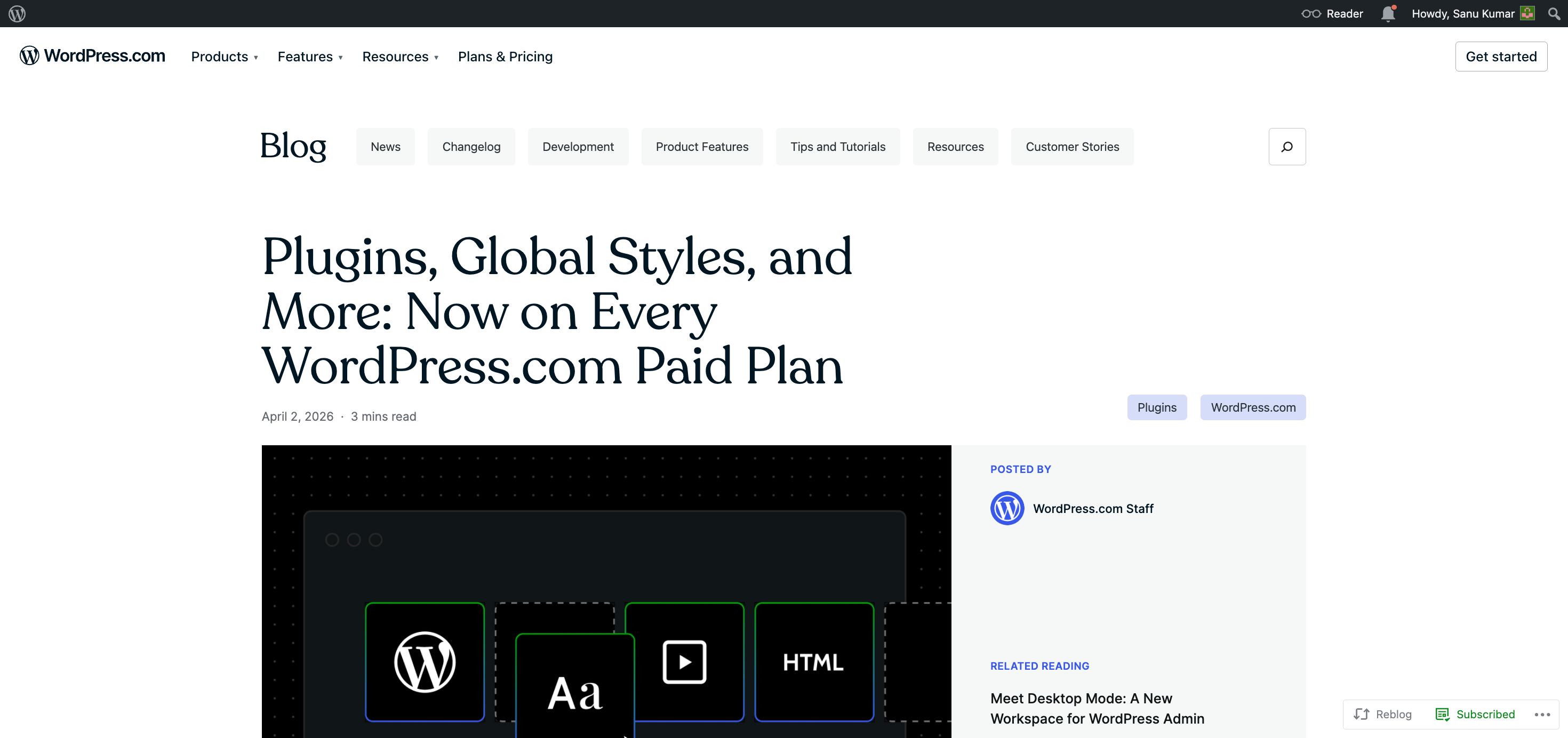
That means you can install SEO plugins, form builders, ecommerce tools, analytics tools, membership plugins, and thousands of other extensions without upgrading to a higher tier.
If you’ve read older comparisons saying plugin access requires expensive plans, you’re reading outdated information.
For many users, this single change eliminates the biggest reason they previously chose WordPress.org.
Winner: Draw
Pricing and Value
Current WordPress.com pricing starts at:
| Plan | Monthly Billing | Annual Billing |
|---|---|---|
| Personal | $9/month | $4/month |
| Premium | $18/month | $8/month |
| Business | $40/month | $25/month |
| Commerce | $70/month | $45/month |
The Personal plan includes a custom domain and access to the core WordPress.com experience.
For many bloggers and simple business websites, that’s enough.
When people compare this to WordPress.org, they often forget to include the hidden costs.
With WordPress.org, you may need to pay separately for:
- Hosting
- Domain registration
- Premium themes
- Premium plugins
- Backup tools
- Security tools
Can WordPress.org be cheaper?
Absolutely.
Can it become more expensive than expected once you start adding services and tools?
Also yes.
That’s why I think looking at sticker price alone is a mistake.
The better question is:
How much is your time worth?
If WordPress.com saves you hours of maintenance every month, the value proposition becomes much stronger.
My Take
Five years ago, recommending WordPress.org was easy.
In 2026, it’s a much closer contest.
The plugin argument is weaker. The customization argument is weaker. The design flexibility argument is weaker.
What remains is a choice between convenience and control.
If you’re a developer or power user, choose WordPress.org.
If you’re a blogger, creator, consultant, freelancer, local business owner, or anyone who simply wants a professional website without the maintenance burden, I’d lean toward WordPress.com.
Hosting, Security, and Maintenance: The Biggest Difference Between These Platforms
If you remember only one thing from this comparison, make it this:
WordPress.com and WordPress.org are not competing products in the traditional sense. They’re competing philosophies.
One gives you convenience.
The other gives you control.
And nowhere is that difference more obvious than hosting, security, and maintenance.
What WordPress.com Handles for You
When you sign up for a WordPress.com plan, you’re not just paying for a website builder.
You’re paying to avoid a long list of technical responsibilities.
WordPress.com handles:
- Web hosting
- Core WordPress updates
- Security monitoring
- Infrastructure management
- Performance optimization
- Platform maintenance
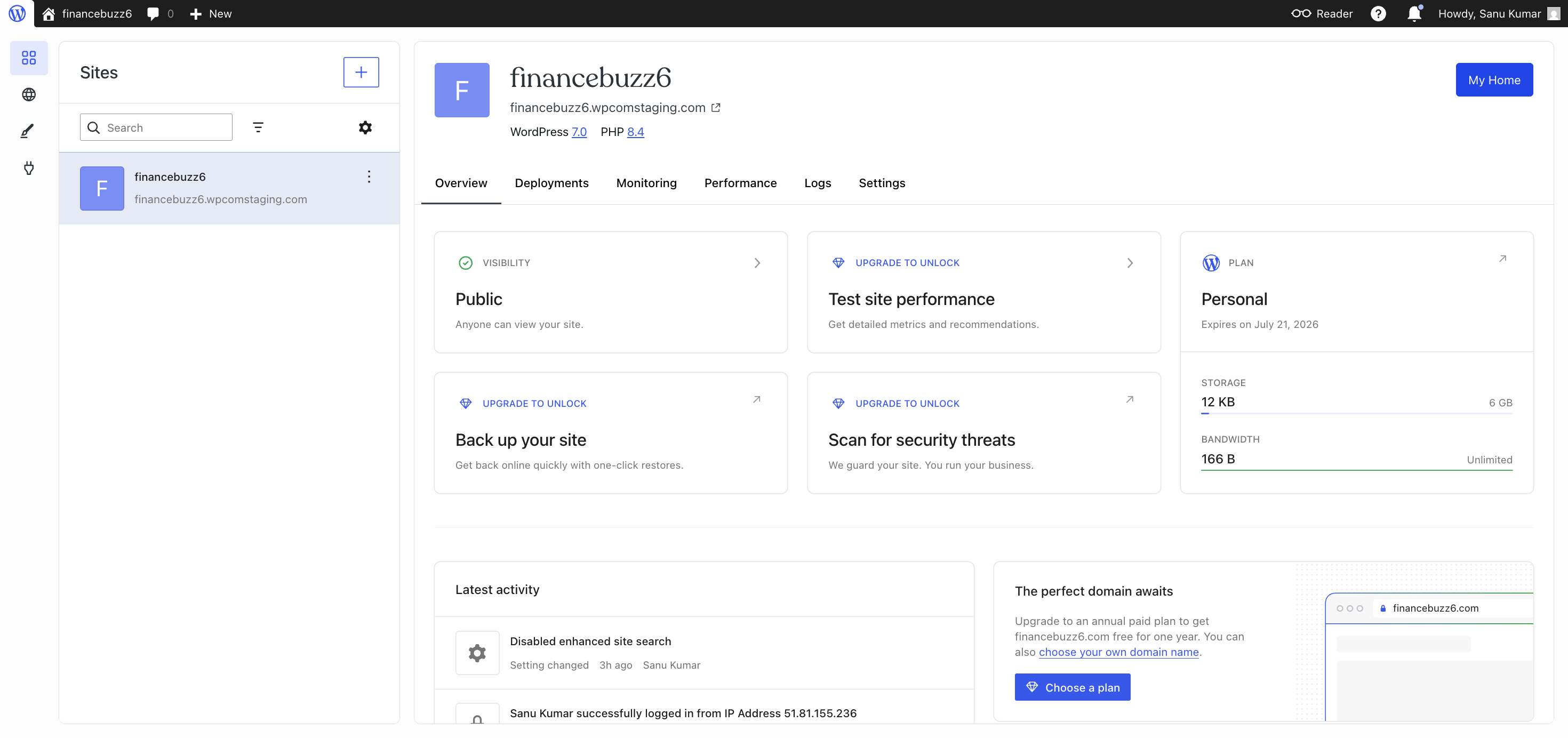
For many website owners, these are the tasks they never wanted to deal with in the first place.
Your focus stays on publishing content, updating pages, generating leads, or making sales.
That’s a very different experience from managing a self-hosted site.
What Happens With WordPress.org
With WordPress.org, you’re responsible for choosing where your website lives.
That means selecting a hosting company, managing your hosting account, monitoring updates, handling backups, and making sure everything continues working as expected.
Many hosting companies make these tasks easier than they used to be.
Some even include automated updates and backups.
But the responsibility ultimately falls on you.
If something breaks, you’re usually the one investigating why.
If your site gets compromised, you’re responsible for fixing it.
If a plugin update causes a conflict, you’re responsible for troubleshooting it.
That’s the price of complete control.
The Hidden Cost Most Comparisons Ignore
A lot of WordPress.org advocates focus on software costs.
That’s understandable.
What often gets ignored is the cost of your time.
Let’s say a website owner spends:
- Updating plugins
- Checking backups
- Monitoring security
- Troubleshooting issues
- Contacting hosting support
Even if each task seems small, they add up over months and years.
For hobbyists, that may not matter.
For business owners, creators, consultants, and freelancers, time is often more valuable than saving a few dollars per month.
That’s why many people are willing to pay for managed solutions.
They’re not buying hosting.
They’re buying peace of mind.
When WordPress.org Is Worth the Extra Work
To be fair, there are situations where handling your own hosting makes complete sense.
For example:
- You’re a developer.
- You manage multiple client websites.
- You need custom server configurations.
- You require specialized software or integrations.
- You want complete infrastructure control.
In those cases, WordPress.org’s flexibility can easily justify the additional responsibility.
My Verdict
This is the section that often decides the winner.
If your goal is to build a website and grow it, WordPress.com’s managed approach is incredibly appealing. Hosting, updates, and security happen in the background, allowing you to focus on the work that actually moves your project forward.
If your goal is maximum technical freedom, WordPress.org remains the better choice.
For everyone else, I’d argue that freedom is often overrated and convenience is underrated.
Design Flexibility and Customization
For years, one of the easiest criticisms of WordPress.com was that it didn’t give users enough control over their site’s design.
That criticism carried a lot of weight when WordPress.com offered fewer customization options, and plugin access was heavily restricted.
In 2026, I think many people are still judging the platform based on that older version.
And that’s a mistake.
The Customization Gap Is Much Smaller Than You Think
If your last experience with WordPress.com was several years ago, you’ll probably be surprised by how much control is now available.
On paid plans, users can access:
- Thousands of WordPress themes
- Full Site Editing
- Global Styles
- Custom fonts
- Custom CSS
- Template editing
- Header and footer customization
- Site-wide typography controls
- Color palette customization
In practical terms, you can build a website that looks nothing like the default theme you started with.
For most bloggers, creators, consultants, and small businesses, that’s exactly what they need.
What Global Styles Changes
One of the most underrated improvements is Global Styles.
Instead of adjusting colours, typography, and layouts page by page, you can make changes across the entire website from a central location.
Want to change your heading font?
Do it once.
Want to update your site’s colour palette?
Do it once.
Want a consistent look across every page?
That’s the point.
It’s a much more efficient workflow than many users expect.
Where WordPress.org Still Has the Edge
WordPress.org remains the king of unlimited customization.
If you want to:
- Modify server-level settings
- Build custom themes from scratch
- Develop highly specialized functionality
- Use custom development workflows
- Integrate deeply with external systems
Then WordPress.org still gives you more freedom.
There’s no debating that.
The question is whether you actually need that freedom.
Most website owners never touch server settings.
Most bloggers never build custom themes.
Most local businesses never hire developers to create complex custom functionality.
They’re simply trying to build a website that looks professional and converts visitors into customers.
A Better Question to Ask
Instead of asking:
“Which platform is more customizable?”
Ask:
“Can this platform build the website I actually want?”
For the vast majority of websites, the answer is yes for both platforms.
The difference is that WordPress.com gets you there while handling the technical maintenance in the background.
Quick Comparison
| Design Feature | WordPress.com | WordPress.org |
|---|---|---|
| Theme Access | Yes | Yes |
| Full Site Editing | Yes | Yes |
| Global Styles | Yes | Yes |
| Custom Fonts | Yes | Yes |
| Custom CSS | Yes | Yes |
| Template Editing | Yes | Yes |
| Custom Theme Development | Limited | Yes |
| Server-Level Modifications | No | Yes |
My Verdict
If you’re building a blog, portfolio, business website, content site, or even many e-commerce stores, design flexibility should no longer be the reason you rule out WordPress.com.
The platform has evolved significantly, and the combination of themes, Full Site Editing, Global Styles, custom fonts, and CSS customization gives most users more creative control than they’ll ever need.
WordPress.org still wins for developers and advanced custom projects.
For everyone else, this category is much closer to a draw than many comparison articles would have you believe.
Plugins and Extensibility
If you asked me a few years ago for the single biggest reason to choose WordPress.org over WordPress.com, my answer would have been simple:
Plugins.
That was the category where WordPress.org had a clear and undeniable advantage.
In 2026, that advantage is nowhere near as significant as many people think.
The Plugin Argument Has Changed
One of the biggest shifts in the WordPress ecosystem is that WordPress.com now allows plugin installation on all paid plans.
That’s a huge deal.
Why?
Because plugins are what turn WordPress from a basic website into almost anything you can imagine.
Need SEO tools?
Install a plugin.
Need contact forms?
Install a plugin.
Need email marketing integrations?
Install a plugin.
Need ecommerce functionality?
Install a plugin.
Need membership features?
Install a plugin.
Access to the WordPress plugin ecosystem has always been one of WordPress’s greatest strengths, and WordPress.com users no longer have to jump through the same hoops they once did to take advantage of it.
What This Means in the Real World
For the average website owner, plugin access removes one of the biggest historical reasons to choose WordPress.org.
Let’s say you’re launching:
- A blog
- A portfolio site
- A local business website
- A coaching website
- A consulting business
- An online store
In most cases, you’ll have access to the tools you need without feeling limited by the platform.
That’s why many older comparisons no longer reflect the reality of using WordPress.com today.
Where WordPress.org Still Pulls Ahead
That doesn’t mean the two platforms are identical.
WordPress.org still appeals to users who want absolute freedom.
For example:
- Developers building custom solutions
- Agencies managing complex client projects
- Businesses with highly specialized requirements
- Users running custom server environments
When you’re operating at that level, every layer of control matters.
WordPress.org gives you the freedom to customize nearly every aspect of your setup.
For advanced users, that’s a meaningful advantage.
Most People Don’t Need Maximum Flexibility
Here’s something I’ve noticed after watching countless website owners go through this decision.
Many people shop for a website platform as if they’re building the next Facebook.
In reality, they’re creating:
- A blog
- A service website
- A portfolio
- An e-commerce store
- A content business
Those projects rarely require unlimited technical flexibility.
What they require is reliability, ease of use, and enough customization to achieve specific business goals.
That’s exactly why WordPress.com’s recent changes matter so much.
My Verdict
The plugin conversation used to be a major win for WordPress.org.
Today, it’s closer to a draw.
Because WordPress.com now provides plugin access across all paid plans, most users can install the tools they need without sacrificing the convenience of managed hosting, security, and maintenance.
If you’re a developer or need unrestricted technical control, WordPress.org still has the edge.
For bloggers, creators, freelancers, consultants, and small business owners, plugin access is no longer a compelling reason to avoid WordPress.com.
In fact, for many people, the smarter question is no longer:
“Can WordPress.com do enough?”
It’s:
“Do I really need more than what WordPress.com already provides?”
WordPress.com Pricing in 2026
Let’s talk about the thing that ultimately influences most buying decisions:
Is WordPress.com actually worth the money?
I think this is where a lot of comparisons go wrong.
They look at the monthly price and immediately compare it to the cheapest WordPress hosting they can find.
That’s not an apples-to-apples comparison.
When you pay for WordPress.com, you’re not just paying for hosting. You’re paying for hosting, security, updates, maintenance, infrastructure management, support, and a streamlined experience that’s designed to let you focus on your website rather than the technology behind it.
That’s why I think value matters more than sticker price.
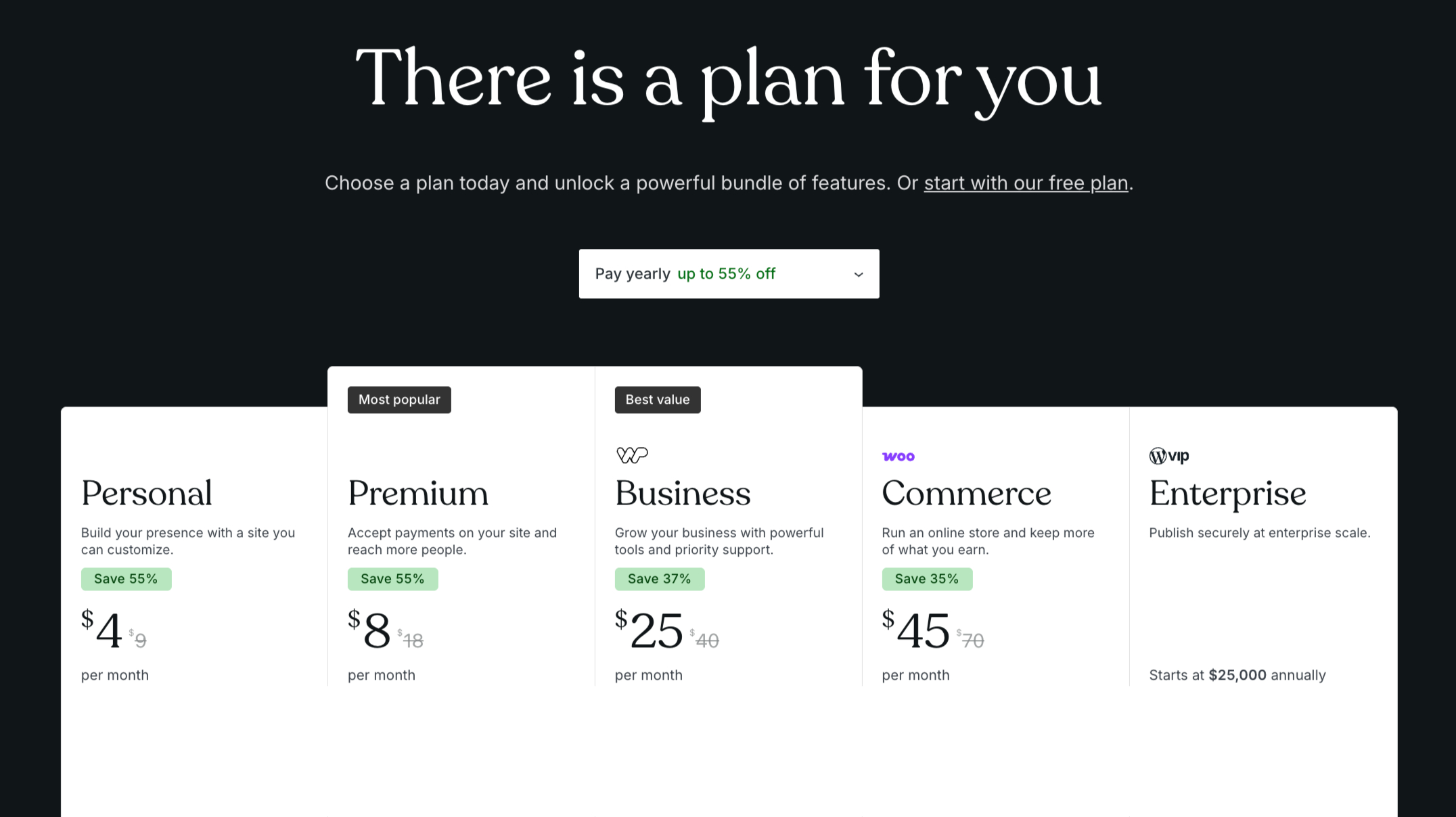
Current WordPress.com Pricing
Here’s what WordPress.com charges in 2026:
| Plan | Monthly Billing | Annual Billing |
|---|---|---|
| Personal | $9/month | $4/month |
| Premium | $18/month | $8/month |
| Business | $40/month | $25/month |
| Commerce | $70/month | $45/month |
At first glance, some people look at these prices and immediately start comparing them to budget hosting plans.
I think that’s the wrong comparison.
The better question is:
Which plan gives you everything you need without forcing you to spend time managing your website?
Personal Plan ($9 Monthly or $4 Monthly Billed Annually)
For many new bloggers, hobby sites, personal brands, and simple websites, this is where I’d start.
The biggest selling point is that you get:
- A custom domain
- Managed hosting
- Security handled for you
- Automatic updates
- Access to core WordPress.com features
If your primary goal is publishing content and establishing an online presence, the Personal plan offers a surprisingly affordable entry point.
At $4 per month when billed annually, it’s difficult to argue that managing your own hosting setup is automatically the better value.
Premium Plan ($18 Monthly or $8 Monthly Billed Annually)
This is where I think many serious bloggers and content creators should pay attention.
The Premium plan strikes a nice balance between affordability and flexibility.
If you’re building a website that represents your business, personal brand, or content platform, the extra room to grow can easily justify the upgrade.
For many users, this is the sweet spot in the lineup.
Business Plan ($40 Monthly or $25 Monthly Billed Annually)
This is the plan I would recommend most often to small businesses that depend on their websites.
At this level, you’re investing in a platform rather than simply paying for a website.
If your site generates leads, supports client acquisition, promotes services, or plays a meaningful role in your business, the Business plan starts making a lot of sense.
The cost is relatively small when compared to the value of a functioning, professionally managed website.
Commerce Plan ($70 Monthly or $45 Monthly Billed Annually)
If you’re running an online store, this is the plan built for you.
The Commerce plan is designed for businesses that need e-commerce functionality while still benefiting from WordPress.com’s managed approach.
Rather than piecing together hosting, security, performance tools, and e-commerce software from multiple providers, everything lives under one roof.
For store owners, that simplicity can be worth far more than the monthly fee.
What About WordPress.org Costs?
This is where things become more complicated.
Technically, WordPress.org software is free.
But running a WordPress.org website rarely is.
You’ll typically need to budget for:
- Hosting
- Domain registration
- Premium themes
- Premium plugins
- Security solutions
- Backup tools
- Maintenance services (if you don’t want to handle them yourself)
The exact cost varies widely.
Some people spend very little.
Others spend far more than they expected.
That’s why I don’t think it’s accurate to say WordPress.org is automatically the cheaper option.
In many cases, it’s simply a different pricing model.
Which WordPress.com Plan Would I Choose?
If I were launching a simple blog, portfolio, or personal website, I’d start with the Personal plan.
At $4 per month when billed annually, it offers a strong balance between affordability and convenience.
If I were building a serious content site, professional brand, consulting business, or client-facing website, I’d lean toward the Premium plan because it provides more room to grow without a massive jump in cost.
For established businesses that rely on their websites to generate revenue, I’d look closely at the Business plan.
And if e-commerce is the goal, the Commerce plan is the obvious choice.
My Verdict
The biggest mistake people make is comparing WordPress.com pricing to the cheapest hosting plan they can find.
A better comparison is this:
How much is your time worth?
If you enjoy managing hosting environments, troubleshooting plugins, configuring backups, and handling website maintenance, WordPress.org may save you money.
If you’d rather focus on creating content, attracting customers, and growing your business, WordPress.com’s pricing starts to look much more attractive.
For most readers of this article, I think the Personal and Premium plans offer the strongest value, especially when billed annually.
SEO: Is There Any Real Difference?
If you’ve spent any time researching WordPress.com vs WordPress.org, you’ve probably come across a claim like this:
“WordPress.org is better for SEO.”
The problem?
Most people making that claim never explain why.
And in 2026, the answer is a lot more nuanced than many comparison articles suggest.
The Truth About SEO
Search engines don’t rank websites because they’re built on WordPress.com or WordPress.org.
They rank websites because they provide value.
Google doesn’t care where your site is hosted.
It doesn’t care whether you manage your own server.
And it certainly doesn’t hand out higher rankings simply because you’re using WordPress.org.
What Google cares about is:
- High-quality content
- Search intent
- Page experience
- Site speed
- Mobile usability
- Internal linking
- Backlinks
- Topical authority
Those factors matter far more than which version of WordPress you choose.
Where WordPress.com Performs Great
One of WordPress.com’s biggest SEO advantages is that much of the technical groundwork is already handled for you.
You don’t need to spend time worrying about:
- Core platform updates
- Hosting infrastructure
- Basic security management
- Platform maintenance
That means you can spend more time doing the things that actually move rankings:
- Publishing content
- Building authority
- Earning links
- Improving user experience
For many website owners, that’s a bigger advantage than any advanced SEO setting.
The Plugin Gap Isn’t What It Used to Be
Historically, SEO was often cited as a reason to choose WordPress.org because users could install specialized SEO plugins.
That argument doesn’t carry the same weight today.
Since WordPress.com now allows plugin installation on all paid plans, users can access many of the same SEO tools available to self-hosted WordPress websites.
As a result, the practical SEO differences between the two platforms are much smaller than they once were.
When WordPress.org Has the Edge
That said, WordPress.org still gives advanced users more flexibility.
If you’re an SEO professional, developer, or agency managing large-scale projects, you may appreciate the ability to:
- Choose your own hosting environment
- Configure advanced performance settings
- Implement highly customized SEO workflows
- Control every aspect of your website stack
For highly competitive niches, those extra layers of control can be valuable.
But it’s important to keep perspective.
Most website owners will never use the majority of those capabilities.
The SEO Mistake I See Most Often
Many people obsess over technical SEO details before they’ve written a single useful article.
That’s backwards.
The difference between publishing 100 helpful articles and publishing 10 helpful articles will have a much bigger impact on your traffic than the difference between WordPress.com and WordPress.org.
In other words:
Your content strategy matters more than your platform choice.
Every single time.
My Verdict
If you’re choosing WordPress.org because you believe it automatically ranks better in Google, I think you’re making the decision for the wrong reason.
Both WordPress.com and WordPress.org are capable of building highly optimized websites.
For most bloggers, creators, freelancers, and small businesses, SEO should not be the deciding factor.
The real decision comes down to convenience versus control.
And if WordPress.com’s managed approach helps you publish more content, stay consistent, and focus on growth, that may end up being a bigger SEO advantage than any technical setting you’ll ever change.
Pros and Cons
At this point, you probably already have a sense of which platform is the better fit for your situation.
Still, before making a final decision, it’s worth looking at the strengths and weaknesses of each option side by side.
No platform is perfect.
The goal isn’t to find the platform with zero drawbacks.
The goal is to choose the platform whose drawbacks you’re willing to live with.
WordPress.com Pros
You can focus on your website instead of website maintenance.
This is the biggest advantage and the main reason I believe WordPress.com makes sense for so many people.
Hosting, updates, security, and infrastructure management are handled for you.
Getting started is fast.
You can register a domain, choose a plan, pick a theme, and start building without piecing together multiple services.
Plugin access is no longer a major limitation.
Because plugins are available on all paid plans, one of the platform’s biggest historical weaknesses has largely disappeared.
Design flexibility is stronger than many people realize.
Between themes, Full Site Editing, Global Styles, custom fonts, and CSS customization, most users can create a professional-looking website without hiring a developer.
Pricing is predictable.
Instead of paying for hosting here, backups there, and security tools somewhere else, most of what you need is included in a single subscription.
WordPress.com Cons
You don’t get complete control.
For many users, this won’t matter.
For developers and advanced users, it absolutely will.
You’re working within WordPress.com’s ecosystem.
The platform gives you a lot of flexibility, but not the same level of freedom as managing everything yourself.
Some users may end up paying more than a bare-bones self-hosted setup.
If your only goal is finding the absolute lowest-cost way to run a website, WordPress.org can sometimes be cheaper.
WordPress.org Pros
You control everything.
Hosting, themes, plugins, server settings, performance optimization, security tools—it’s all up to you.
For advanced users, that’s a major advantage.
Virtually unlimited customization.
If you can imagine it, there’s a good chance you can build it with WordPress.org.
You choose your own hosting provider.
That means you can optimize your setup around your specific needs and budget.
Ideal for developers and agencies.
If you’re building custom websites, managing client projects, or working with advanced integrations, WordPress.org offers unmatched flexibility.
WordPress.org Cons
You’re responsible for maintenance.
Updates, backups, security, troubleshooting, and performance management all require attention.
Website ownership comes with ongoing responsibilities.
The freedom is great when everything works.
When something breaks, that freedom can quickly become a burden.
Costs can become unpredictable.
Hosting may be inexpensive at first, but premium plugins, themes, maintenance tools, and other services can increase your total investment over time.
My Honest Assessment
Years ago, WordPress.org was the obvious recommendation for almost everyone.
I’m not convinced that’s true anymore.
WordPress.com has eliminated many of the limitations that once held it back. Plugin access, theme flexibility, design customization, and overall capability have improved dramatically.
As a result, the decision is no longer about what each platform can do.
It’s about how much responsibility you want to take on.
If you love control, WordPress.org is still the winner.
If you value simplicity, convenience, and getting things done faster, WordPress.com has become much harder to ignore.
Who Should Choose WordPress.com?
After everything we’ve covered, this is the section where I think most readers will find their answer.
If your goal is simply to launch a website, publish content, attract visitors, and grow your online presence, I believe WordPress.com deserves serious consideration.
In fact, it’s the option I would recommend to the majority of non-technical users in 2026.
Bloggers
If you’re starting a blog, your success will depend on things like:
- Publishing consistently
- Building topical authority
- Growing an audience
- Creating useful content
It won’t depend on whether you spent three hours configuring your hosting environment.
That’s why I think WordPress.com is such a strong fit for bloggers.
The platform handles the technical work so you can focus on writing and publishing.
Freelancers and Consultants
Most freelancers don’t need unlimited server-level control.
They need a professional website that:
- Looks credible
- Generates leads
- Showcases their expertise
- Helps convert visitors into clients
WordPress.com checks those boxes without creating additional maintenance work.
Creators and Personal Brands
Whether you’re building a newsletter, podcast, YouTube brand, coaching business, or personal website, speed matters.
The faster you can launch, the faster you can start building an audience.
That’s one of WordPress.com’s biggest strengths.
You spend less time managing technology and more time creating.
Local Businesses
Many local business websites are surprisingly simple.
They need:
- A homepage
- Service pages
- Contact information
- Lead generation forms
- Basic SEO
They don’t need custom server configurations or advanced development workflows.
For many local businesses, WordPress.com offers far more than enough functionality.
Small Business Owners
If your website supports your business but isn’t your business, simplicity becomes extremely valuable.
Most business owners don’t want to become part-time web administrators.
They want a website that works.
That’s exactly where WordPress.com’s managed approach shines.
E-commerce Beginners
If you’re launching your first online store, the Commerce plan can be an attractive option.
Instead of stitching together hosting, security, performance tools, and ecommerce functionality from different providers, much of the heavy work is already handled.
That means fewer technical decisions and more time spent growing your store.
You Should Probably Choose WordPress.com If…
- You want to launch quickly.
- You don’t enjoy managing hosting.
- You don’t want to worry about updates and security.
- You want predictable pricing.
- You value convenience.
- Your website’s primary purpose is content, lead generation, branding, or selling products.
My Recommendation
If you’re a blogger, creator, freelancer, consultant, local business owner, or small business owner, I’d start by looking at WordPress.com before anything else.
A few years ago, I might have made a different recommendation.
But with plugin access available on all paid plans, stronger customization tools, and a managed experience that removes much of the technical overhead, WordPress.com has become the platform I believe makes the most sense for the largest number of website owners.
For many people, it offers the best balance of flexibility, simplicity, and value.
Who Should Choose WordPress.org?
Despite everything I’ve said in favour of WordPress.com, there are still plenty of situations where I’d recommend WordPress.org without hesitation.
In fact, for certain users, it remains the clear winner.
The key is understanding whether you genuinely need the extra control it provides.
Developers
If you’re a developer, WordPress.org is probably the obvious choice.
You’ll have the freedom to:
- Choose your hosting environment
- Configure servers
- Build custom themes
- Create custom plugins
- Integrate specialized tools
- Modify virtually every aspect of your site
That’s the kind of flexibility developers expect, and WordPress.org delivers it.
Agencies
Agencies often manage multiple websites across different clients, industries, and technical requirements.
That usually means:
- Different hosting providers
- Custom workflows
- Specialized integrations
- Advanced optimization requirements
WordPress.org gives agencies the freedom to build solutions around client needs rather than around platform limitations.
Businesses With Complex Requirements
Not every website is a simple blog or business brochure site.
Some businesses require:
- Advanced membership systems
- Complex custom applications
- Specialized databases
- Enterprise-level integrations
- Highly customized ecommerce experiences
In those situations, the additional control offered by WordPress.org can become a real advantage.
Technical Users Who Enjoy Control
Let’s be honest.
Some people simply enjoy managing their own websites.
They like choosing hosting providers.
They like tweaking performance settings.
They like testing plugins and experimenting with configurations.
If that sounds like you, WordPress.org will probably feel more rewarding.
The extra responsibility won’t feel like a burden because it’s part of the experience you actually enjoy.
Website Owners With Unique Hosting Requirements
There are also cases where hosting itself becomes a deciding factor.
You may need:
- Specific server software
- Custom caching solutions
- Geographic hosting requirements
- Enterprise infrastructure
- Specialized performance setups
WordPress.org gives you complete freedom to choose the environment that best fits your needs.
You Should Probably Choose WordPress.org If…
- You want complete control over your hosting environment.
- You build custom themes or plugins.
- You’re a developer or agency.
- You require specialized integrations.
- You enjoy managing the technical side of websites.
- You need flexibility beyond what a managed platform typically offers.
My Recommendation
Don’t choose WordPress.org because someone told you it’s the “professional” option.
Choose it because you actually need what it offers.
Too many website owners end up taking on extra complexity simply because they assume more control automatically means a better website.
In reality, most people never use the majority of the flexibility they’re paying for with their time and effort.
If you’re a developer, agency, or advanced user, WordPress.org remains incredibly powerful.
If you’re not, there’s a good chance you’re making your life harder than it needs to be.
Final Recommendation: Which Platform Should You Choose in 2026?
If you’ve skipped straight to the conclusion, here’s my answer:
For most people, I recommend WordPress.com.
Not because WordPress.org is bad.
Not because WordPress.org is outdated.
And certainly not because WordPress.com can do everything WordPress.org can do.
I recommend WordPress.com because I think most website owners are trying to solve the wrong problem.
They’re focused on maximizing control when they should be focused on maximizing results.
The Question I Always Come Back To
When someone asks me which platform they should choose, I ask a simple question:
What are you actually trying to accomplish?
If the answer is:
- Start a blog
- Build a personal brand
- Create a portfolio
- Launch a business website
- Generate leads
- Grow an audience
- Sell products online
Then my follow-up question is:
Why take on extra technical responsibilities if you don’t have to?
That’s where WordPress.com makes a compelling case.
Hosting is included.
Security is handled.
Updates are managed.
You get access to plugins on all paid plans.
You can customize your site’s design with themes, Global Styles, custom fonts, and CSS.
And you can spend your time working on the things that actually grow a website.
Why My Recommendation Has Changed
A few years ago, recommending WordPress.org was much easier.
Back then, WordPress.com had limitations that pushed many serious website owners toward self-hosting.
Today, several of those limitations are gone.
The platform has evolved.
Plugin access is available on paid plans.
Design customization is far more flexible.
The overall experience is significantly more capable than many people realize.
That’s why I think relying on old comparisons leads many readers to the wrong conclusion.
The Platform I’d Choose for Different Scenarios
If I were starting a blog today:
I’d choose WordPress.com.
If I were launching a consulting business:
I’d choose WordPress.com.
If I were creating a portfolio website:
I’d choose WordPress.com.
If I were building a local business website:
I’d choose WordPress.com.
If I were launching my first online store:
I’d seriously consider WordPress.com’s Commerce plan before looking elsewhere.
The only situations where I’d automatically choose WordPress.org are those that genuinely require advanced technical control, custom development, or specialized infrastructure.
For everyone else, the benefits simply don’t outweigh the additional complexity.
My Final Verdict
The WordPress.com vs WordPress.org debate isn’t really about features anymore.
It’s about responsibility.
WordPress.org gives you more responsibility in exchange for more control.
WordPress.com removes much of that responsibility while still providing the tools most website owners need.
That’s why, in 2026, I believe WordPress.com is the better choice for the majority of bloggers, creators, freelancers, consultants, and small business owners.
The platform has come a long way, and many of the reasons people used to dismiss it no longer apply.
If your goal is to build a successful website—not become a part-time system administrator—WordPress.com is where I’d start.