


Are you looking for the best tips to improve your WordPress site performance?
Speeding up a WordPress site will not only improve the overall user experience but also your site gets maximum visibility on search engines like Google.
In this article, I’ll share with you some of the best hacks to improve the performance of your WordPress website without any technical skills.
So without any further ado, let’s get started.
Why You Need to Speed Up Your WordPress Site
According to a study, if your site is taking more than 3 seconds to load then you are losing 53% of visitors. Having a slow website can frustrate your users and they’ll never come back. It could reduce your overall conversions by almost 7% (if you’re running WooCommerce store).
Besides that, Google has already announced that they will start using website speed as a ranking factor from June 2021 and they will use it to measure the experience of your visitors on your site, if it is bad then your ranking may go down.
So how do you know what is the speed of your site? Let’s discuss this in more detail.
How to Check Your WordPress Website Speed?
The easiest way to check your WordPress Site Speed is by using the MonsterInsights plugin.
MonsterInsights is the best Google Analytics plugin for WordPress and it shows a speed site report right inside the WordPress dashboard so you don’t have to leave the website to check its performance.
But that’s not all, you can also use this plugin to track advanced features like eCommerce tracking, file downloads, form conversions, and more in just a few clicks.

To start, you’ll need to sign up for the MonsterInsights account and download the plugin. After that, head over to your WordPress admin panel and go to Plugins » Add New and then click on the Upload Plugin button.
Next, Click on the Choose File button to select your zip file then Install. Once it is installed, click on Activate Plugin button to complete the installation process.
Once the plugin is activated, go to Insights » Reports » Site Speed.
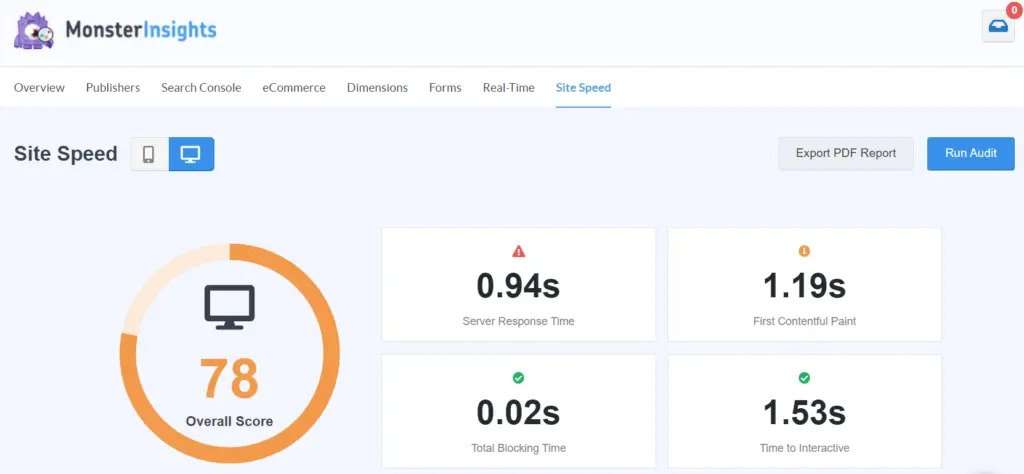
Here you’ll see an overall score of your website load time along with other metrics to speed up your WordPress website, and MonsterInsights will also guide you on how to improve each metric to make your site load faster.
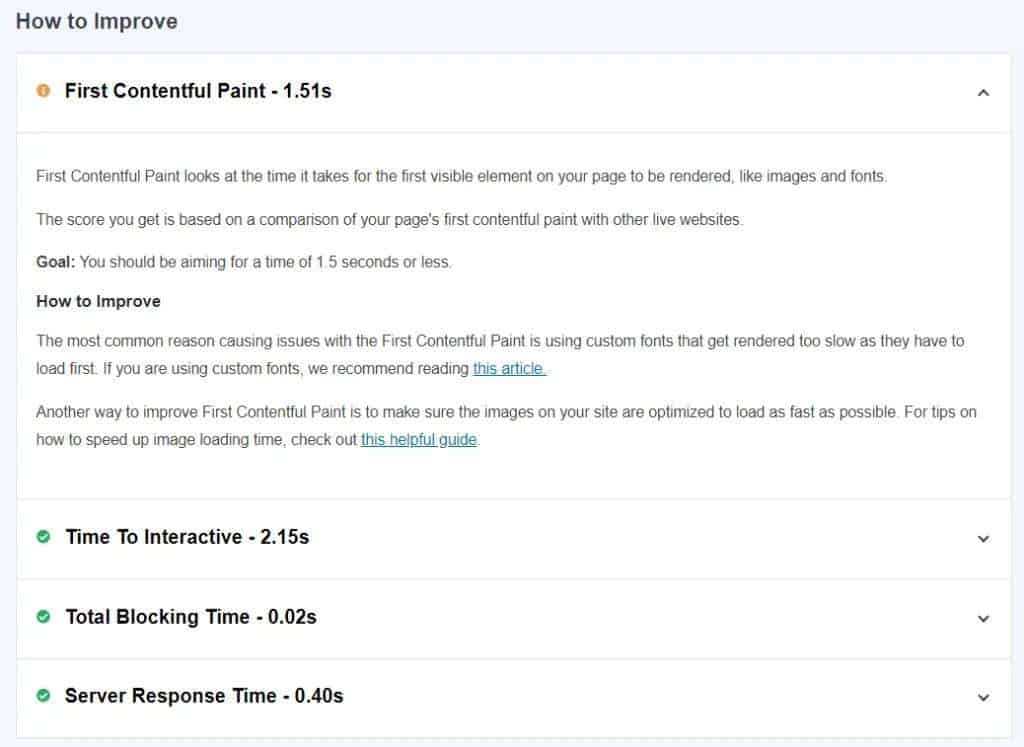
That’s how you can check your WordPress website speed easily using the MonsterInsights Google Analytics Plugin. Now let’s take a quick look at some of the hacks to speed up your WordPress site. Let’s go.
Top Hacks to Speed Up Your WordPress Site
Speeding up a WordPress site is depends on many factors such as web hosting, plugins you’re using, media files, images, scripts, and more. But following are the hacks that will surely help you to improve the performance of your WordPress website.
Let’s dive right in.
Choose Right Hosting
When it comes to site speed, web hosting plays an important role in the success of your WordPress website. In case, if you don’t know what web hosting is, then let me tell you that this is a server where all your website files and content are stored.
Choosing the right hosting for your business can be a tricky part especially if you’re a newbie and there are a lot of factors that have to be considered to find the right web host like FFTB, uptime, response time, customer support, etc.
Here’re my top 3 picks for web hosting to try this year:
- Bluehost – If you’re just getting started
- Cloudways – If you have a high traffic websites
- Liquid Web / Nexcess – If you’re running an online store or WooCommerce.
All the above hosting companies ensure that you will get the best performance and quick speed throughout the year.
Image Optimization
Have you ever felt that when you open a website, the images load too late? If this happens then you probably haven’t properly optimized the images and it’s not good for user experience and Google doesn’t like it either. So what’s the solution?
Compress your image before uploading it to the site.
To compress the images, you can use various image optimization tools like TinyPNG, Kraken.io. These are free tools, you just need to upload the images, and then the tool will automatically reduce its file size.
Deactivate Unused Plugins
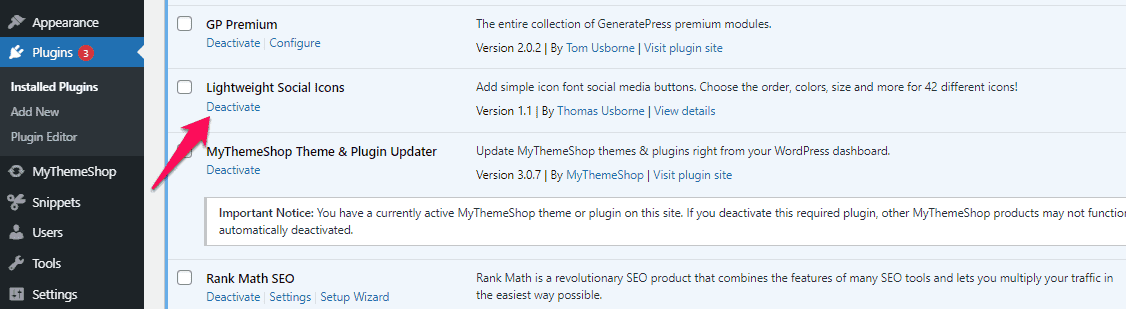
Having a lot of plugins that you’re not using can add unwanted space in your storage which will affect your site speed. So the solution is to deactivate the plugins that you don’t need anymore.
To deactivate, open your WordPress dashboard and then click on Plugins. Next, scroll down to any plugin that’s not necessary and click on the Deactivate Delete.
More Tips to Speed Up Your Website
- Use Lazy Load: If you’re using too many images, graphics, or other media files then you can use Lazy Load by WP Rocket.
- Always try to show excerpts on the homepage and archive pages. You can do that by going to Settings » Reading and select the summary option.
- Split your comments into multiple pages. To do this, go to Settings » Discussion and tick the box that says Break comments into pages.
- If you have written a super detailed article of around 10,000+ words, then break it into multiple pages. In-depth content matters but it will take too much time to load so to avoid this issue, add a Page Break block in the WordPress editor.
- Clean up your WordPress databases by using the WP Sweep plugin.
- Don’t upload video and audio directly to WordPress, instead, you can copy and paste the code/URL on your website. WordPress has an in-built embed feature that allows you to add media files without hosting them on the server.
- Fix render-blocking javascript and unused CSS. Learn more.
- Make sure you’re using a fast load theme like GeneratePress and in addition to this, avoid using too many custom fonts to your WordPress site.
- Improve the performance of your site by updating to the latest version of WordPress. To check for the latest version, log in to your WordPress site and go to Dashboard » Updates.
- One last hack in our list is CDN (Content Delivery Network). It delivers content from the nearest server and loads your website faster, no matter where your users are located in the World. For more information, you can refer to this guide on how to improve WordPress website loading speed using a CDN.
That’s it!
I hope this article gave you some easy hacks to speed up your WordPress site, and if you find it useful then share would be extremely appreciated.
Cheers!
