Rank Math vs. Yoast: Which SEO plugin should you get for your site?
So, you’re on the hunt for the best WordPress SEO plugin, right? You’ve probably seen Rank Math and Yoast SEO mentioned quite a bit – the major players.
Both of these plugins assist with your WordPress SEO. They help you follow SEO best practices and work toward higher search rankings.
But you’re likely wondering which one will work best for you, am I right?
Don’t worry, I can definitely help you decide.
I’ve thoroughly tested both of these SEO plugins and came up with some pretty interesting findings.
In this article, I’m going to compare Rank Math and Yoast SEO and point out the key differences that are important. I’ve used both of these plugins a lot on many different websites, so I think I have a good understanding of what each plugin does well.
By the end, based on my experience, I’ll share my opinion on which of these two is the leading WordPress SEO plugin.
Let’s start with a quick introduction to our contenders.

Rank Math vs. Yoast – Meet the Contenders
We’re looking at two powerful SEO plugins for WordPress. Both come with basic tools and advanced features to help your website show up better on search engines like Google.
Here’s a quick look at Yoast and Rank Math:
Yoast SEO

Yoast SEO has been around for a long time. It was first launched in 2010 by a guy named Joost de Valk.
At first, it was called “WordPress SEO by Yoast.”
You can use the free version or pay for the Pro version, and there are a few extra tools you can add on if you want more features.
In August 2021, a company called Newfold Digital bought Yoast. This company also owns other well-known brands like Bluehost and HostGator.
Here’s an example of what some of Yoast’s users are saying:

Here’s what (@NDV Comunicazione – Sviluppo) has to say:
I use Yoast SEO on most of my websites, and it consistently delivers great results. It’s a very complete and functional tool that simplifies on-page SEO and helps ensure my content is optimized for search engines. While it’s an excellent plugin overall, there’s always room for improvement. Highly recommended for anyone looking to enhance their site’s visibility.
For a more in-depth look, check out our Yoast SEO review.
Rank Math

Rank Math is newer than Yoast, but it has quickly become very popular. It came out in late 2018 and was built by the team behind MyThemeShop. In 2023, a company called group.one bought it.
Over 3 million people actively use Rank Math for their websites, and they’re big fans. It has a fantastic 4.9-star rating on WordPress.org and 4.8 stars on Trustpilot.
Plus, it ranks among the 14 most-used WordPress plugins on WordPress.org and continues to attract new users daily.
Like Yoast, Rank Math also has a free version and a paid Pro version.
Here’s what some Rank Math SEO users are saying:


Another user (@irokob) says:
I’ve tried several SEO plugins, and this one has been the most convincing so far.
As you can see, both Rank Math and Yoast SEO have raving reviews on WordPress.org, which is great. But just reading what people say isn’t enough to really understand them.
We need to look more closely at each plugin to see what they’re good at and where they could be better.
Rank Math vs. Yoast – A Quick Comparison
Before we dive into a detailed comparison, here’s a quick look at the differences and similarities between these top SEO plugins.
| Features | Rank Math | Yoast SEO |
| Lines of Code | 61.1k | 97.1k |
| Plugin Folder Size | 11.8 MB | 32.4 MB |
| Memory Usage | +0.35MB | +1.62MB |
| Page Speed | +0.01S | +0.18S |
| AI Link Genius (New) | ✓ | X |
| Broken Link Checker | ✓ | X |
| Automated Keyword Linking | ✓ | X |
| WordPress.org Average Rating | 4.9 out of 5 | 4.8 out of 5 |
| Content AI | ✓ | X |
| Track Google Index Status | ✓ | X |
| Advanced Google Analytics 4 Integration | ✓ | X |
| Keyword Rank Tracker | ✓ | ✓ |
| The Most Advanced Schema Generator | ✓ | X |
| SEO Performance Email Reports | ✓ | X |
| Import Schema From Any Website | ✓ | X |
| Google Trends Integration | ✓ | X |
| Google News SEO Sitemap | ✓ | ✓ |
| Google Video SEO Sitemap | ✓ | ✓ |
| Image SEO PRO | ✓ | X |
| Local SEO PRO With Multi Locations | ✓ | ✓ |
| WooCommerce SEO PRO | ✓ | ✓ |
| Podcast Module | ✓ | X |
| 18 Pre-defined Schema Types | ✓ | X |
| Auto-detect Video for Video Schema | ✓ | ✓ |
| Client Management | ✓ | X |
| Track Top 5 Winning Keywords | ✓ | X |
| Track Top 5 Losing Keywords | ✓ | X |
| Track Top 5 Winning Posts | ✓ | X |
| Track Top 5 Losing Posts | ✓ | X |
| Keyword Ranking Checks for Each Post | ✓ | X |
| Position History for Keywords & Posts | ✓ | X |
| Validate Schema With Google | ✓ | X |
| Custom Schema Builder | ✓ | X |
| Add Unlimited Multiple Schemas | ✓ | X |
| 840+ Schema Types Supported | ✓ | X |
| Automatic Q&A Schema for bbPress | ✓ | ✓ |
| Advanced Redirections Module | ✓ | X |
| 193 Local Business Types | ✓ | X |
| Advanced Local SEO Blocks | ✓ | ✓ |
| Google AdSense Earning History | ✓ | X |
| Import GSC & GA Data from Defined Country | ✓ | X |
| Custom Setup Wizard Mode | ✓ | X |
| Advanced Bulk Edit Options | ✓ | X |
| Complete Import/Export Options | ✓ | ✓ |
| Complete Elementor Integration | ✓ | ✓ |
| Complete Divi Integration | ✓ | X |
| Import Redirection Data via CSV File | ✓ | ✓ |
| Detect Orphan Pages | ✓ | ✓ |
| Track SEO Performance of Individual Posts | ✓ | X |
| Sync Redirection to .htaccess | ✓ | X |
| Automate Image Captions | ✓ | X |
| Compatibility Check | ✓ | X |
| Auto Canonical URLs | ✓ | ✓ |
| Google Search Console Integration | ✓ | X |
| Install Google Analytics Code | ✓ | ✓ |
| 1 Click Import From Yoast SEO | ✓ | NA |
| 1 Click Import From AIO SEO | ✓ | ✓ |
| 1 Click Import for SEOPress | ✓ | ✓ |
| Advanced SEO Analysis Tool | ✓ | X |
| Automated Image SEO | ✓ | X |
| Bulk Edit Title & Description | ✓ | ✓ |
| Content Analysis | ✓ | ✓ |
| Focus Keyword | ✓ | ✓ |
| Choose a Primary Category | ✓ | ✓ |
| Google Keyword Suggestion | ✓ | X |
| Choose Pillar Posts & Pages | ✓ | ✓ |
| Internal Linking Suggestions | ✓ | ✓ |
| Powerful XML Sitemap | ✓ | ✓ |
| Advanced Redirection Manager | ✓ | X |
| 301 Redirection Type | ✓ | ✓ |
| 302 Redirection Type | ✓ | ✓ |
| 307 Redirection Type | ✓ | ✓ |
| 410 Redirection Type | ✓ | ✓ |
| 451 Redirection Type | ✓ | ✓ |
| Debug Redirections | ✓ | X |
| Redirect Attachments to Parent | ✓ | ✓ |
| Advanced 404 Monitor | ✓ | X |
| Role Manager | ✓ | X |
| Job Posting Schema | ✓ | X |
| Local Business Schema | ✓ | X |
| Social Media Optimization | ✓ | ✓ |
| Social Previews | ✓ | ✓ |
| Option to get Email if Update is Available | ✓ | X |
| Search Engine Verification Tools | ✓ | ✓ |
| SEO Breadcrumbs | ✓ | ✓ |
| Nofollow All External Image Links | ✓ | X |
| Nofollow All External Links | ✓ | X |
| Open External Links in New Tab | ✓ | X |
| .htaccess Editor | ✓ | X |
| robots.txt Editor | ✓ | X |
| Version Control | ✓ | X |
| Detailed Documentation | ✓ | ✓ |
| Multisite Compatible | ✓ | ✓ |
| Free Plugin | ✓ | ✓ |
Now that you’ve seen a quick intro and a comparison table for Rank Math and Yoast SEO, it’s time to look at how these two plugins are different.
We’ll compare them side by side in the main areas that matter most. This will help you decide which one is right for you.
Let’s dive in.
Rank Math vs. Yoast – Setup Wizard
When you’re setting up an SEO plugin, the first experience you have is the setup wizard, and it sets the tone for everything else. Let’s compare how Rank Math and Yoast handle this first step.
Yoast First-Time Setup
Yoast SEO greets you with a 5-step installation wizard, but honestly, it can feel like a lot right away. Right after installation and activation, beginners face a busy dashboard packed with more technical details than they likely need initially.

Below is what the Yoast SEO Dashboard looks like after installation, with the ‘first-time configuration’ tab sitting at the bottom. Personally, I think ‘first-time configuration’ sounds a bit intimidating and technical. That’s why I like to call it the ‘Set Up Wizard’ instead.

Even though Yoast SEO’s initial setup now has 5 steps (it used to have 12), it still comes across as quite technical and complex.
Rank Math First-Time Setup
To get started with Rank Math, just install it, and the setup wizard will guide you through the process quickly.
Once you’ve installed and activated Rank Math, you’ll see the Dashboard. This displays the different features offered in both the Lite and Pro versions. To start configuring, simply click the “Setup Wizard” tab.

The Lite version’s setup wizard contains five straightforward steps (Easy setup). If you’re using the Pro version, you’ll find a more detailed eight-step process (Advanced setup).

Verdict
If you ask me which of these two SEO plugins has the best setup wizard, I’d say Rank Math definitely takes the crown. Here’s why:
Rank Math just does it better with its sleek design, beginner-friendly steps, flexible modes, and powerful integrations—all available for free.
Sure, Yoast has been around the block, but its setup feels pretty simple and doesn’t have the advanced features Rank Math offers right from the start.
Now that you know the basics, let’s see how these plugins can help your website and content rank higher on Google and other search engines.
Rank Math vs. Yoast – On-Page Optimization
Whenever you create a new blog post or web page, you’ve got to make sure Google and other search engines can easily figure out what it’s about. We call this on-page SEO, and it’s something you’ll handle each time you add fresh content.
To make this easier, you’ll likely use an SEO plugin. These plugins provide simple tools to help your content perform better in search results. If you’re not sure how to do that, you can follow this simple checklist to get started.
Both of these SEO plugins offer a specific area where you can control how your post appears to search engines. Usually, the plugin will automatically use your post’s title as the SEO title and a brief summary as the description. However, you can write your own unique title and description if you want.
Now, let’s take a look at how these two plugins handle the job of on-page SEO optimization.
Yoast SEO Meta Box
Yoast’s SEO meta box works, but the layout feels dated and cramped. You’ll usually find it below the main content editor or in the sidebar when using the block editor. From there, you can optimize each post or page for search.

The meta box is split into a few main sections:
- SEO Analysis: Yoast reviews your content in real time based on the focus keyword you enter. It uses a traffic-light system (green, orange, red) to show what works and what needs improvement.
- Readability: This section checks things like sentence length, paragraph size, transition words, and the Flesch Reading Ease score. The goal is to help you write content that readers can follow, which can indirectly support SEO.
- Snippet Preview: You see how your page may appear in Google search results, including the title and meta description.
One limitation in the free version is the small set of variables. You only get the title, page, separator, and site title for building your SEO title and meta description.
Rank Math SEO Meta Box
In contrast, Rank Math provides a more modern, data-dense meta box primarily integrated into the WordPress block editor sidebar, where it uses a granular numerical score (0–100) and an extensive checklist to guide optimization.

While Yoast limits the free version to a single focus keyword, Rank Math’s meta box allows for up to five keywords for free, along with built-in access to advanced schema settings, a redirect manager, and an automated internal linking assistant—features that Yoast typically locks behind its Premium paywall.
Rank Math also lets you use up to 22 smart tags or write everything manually when optimizing a post or page, which offers more control compared to Yoast’s free setup.

Verdict
Beginners often feel more comfortable with Yoast because the interface stays simple and offers direct feedback while writing.
Rank Math, in contrast, packs in more tools and unlocks many features for free, which suits users who want more control and advanced options while working inside the editor.
Content Analysis and Optimization
Top-tier WordPress SEO plugins include content analysis tools to verify that you hit every on-page requirement. These features provide a roadmap for optimizing your writing before you hit publish.
So, in the Rank Math vs. Yoast SEO comparison, which plugin offers better content analysis?
Let’s take a short look at both.
Yoast SEO Content Analysis
Yoast SEO provides a dedicated analysis tool to help you improve your posts and pages. You can find it by clicking the Yoast icon in the top right corner of the WordPress editor.

The tool evaluates your work to improve search engine rankings and readability.
Because it provides feedback as you write, you can fix issues immediately rather than returning to edit them later. It tracks standard SEO elements and assigns an overall score to indicate how well your page follows best practices.

Rank Math Content Analysis
Rank Math also provides real-time content analysis inside the editor. As you create a post or page, it shows practical SEO suggestions that help improve search performance.
The plugin checks content readability, title structure, keyword placement, multimedia usage, and other on-page factors.

It also includes separate content and title readability checks, which help you compare your content against common SEO practices and make improvements before publishing.

Verdict
For content analysis and optimization overall, I give the edge to Rank Math because it bundles more practical features into the free plugin (multi-keyword support, Content AI, more schema types and built-in link tools), which speeds optimization without immediate additional spend.
Author Profile
Author SEO focuses on improving author profiles so they perform better in search results.
When author information is structured properly, it strengthens Google’s E-E-A-T signals: Experience, Expertise, Authoritativeness, and Trustworthiness. These signals play a real role in rankings.
WordPress already lets you add basic author details, such as:
- Full name for proper attribution
- Email address to support identity verification
- Website URL to point to your professional presence
- A biography that highlights background and expertise
- Profile image for consistency and recognition
Many SEO plugins build on these basics and offer extra features to support author SEO. Below is a comparison of how Rank Math and Yoast SEO handle this area.
Yoast SEO
Yoast SEO adds some controls to the default WordPress author setup, but the feature set remains limited. You can set titles for author pages, choose whether author archives appear in search results, and turn off SEO and readability analysis for those pages if needed.
Yoast also includes options for author archives under the Search Appearance section. These archives list all posts written by a specific author. From there, you can decide whether search engines should index them and define custom SEO titles and meta descriptions.

For those using the premium version, Yoast adds social media preview settings for author pages. This helps multi-author blogs maintain a professional brand when links are shared, though single-author sites may find these archive pages redundant.
Rank Math
Rank Math places more emphasis on author SEO. It supports author schema markup, which helps search engines recognize an author’s identity, role, and credentials more accurately.

Rank Math also offers detailed control over author archives inside the Titles & Meta settings. You can set custom SEO titles and meta descriptions and use dynamic variables to display author-specific information automatically.
Like Yoast SEO, Rank Math lets you decide whether author archives should be indexed. This matters for multi-author websites that want to highlight individual authors and strengthen E-E-A-T. Rank Math also includes an option to customize the author base URL, which adds flexibility to the site structure.
Verdict
Rank Math is the winner for author profiles because it provides advanced Schema customization and SEO controls for author pages in its free version, whereas Yoast SEO requires a paid subscription for similar levels of social and metadata control.
Rank Math vs. Yoast – AI Visibility
Both Rank Math and Yoast now focus on how brands are mentioned in AI-generated search results, but there are some clear differences between the two.
Rank Math
Rank Math puts more emphasis on tracking AI visibility. Its AI Visibility feature monitors brand and product mentions, citations, sentiment, competitors, and rankings in AI-generated responses. It also provides an AI Visibility Score and lets you see the prompts and responses used during tracking. This is useful if you want a closer look at how AI tools talk about your brand.
Rank Math has a separate plan for its AI Visibility feature, starting at $5.99 per month. At the moment, it also offers a 15-day free trial, so you can try the feature before paying for it.
Yoast SEO
Yoast covers AI visibility through its AI Brand Insights feature. It tracks brand mentions, sentiment, citations, and competitors across several AI platforms. Yoast also includes features that help search engines and AI systems better understand and access your website.
Verdict
The main difference is that Rank Math focuses more on measuring AI visibility, while Yoast combines AI visibility tracking with tools for improving your website’s AI readiness. If you mainly want detailed information about your brand’s presence in AI responses, Rank Math is the stronger choice.
Rank Math vs. Yoast – AI Features Comparison
SEO plugins now use AI to help users work smarter, automate tasks, and get better results in search rankings. Both Rank Math and Yoast SEO have added AI to their tools, but which one is better, and how do they stack up against each other?
Let’s find out.
Yoast SEO
Yoast, known for its content and readability analysis, now offers AI-powered features in its Premium version: “Yoast AI Generate” and “Yoast AI Optimize.”
For instance, Yoast AI Generate helps you create optimized titles and meta descriptions for posts, pages, categories, and products so you can write compelling snippets that get clicks in search results.

Yoast AI Optimize offers AI-driven suggestions to improve existing content for SEO and readability.

It recommends modifications for keyphrase use in introductions, keyphrase density, keyphrase distribution, sentence length, and paragraph length. You can also accept or disregard these suggestions.
Rank Math

Rank Math has a more extensive AI module called Content AI, available in its Pro version. This module offers over 40 AI tools and 125+ ready-to-use AI prompt templates.
It helps you with various stages of content creation and optimization right inside the WordPress editor. You can generate blog post ideas and outlines, write introductions and conclusions, research keywords, and get personalized content suggestions.
Rank Math’s Content AI also allows you to generate SEO titles and meta descriptions for existing content in bulk. It even creates AI-powered ALT text for images. Plus, you’ll find “Fix with AI” buttons that automatically resolve failed SEO tests like keyword density or power words in SEO titles.
Rank Math also has a chatbot called RankBot, which you can talk to if you need help or want to learn more about a topic, all without leaving your WordPress dashboard.

This extensive suite of AI tools operates on a credit-based system, and you usually receive some free credits to start.
See my full Content AI review for more details.
Verdict
Rank Math provides more AI functionality directly integrated into the SEO plugin, with many features available even without extra costs. It’s ideal if you want AI SEO help built in, immediately accessible, and budget-friendly.
Rank Math vs. Yoast – Technical SEO
Technical SEO focuses on the behind-the-scenes work that helps a site perform better for users and search engines. This includes crawling, indexing, site speed, UX, and overall site health.
Here’s a quick look at how Rank Math and Yoast SEO handle technical SEO, starting with schema markup.
Schema Generators
Schema markup helps search engines interpret your content. When you use it correctly, your pages can appear as rich snippets, which often attract more clicks in search results.

Both plugins include schema tools, but they handle the specifics quite differently—especially if you aren’t paying for a premium version.
Yoast SEO Schema Generator
Yoast SEO takes a basic approach to schema in its free version. It adds essential structured data so search engines can interpret your content properly, but the number of schema types available without upgrading feels limited.

Yoast’s schema system does cover the fundamentals, but users who want more schema options or easier control may find it restrictive. I also found Yoast SEO’s schema interface outdated and not very appealing, especially when compared to tools like Rank Math.
Rank Math’s Schema Generator
Rank Math leads the pack regarding schema and rich snippets. The free version includes 16 predefined schema types, which is a massive advantage for users on a budget.

The interface is modern and far more intuitive than Yoast’s. I actually enjoyed setting up markup because the steps felt logical and easy to follow. Rank Math also includes built-in validation tools so you can verify that your code works before you finish.
Verdict
If your priority is strong schema generation without extra plugins or cost, Rank Math is typically the better choice.
Redirection and 404 Management
When it comes to maintaining a healthy website, managing broken links and directing traffic away from “dead ends” is non-negotiable. While both Rank Math and Yoast SEO handle these tasks, they do so with very different philosophies regarding what you should pay for.
Here is the breakdown of how these two heavyweights handle Redirections and 404 Management in 2026.
Redirection Management
Redirections (like 301s) are vital when you change a URL or delete a page. They ensure that users and search engines don’t land on a “Not Found” page.
Yoast SEO

The Redirection Manager is a Premium-only feature. If you use the free version of Yoast, you have to install a separate third-party plugin to manage redirects. If you pay for Premium, you get a clean, automated system that prompts you to create a redirect whenever you change a post’s slug or move content to the trash.
Rank Math

Rank Math includes a full-featured Redirect Manager in its free version. It supports various redirect types, including 301 (Permanent), 302 (Temporary), 410 (Content Deleted), and even advanced Regex (Regular Expressions) for bulk changes.
One of its most popular features is the “Auto-Redirect,” which automatically prompts you to create a redirect the moment you change a post’s URL.
404 Error Monitoring
A 404 monitor watches your site for instances where visitors or search bots try to access a URL that doesn’t exist. This allows you to “catch” broken links before they become a major SEO issue.
Yoast SEO
Yoast does not have a native 404 monitoring tool, even in the Premium version. While the Premium version helps you prevent 404s by prompting redirects when you delete things, it won’t tell you if a user typed in a wrong URL or if an external site is linking to a broken page on your site.
Rank Math

Again, Rank Math offers a 404 Monitor for free. It logs the specific URL that failed, how many times it was hit, and the “Referer” (the page the user came from). This makes it incredibly easy to see which links are broken and fix them with a click using the built-in redirect tool.
Verdict
For most users, Rank Math is the winner here simply because it offers more utility for $0 than Yoast does for $99.
Breadcrumb Navigation
Breadcrumb navigation acts as a secondary map for both visitors and search engines. These small trails improve the user experience by showing exactly where a page sits within your site’s hierarchy.

Yoast SEO
Yoast SEO simplifies the process of adding breadcrumbs to a WordPress site. You can toggle this feature on and manage how the trails look right from the dashboard. This includes picking a separator symbol or changing the name of your homepage link.

One major advantage involves schema markup. Yoast handles the technical data automatically, which helps search engines display your site structure in search results. If your current theme lacks support for breadcrumbs, the plugin provides a specific snippet of code to bridge that gap.
Note: While the tool is powerful, beginners might need a moment to get familiar with the settings layout.
Rank Math
Rank Math offers another path for managing these navigation trails. To get started, head to General Settings and click the Breadcrumbs tab.

The interface allows you to modify basic settings to match your site’s style. While the setup works well for most owners, advanced users might find the options a bit basic. It lacks the deep customization features that developers often look for when building complex site architectures.
Verdict
For most users, neither option will hold you back. The right choice often comes down to which plugin you’re already using and how much control you want over the breadcrumb structure.
Sitemap Generators
SEO starts with one basic requirement: search engines must be able to crawl and index your site. If they can’t find your content, your strategy fails before it even begins.
Sitemaps act as a roadmap for search engine bots. They show bots exactly how your site is structured and point them toward new or updated pages. This helps search engines index your content much faster than if they had to find it on their own.
Here is how the sitemap tools in Yoast SEO and Rank Math compare.
Yoast SEO Sitemap Generator
Yoast SEO automatically generates an XML sitemap for your site when the plugin is active. It includes all important content types (posts, pages, taxonomies) and updates as you publish or remove content.
You can toggle sitemap inclusion per content type in the settings and exclude specific content manually if needed.
Yoast also breaks large sitemaps into smaller files so search engines can crawl them more easily, which makes it easier to handle growing websites.

Rank Math’s Sitemap Generator
Rank Math also generates XML sitemaps automatically, but it goes further by offering more granular control over what gets included, along with options to manage post types, taxonomies, images, priorities, and exclusions directly from its dashboard, even in the free version.

Verdict
If you want a set-it-and-forget-it sitemap that just works, Yoast SEO is solid, but if you prefer deeper control and customization without upgrading to premium, Rank Math is the clear winner for sitemap generation.
Robots.txt File
A robots.txt file is a simple text file that tells search engine bots and other crawlers how to crawl and index your website. For example, you can block bots from accessing WordPress admin pages, plugin files, or the themes folder.
At its core, the robots.txt file helps you manage your crawl budget. When search engines spend less time crawling low-value areas, they can focus more on your important pages and index them sooner.
Yoast’s Robots.txt Editor
Yoast SEO lets you manage your robots.txt file from inside your WordPress dashboard. You do not need to touch server files or use FTP. You can create or edit the file from the plugin’s Tools section.

To access it, you need to open the Tools page and then go to the File Editor option. In my experience, this feels like too many steps for such an important feature.
The editor itself is easy to use. It shows the existing robots.txt content, if available, and allows you to edit it directly. You can block specific files or folders and add a link to your XML sitemap without much effort.
Rank Math’s Robots.txt Editor
Rank Math also includes a built-in robots.txt editor, located under Rank Math » General Settings. If you use the Pro version, it adds a validator that checks your rules while you work and warns you about possible errors.

Because of that built-in validation and fewer chances of breaking something, Rank Math offers more control and peace of mind when working with robots.txt.
Verdict
Both plugins handle basic robots.txt editing well, but if you want built-in checks and extra safety, Rank Math has the edge.
Rank Math vs. Yoast – Advanced SEO Features
With Rank Math and Yoast, you get advanced SEO features right inside the plugin. This lets you optimize your website for search engines with a lot more precision, and you won’t need any extra plugins to do it.
When you use these tools, you gain a real advantage against competitors, which helps your site appear more prominently and achieve stronger results in search.
Local SEO Features
If you have a business that serves people in a certain area, you need to focus on local SEO. For instance, if you operate a restaurant, salon, plumbing service, or retail shop, you want local customers to find you online.
Local SEO improves your chances of showing up when people in your community search for things you offer.
For example, if someone looks for an “Indian Restaurant in New York” near them, a well-optimized site makes it much more likely they’ll see your restaurant in the search results.

Now, let’s look at how both plugins handle this.
Yoast Local SEO
Yoast SEO includes local SEO features in its premium plugin, which is great for businesses targeting specific geographical areas.

It lets you easily add location-based information like business name, address, and phone number (NAP) to your website. This is key for local SEO because search engines rely on consistent NAP data across the web to understand where your business is located.
Yoast also provides an option to optimize your website’s pages for local keywords, and it integrates well with Google My Business, which helps you manage your business profile.
Rank Math Local SEO
Rank Math, on the other hand, includes powerful Local SEO features for free in its core plugin and expands on them in the Pro version. It allows you to easily configure multiple business locations, apply the LocalBusiness schema automatically, and integrate seamlessly with Google Maps.

It also offers support for KML files and advanced options like geo-coordinates and contact information display, all within a more user-friendly and intuitive interface.
Verdict
Overall, Rank Math offers more helpful local SEO tools than Yoast right from the start.
WooCommerce SEO
If you run an online store, you know how important it is to get people to visit your website. The more people who find your store through search engines, the more likely they are to buy something. That’s why eCommerce SEO is so important for your business.
Now, let’s explore how these two plugins manage this.
Yoast SEO WooCommerce Integration

Yoast offers a dedicated WooCommerce SEO plugin that integrates seamlessly with your store, but it comes as a separate premium add-on. This extension helps your product pages and your whole shop get found easily by search engines.
Additionally, the plugin includes schema markup. This helps search engines show more details about your products, like prices and whether they’re in stock. Because of this, your products look more appealing in search results.
Although Yoast simplifies the optimization process, you’ll need to invest in the premium add-on to unlock all the WooCommerce-specific features.
Rank Math WooCommerce Integration
If you manage an online store, Rank Math’s WooCommerce SEO module provides the tools you need to boost your product pages and search rankings.

The module starts by stripping away unnecessary text like “product,” “shop,” or “/product-category/” from your web addresses. This leaves you with short, direct links that people can actually read and search engines can index without clutter.
Rank Math also places an SEO box directly inside your product editor. This lets you control exactly how your items look when they appear on a Google results page.

Verdict
Both plugins are feature-rich, but Rank Math often lets you control your URLs more closely and has extra schema options. This makes it a great pick for stores that want to really improve the technical SEO aspects of their product pages.
Tracking Performance and Keyword Rankings
When comparing Yoast SEO and Rank Math for keyword rank tracking, there’s a big difference in functionality. Here’s a detailed comparison between the two:
How Yoast SEO Tracks Performance
Yoast SEO doesn’t offer built-in rank tracking features directly within the plugin. Instead, it integrates with a third-party tool called Wincher.

To use this feature, users must create a separate Wincher account. Once connected, you can monitor keyword performance and track ranking progress over time inside the Yoast interface.
While this setup is helpful, it requires an additional service and is not part of Yoast’s core features.
How Rank Math Tracks Performance
In contrast, Rank Math offers its own built-in performance and keyword rank tracking through its Analytics module, which connects directly with Google Search Console and Google Analytics.

Rank Math’s built-in Rank Tracker helps you monitor keyword positions on Google, spot trends, and identify when rankings fluctuate over time. This helps you understand what’s working and what you need to improve.

Additionally, Rank Math goes beyond keyword tracking by offering site performance insights like page speed and mobile responsiveness, along with actionable suggestions to improve your site’s health.

This all-in-one solution makes Rank Math’s rank tracking and performance monitoring more integrated and comprehensive compared to Yoast’s external integration method.
Verdict
If keyword rank tracking is important for you, Rank Math is the clear winner. It offers built-in, detailed rank tracking with reports and alerts that Yoast simply doesn’t provide.
Rank Math vs. Yoast – Page Builder Integrations
Both Yoast SEO and Rank Math help you optimize your website pages for search engines when you use page builders like Elementor or Beaver Builder. However, they approach this task differently. Let’s look at how each one handles it.
Yoast SEO
Yoast SEO works really well with Elementor. You can see Yoast’s tips and settings right inside Elementor while you build your page. That means you don’t have to leave the page builder to check if your content is SEO-friendly.

But with other page builders like Beaver Builder, you might have to switch back to the regular WordPress editor to see Yoast’s advice. This can take more time.
Yoast is getting better at working with different page builders, but some of its newest AI features work best in the regular WordPress editor.
Rank Math
Rank Math, however, works better with all the popular page builders on the market, especially Elementor and Divi.
That’s one big reason why many people love using it in 2026. You can use all its SEO tools, like setting up titles, descriptions, and even how your page looks on social media, right inside the page builder. You won’t need to leave the builder to do SEO tasks.

Rank Math also understands the content you create within builder blocks and offers more settings for various content types. This is helpful if your website heavily relies on page builders.
Verdict
Ultimately, both tools help with SEO in page builders. However, Rank Math offers you more control and integrates more deeply with the builder, especially if you prefer to remain within the visual editor.
Rank Math vs. Yoast – Pricing Models Compared
If you’re still not sure which SEO tool to choose, then it’s time to look at the cost and what you’re getting for your money.
Both Yoast SEO and Rank Math have free versions with basic features, but their paid versions offer more tools to help you manage your website’s SEO better.
Here’s a breakdown of what you need to know about the plans for both plugins.
Free Plans for One Website
When you’re just starting, it’s a good idea to try the free version of an SEO plugin. Both Rank Math and Yoast SEO offer free versions.
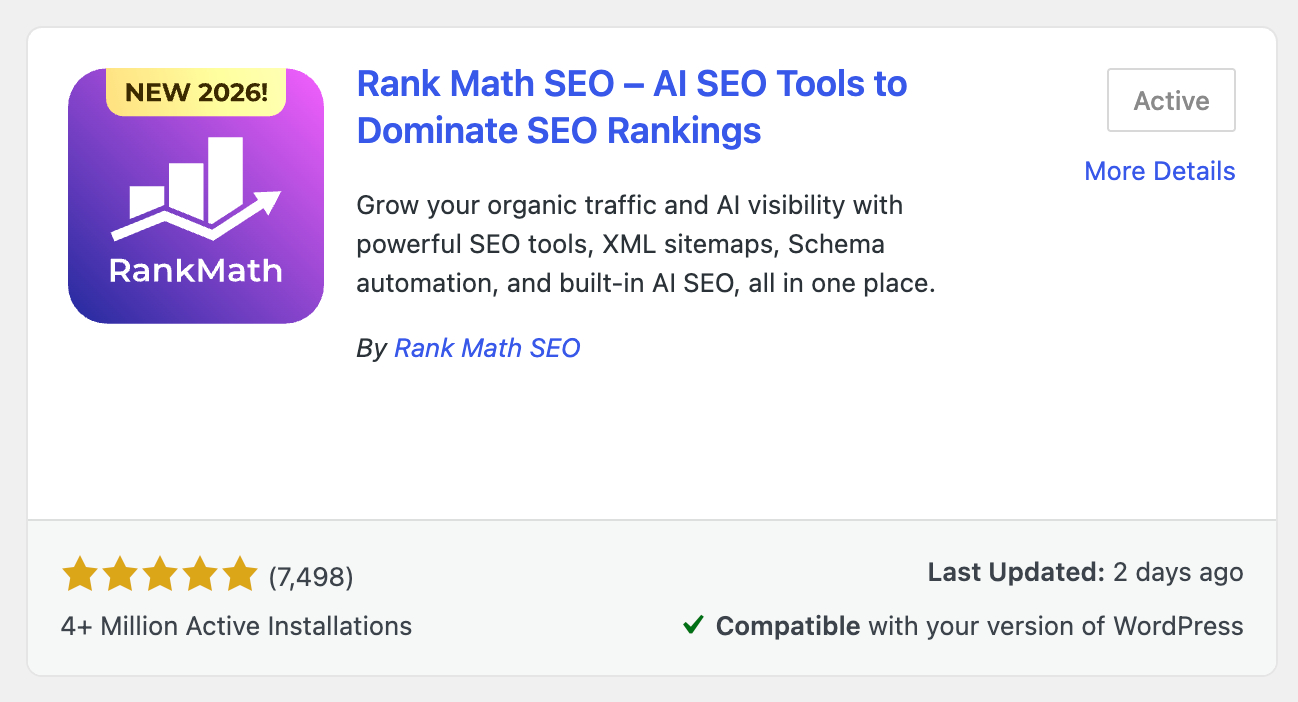
In 2026, Rank Math’s free version is very popular, with over 3 million active users and thousands of 5-star reviews. This shows that many website owners trust it to help improve their site’s SEO and get higher rankings on Google.
Paid Plans for Multiple Websites
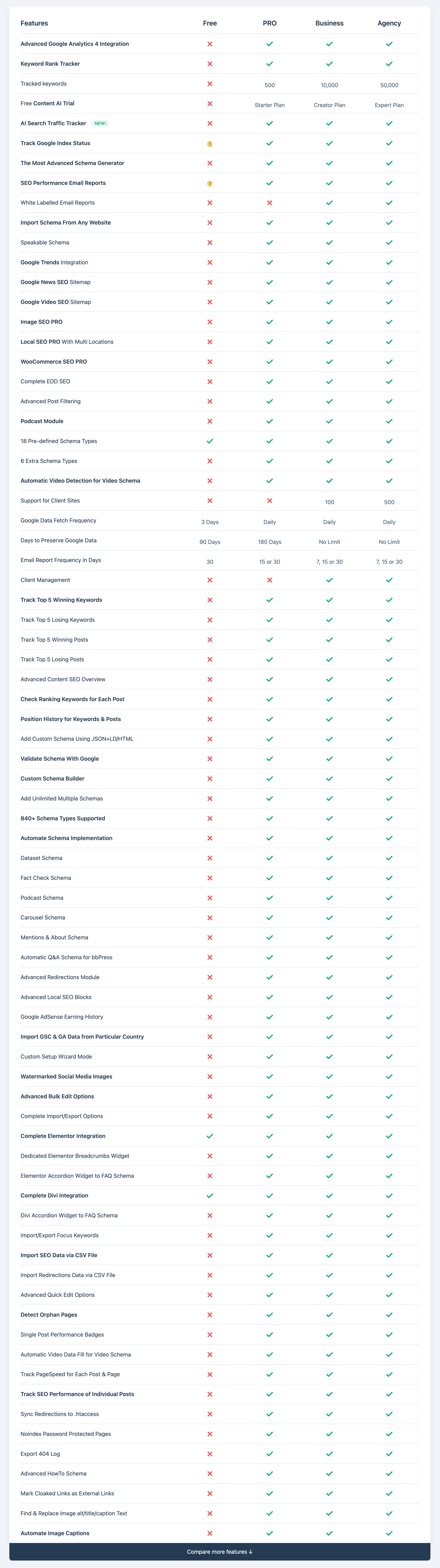
If you want to use more advanced tools on just one site, you can start with Rank Math’s Pro plan for as low as $7.99 per month. This plan includes all of Rank Math’s features and can be used on unlimited personal sites.
If you need more features, Rank Math offers a Business plan for $24.99 per month (for up to 100 websites) and an Agency plan for $54.99 per month (for up to 500 websites).

On the other hand, Yoast SEO is more expensive. Their single-site plan starts at $118.80 per year and goes up to $564.30 per year for up to 5 sites.

Furthermore, while Yoast has recently started bundling some add-ons into its Premium tier, specialized features like WooCommerce SEO ($178.80 per year) or Yoast SEO AI+ ($358.80 per year) can still require separate purchases, quickly increasing the total cost for multi-site owners.

But with Rank Math’s PRO plan, you can get all the features for just $7.99 per month, and it can be used on as many personal websites as you want.
Here is a quick pricing comparison table of Rank Math Pro and Yoast SEO Premium.
| Feature / Plan | Rank Math (Pro) | Yoast SEO (Premium) |
| Monthly Price | $7.99 per month | $9.90 per month |
| Site License | Unlimited Personal Sites | 1 Site Only |
| Redirect Manager | Included (Free & Pro) | Premium Only |
| Multi-Keyword Analysis | Unlimited (Free & Pro) | Up to 5 Keywords |
| Local / Video / News SEO | Included | Included in Premium |
| WooCommerce SEO | Included | Often Requires Bundle |
| AI Link Genius | Included | NA |
This clearly indicates which SEO plugin should be your primary choice.
To give you extra confidence, Rank Math also provides a 30-day money-back guarantee with no risk. So, if a plan isn’t the right fit, you can get a refund without even explaining why.
Next, let’s talk about the support you get when you choose the paid and free versions of each plugin.
Customer Support
When it comes to support, both Rank Math and Yoast SEO provide solid resources, but the way you get help differs.
Yoast SEO
Yoast SEO has an extensive official help center and documentation, plus 24/7 premium support included with Yoast SEO Premium, which lets paying users submit tickets and access expert assistance anytime.

Rank Math
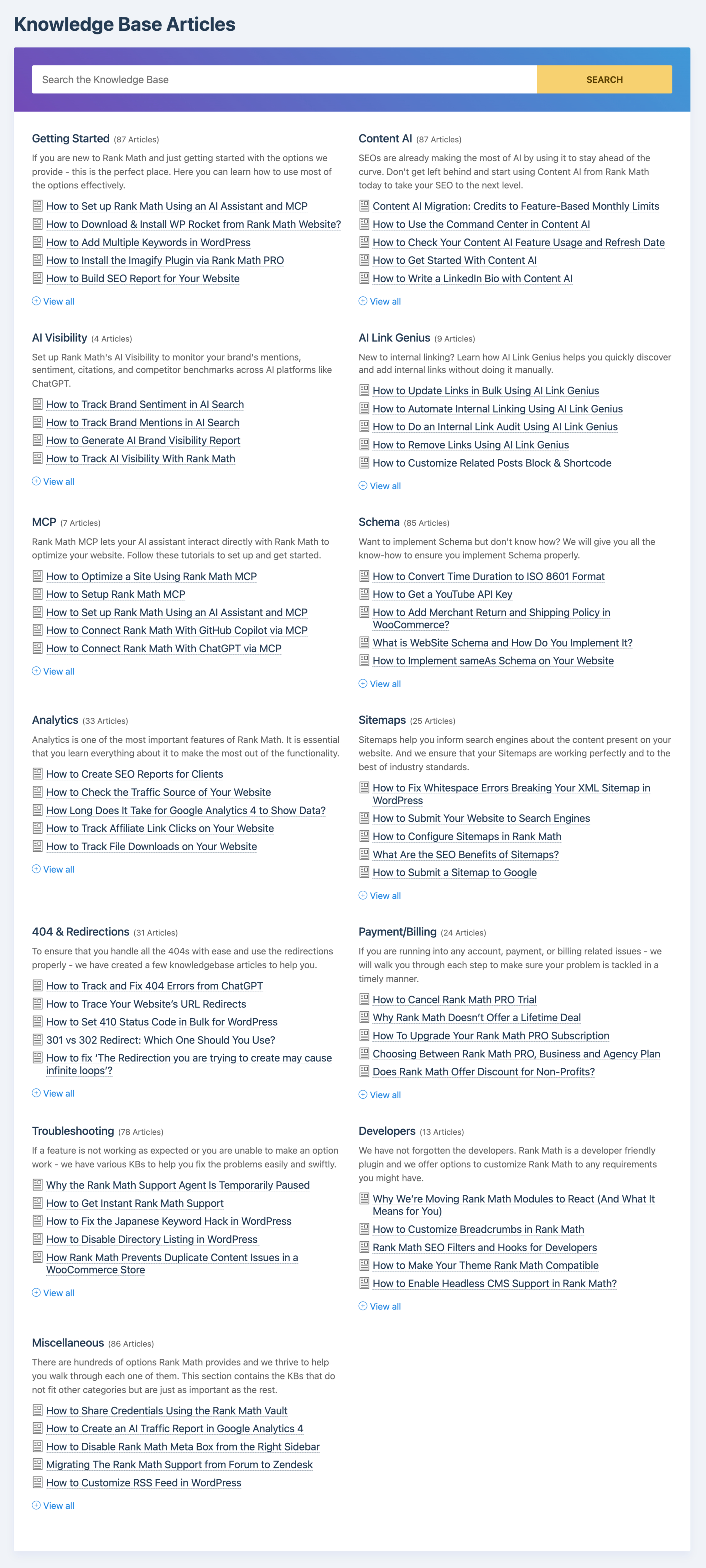
Rank Math also offers detailed documentation, tutorials, and a community support forum, along with an active Facebook group where users and the team discuss problems and solutions.
Free and Pro users can get help through their support channels 24/7, and many users find the response times prompt and practical.
In some community comparisons, Rank Math support comes across as slightly more engaged with users outside traditional ticket systems, though it may not have the same formal structure as Yoast’s premium ticket support.
Verdict
If you value structured, guaranteed support with ticketing and official guidance baked into a paid plan, Yoast SEO Premium is a dependable option.
If you prefer a responsive community that helps with good documentation and don’t want to pay just for support, Rank Math’s support ecosystem tends to be well-received and accessible even on the free plan.
Rank Math vs. Yoast – Which Is Best in 2026?
Rank Math
★★★★★ (5 out of 5)
Rank Math and Yoast are both really good SEO plugins. They both have the same goal: to make SEO tasks easier for WordPress websites.
And honestly, they both do a fantastic job at it.
But you probably get the idea by now: Rank Math has outperformed Yoast and is definitely the best WordPress SEO plugin out there in 2026.
For example, Rank Math offers more advanced tools like controlling who can access your settings, customizing your sitemaps, and much more.
Rank Math also has a great on-page SEO checklist and the ability to analyze your competitors’ SEO.
These tools help you beat your competitors and get ahead. And these tools are only available in Rank Math.
Another reason Rank Math is better is that it’s much easier to use. Everything is clean and simple, so you don’t get lost when setting up SEO for your pages or blog posts.
Best of all, Rank Math costs less than Yoast SEO. It also lets you manage up to 100 websites, while Yoast SEO only lets you handle 20. That’s a big difference and saves you money.
If you run a news website, Rank Math even helps you send your stories to Google News without doing it by hand.
There are a lot more features that come with Rank Math, but we won’t list them all here. If you’re curious to see everything it can do, you should definitely check out their features page.
You might be surprised by how much it offers.
How to Switch From Yoast to Rank Math?
Switching to Rank Math is simple, and you’ll be glad you did.
If you are already using Yoast SEO on your WordPress site and, after reading this post, you are convinced that Rank Math is a better option, then this section is for you.
At first, I was scared to switch my SEO plugin because most of my website visitors come from Google, and I didn’t want anything to break. But switching to Rank Math was really easy, and everything worked just fine.
Here’s how you can do it too:
Step 1: Download Rank Math
Go to your WordPress dashboard, click on “Plugins,” then “Add New.” Search for “Rank Math” and install it. You can also download it from their website.

Step 2: Create A Free Rank Math Account
After installing, Rank Math will ask you to sign in or create an account. Just follow the steps and connect your site.

Step 3: Start The Setup Wizard
Once you’re connected, Rank Math will walk you through the setup. Just follow along — it’s easy.

Step 4: Import Your Settings From Yoast
When it asks, import all your settings from Yoast. If you’ve set up redirects before, you can move those too.

Step 5: Change The Settings
Now it’s time to go through the settings. For help with this, take a look at the official Rank Math settings guide. It’s got all the details you need.

Step 6: Remove Yoast
After everything’s moved over and working, you can delete the Yoast plugin.
And that’s it. If you want extra help, here’s the video I used to import everything from Yoast to Rank Math.
Yoast SEO vs. Rank Math: Your FAQs Answered
Which SEO plugin is better for beginners: Yoast SEO or Rank Math?
Both plugins are excellent, but Rank Math offers more features in its free version, including advanced schema, keyword tracking, and integration with Google services. Yoast is reliable and beginner-friendly, but many of its premium features are paid.
Does Rank Math slow down my website?
No, Rank Math is lightweight and optimized for speed. In fact, many users find it faster than Yoast due to its modular system, which allows you to disable features you don’t use.
Do both plugins support schema markup?
Yes. Both Yoast and Rank Math support schema, but Rank Math offers you more control and customization options, especially for rich snippets and local SEO.
Does switching from Yoast to Rank Math affect SEO?
If done correctly, switching plugins will not harm your SEO. Rank Math includes a setup wizard that helps import your settings from Yoast seamlessly. However, it’s recommended to create a full site backup before making the switch.
Is Rank Math really free?
Yes, Rank Math has a powerful free version that includes many features that Yoast reserves for its premium users. Rank Math also offers Pro and Business plans for additional features like advanced analytics, AI content suggestions, and client management.
Is Rank Math safe to use on my website?
Absolutely. Rank Math is developed by a reputable team and is regularly updated. It’s used by over 3 million websites and follows best practices for WordPress plugin security.
Which plugin is better for WooCommerce SEO?
Rank Math has more built-in WooCommerce SEO features in its free version compared to Yoast, which requires a paid WooCommerce SEO add-on.
Can I use both Yoast and Rank Math together?
No, it’s not recommended. Using two SEO plugins at the same time can cause conflicts, duplicate meta tags, and indexing issues. Choose one and stick with it for the best results.
Does Rank Math support AI content suggestions?
Yes, Rank Math integrates with AI tools and offers smart content analysis, while also supporting GPT-based suggestions (in the Pro version) to help optimize your posts better.
Which plugin is better for multiple focus keywords?
Rank Math allows you to optimize for up to 5 keywords in the free version. Yoast supports only one keyword in the free plan, requiring a premium upgrade for multiple keywords.
Do Yoast SEO and Rank Math offer support for local SEO?
Both Rank Math and Yoast support local SEO, but Rank Math offers this in the free version while Yoast charges extra. If local SEO is a priority and you’re on a budget, Rank Math may be a better option.
What are the key differences between Yoast SEO and Rank Math?
While both plugins aim to improve your website’s SEO, they differ in several aspects. Rank Math offers more advanced features in its free version compared to Yoast SEO. Key differences include:
- Keyword Optimization: Rank Math allows optimization for multiple focus keywords in the free version, whereas Yoast SEO typically limits this to one.
- Schema Markup: Rank Math has built-in support for a wider variety of schema markups, often requiring separate plugins for Yoast SEO.
- Internal Linking Suggestions: Rank Math provides automated internal linking suggestions, a feature not available in the free version of Yoast SEO.
- Integration with Google Services: Rank Math seamlessly integrates with Google Search Console and Google Analytics within the dashboard.
- User Interface: Rank Math’s interface is often described as more modern and user-friendly by some users.
My Final Thoughts on Rank Math vs. Yoast SEO
And that’s it.
But wait, don’t get me wrong—Yoast SEO isn’t a bad plugin. It helped me a lot when I was just getting started. But Rank Math is just more powerful, more user-friendly, and a better value for what I need now.
If you’re serious about SEO and want to get the most bang for your buck (even without spending a buck), Rank Math is a no-brainer.
Still confused about whether Rank Math or Yoast is better? Or need help setting it up?
Ask me in the comments. I’ll reply as soon as I can. Hope this guide helped you out.
You might also like…