


Do you want to install gtag.js on your WordPress site using the MonsterInsights plugin? If so, you have come to the right place.
Google Analytics is changing quickly!
Recently, Google introduced a new way to set up Google Analytics, which includes a new script known as Global Site Tag (gtag). From now onwards, you will be using this tag to set up your Google Analytics on new websites.
In this article, we’ll show you how to easily install Google Site Tag on WordPress but before we dive, let’s find out what gtag.js is, why do you need it.
What is Global Site Tag?
Gtag is Google’s new tag that provides the simplest way of tagging your web pages. This will replace all other Google tags on your site and serve as a single source to connect them all.
The purpose of gtag is to have a unique tag on your site that will work for all Google products such as GA, GTM, Adwords, Firebase etc.
What is the Difference between Universal Analytics & Global Site Tag
Here’re a few differences you need to know about the global site tag and universal tag.
- Install: Universal Analytics (analytics.js) is used for installing Google Analytics, and global tag can be used to install multiple tools like GA and GTM.
- Tracking: Universal Analytics uses trackers (ga(‘create’, ‘UA-XXXXX-Y’, ‘auto’);) to send page views to Google Analytics while gtag send pageviews to GA property identified by the GA_Tracking_ID (gtag(‘config’,’GA_Tracking_ID’)).
- Use: Gtag can be used for conversion tracking while universal analytics can’t be used for conversion tracking.
Benefits of Using gtag.js
The global site tag is a centralized script tag that simplifies website tagging for all of your Google products. Rather than spending hours configuring several tags, the global site tag streamlines the entire process for you.
The previous Google Analytics tag, analytics.js, only sent data to Google Analytics, whereas the gtag allows you to send event data to each Google marketing tool. This allows you to better understand user behaviour while on the website and makes conversion tracking easier.
How to Install Gtag.js on WordPress Using MonsterInsights Plugin
MonsterInsights recently introduced a new MonsterInsights Global Site Tag Support and now it is making Global Site Tag its default tracking code for all new users. So you don’t have to worry about if you are new to MonsterInsights.
If you are an existing user of MonsterInsights, still you do not need to worry about it because MonsterInsights has introduced a very limited time option that you can use to switch from the older tracking code (analytics.js) to Global Site Tag with one click.
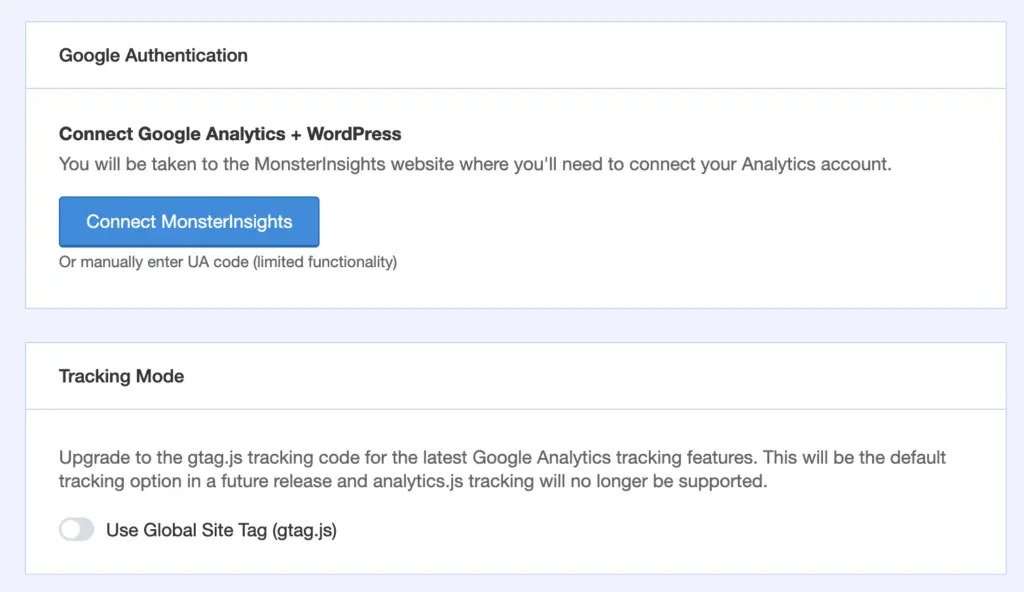
If you have already added any custom coded inside your site or set up event tracking using a third party plugin (other than MonsterInsights), you don’t need to update them, MonsterInsights will automatically detect analytics.js events and connect them through the Global Site Tag (gtag.js).
So, that’s how you can easily install gtag.js on your WordPress site within a minutes.
We hope this article has helped you learn how to easily install gtag on your WordPress site with the help of MonsterInsights. If you liked this article, then please do us a favour and share them. If you have any questions, don’t forget to leave a comment below!
