If you sell on Amazon and use Helium 10 for your FBA business in 2026, this guide is for you.
Artificial intelligence has become part of nearly every Amazon seller’s workflow.
Whether you’re researching keywords, analyzing competitors, writing listing copy, or reviewing PPC campaigns, AI can help you complete tasks faster than ever before.
The challenge is that AI doesn’t know your business.
Without access to your Amazon data, even the most advanced AI assistant can only provide general recommendations. It can’t see your keyword rankings, advertising performance, inventory levels, profit margins, or product research data.
That’s exactly what Helium 10 MCP changes.
Launched on July 16, 2026, Helium 10 MCP connects your Helium 10 account with supported AI assistants such as ChatGPT, Claude, and Codex. After you connect your account, the AI can securely access your Helium 10 data and answer questions using information from your actual Amazon business.
From discovering high-value keywords to analyzing advertising performance and monitoring inventory, Helium 10 MCP turns natural conversations into actionable business insights.
In this guide, you’ll learn what Helium 10 MCP is, how it works, what it can do, how to set it up, and the best ways to use it to grow your Amazon business.
Let’s dive in.
Disclosure: We’re reader-supported. When you buy through links on our site, we earn a commission at no cost to you.
Helium 10 Platinum is currently 30% off for 6 months, but this offer ends September 25.
With the Platinum plan, you get:
- Product and keyword research tools to find product opportunities and validate what to sell.
- Performance and profit tracking so you can monitor your Amazon business from one platform.
- Amazon FBA training and Ads Academy included at no extra cost, so you can learn how to build and grow your business.

What Is Helium 10 MCP?
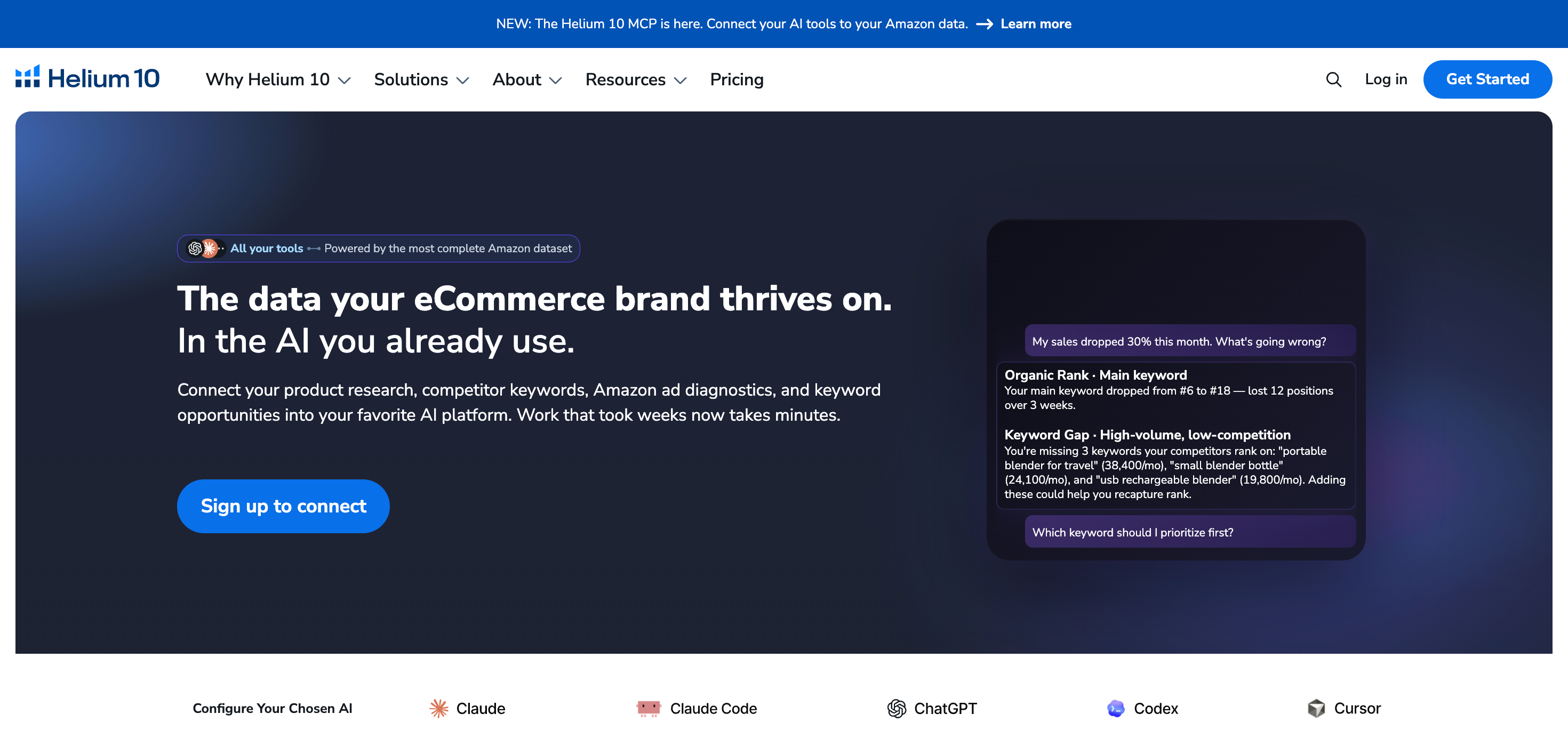
Helium 10 MCP is an integration that allows supported AI assistants to securely access data from your Helium 10 account.
MCP stands for Model Context Protocol, an open standard that allows AI applications to communicate with external tools and data sources through a secure connection. With Helium 10 MCP, your AI assistant can retrieve information directly from your Helium 10 account whenever you ask a question.
In simple terms, it gives your AI assistant access to the same business data you normally view inside the Helium 10 dashboard.
For example, you can ask questions such as:
- Which keywords is my product ranking for?
- Show the advertising performance for my best-selling brand.
- Compare my product with competing ASINs.
- Show my profit and loss report for the last quarter.
Helium 10 retrieves the requested information, the AI analyzes it, and the results are presented in plain language within the same conversation.
This creates a more natural way to work with Amazon seller data. Rather than switching between multiple reports and dashboards, you can simply ask questions and receive answers based on your own business data.
How Helium 10 MCP Works
Although the experience feels like chatting with an AI assistant, several things happen behind the scenes each time you ask a question.
Step 1: Ask a Question
Start by asking your AI assistant a question in plain language.
For example:
“Show me all the keywords my ASIN ranks for in the US marketplace.”
There’s no need to learn special commands or search through multiple reports.
Step 2: The AI Chooses the Right Helium 10 Tool
Helium 10 MCP includes 34 specialized tools that cover areas such as keyword research, product research, rank tracking, listing optimization, profit analytics, inventory management, and advertising performance.
After receiving your request, the AI identifies which tool or combination of tools is needed to retrieve the correct data.
Step 3: Secure Authentication
Before any data is shared, Helium 10 verifies your account using OAuth 2.0, the same authorization standard used by many online services.
Your Helium 10 login credentials are never exposed to the AI assistant. Authentication happens securely between your account and Helium 10’s servers.
Step 4: Data Retrieval
After authentication is complete, Helium 10 collects the requested information from your account and securely sends it to the AI assistant.
Depending on your request, this may include:
- Keyword rankings
- Product research data
- Advertising metrics
- Profit analytics
- Inventory information
- Listing insights
Step 5: AI Analysis
After receiving the data, the AI assistant analyzes the information and presents it in a simple, conversational format.
Rather than reviewing reports and metrics one by one, you receive summaries, explanations, recommendations, and answers based on your own business data.
One of the biggest advantages of this workflow is that the conversation doesn’t stop after the first answer. You can continue asking related questions, request deeper analysis, compare products, or explore new opportunities without starting the process from scratch.
What Can You Do with Helium 10 MCP?
Here are the six core capabilities that Helium 10 MCP offers.
1. Keyword Research
Finding the right keywords is one of the most important parts of growing an Amazon business. Helium 10 MCP allows you to work with keyword data through simple conversations.
You can ask questions like:
- Which keywords does my product rank for?
- What keywords are my competitors ranking for that I’m missing?
- Which search terms have the highest search volume?
- What long-tail keywords should I target?
Behind the scenes, MCP retrieves data from Helium 10’s keyword research tools and presents it in a format that’s easy to understand. You can even ask follow-up questions to dig deeper into specific opportunities without starting a new search.
2. Product Research
Choosing the right product often requires hours of market analysis.
With Helium 10 MCP, you can analyze products, compare opportunities, and evaluate potential niches through a conversation with your AI assistant.
For example, you might ask:
“Find products with strong demand, moderate competition, and consistent sales in the Home & Kitchen category.”
Or:
“Compare these three ASINs and tell me which one has the strongest opportunity.”
The AI retrieves marketplace data from Helium 10, analyzes it, and summarizes the findings so you can evaluate product opportunities more easily.
3. Keyword Rank Tracking
Tracking your keyword rankings helps you see whether your optimization work is paying off.
With Helium 10 MCP, you can ask for ranking data in plain language without opening multiple reports.
For example, you can ask:
- Which keywords moved up this week?
- Which keywords lost rankings?
- Which products are getting more visibility?
- Show the ranking history for this ASIN.
Since the conversation remains active, it’s easy to continue exploring the data until you’ve identified the cause of a ranking change or uncovered a new optimization opportunity.
4. Listing Analysis and Optimization
Creating a high-converting Amazon listing takes more than writing good product copy.
You also need to compare your listing with competing products, find valuable keywords you haven’t used, and improve your content based on real performance data.
With Helium 10 MCP, you can ask questions such as:
- How does my listing compare to my competitors?
- Which important keywords am I missing?
- What improvements could increase my visibility?
- Which parts of my listing should I optimize first?
Because you can ask these questions in plain language, you can review your listings, uncover new opportunities, and make informed improvements without switching between multiple reports, even if you manage multiple products.
5. Profit Analytics
Revenue is only one part of the equation.
If you want to grow a profitable Amazon business, you need to keep track of your costs, Amazon fees, profit margins, and overall financial performance.
With Helium 10 MCP, you can ask questions about your profit data in plain English and get answers based on your account data.
For example:
- Which products generate the highest profit?
- How have my profit margins changed over the past month?
- Which ASINs have become less profitable?
- Show me my most profitable products.
This helps you review your financial performance without spending time searching through reports, which is especially useful if you manage a large product catalog.
6. Advertising Performance
Amazon PPC creates a large amount of advertising data, and reviewing it manually takes time.
With Helium 10 MCP, you can ask your AI assistant to review your advertising data using simple prompts.
For example, you can ask:
- Which campaigns have the highest ACoS?
- Which keywords generate the most sales?
- Where am I spending too much on ads?
- Which campaigns need attention first?
The AI examines your campaign data and points out the most important insights. This helps you find campaigns that need work, identify high-performing keywords, and make better decisions about your ad budget.
The Bottom Line
Each of these features is useful on its own, but the real advantage comes from using them together through a single conversation.
You no longer have to think about which Helium 10 tool to open first or where a specific report lives. You describe what you want to know, and Helium 10 MCP retrieves the relevant data before your AI assistant analyzes it and presents the results in a conversational format.
As your questions become more detailed, the conversation can continue without repeating the entire process. That ability to explore, refine, and analyze your business through natural dialogue is what makes Helium 10 MCP such a powerful addition to the Amazon seller workflow.
How to Set Up Helium 10 MCP?
Getting started with Helium 10 MCP takes only a few minutes. Once the connection is complete, your AI assistant can securely access your Helium 10 data whenever you ask a question.
Before You Start
Before connecting Helium 10 MCP, make sure you have:
- A Helium 10 Diamond (or higher) subscription
- A supported AI assistant, such as ChatGPT, Claude, or Codex
- An active Helium 10 account that you can authenticate through OAuth 2.0
Connecting Helium 10 MCP to ChatGPT
If you use ChatGPT as your primary AI assistant, the setup process is simple.
- Open ChatGPT and sign in to your account.
- Open Settings and enable Developer Mode.
- Create a new plugin/app connection.
- Enter the following details:
- Name: Helium 10 MCP
- Server URL:
https://mcp.helium10.com/mcp - Authentication: OAuth
- Complete the OAuth authorization by signing in with your Helium 10 account.
- Enable Helium 10 MCP in a new chat.
- Test the connection with a prompt such as:
“Use Helium 10 MCP to analyze keywords for Amazon ASIN B0XXXXXXXX.”
If the AI returns keyword data, your connection is ready to use.
Connecting Helium 10 MCP to Claude
Claude offers one of the simplest setup experiences through its Connector Store.
- Open Claude.
- Navigate to Settings → Connectors.
- Search for Helium 10.
- Click Connect.
- Sign in to your Helium 10 account when prompted.
- Approve the OAuth request.
- Start a new conversation and enable the Helium 10 connector.
You’re now ready to query your Helium 10 data directly from Claude.
Connecting Helium 10 MCP to Codex
Codex also supports Helium 10 MCP for developers and advanced users.
To connect:
- Add Helium 10 as a custom MCP server.
- Sign in to your Helium 10 account through OAuth.
- Verify the connection by running a sample prompt.
Once connected, Codex can securely retrieve and analyze your Amazon seller data for coding, automation, and research tasks.
Managing Your MCP Connections
You can review or revoke authorized AI clients at any time.
Navigate to:
Helium 10 → Settings → MCP → Authorized AI Clients Management
This allows you to disconnect AI tools you no longer use or reconnect them if an authorization expires.
What Helium 10 MCP Can and Can’t Do
Understanding the current capabilities of Helium 10 MCP helps you know when it’s the right tool for the job.
What Helium 10 MCP Can Do
Helium 10 MCP can:
- Access live data from your Helium 10 account.
- Analyze keyword research, product research, listings, advertising, profitability, and rank tracking data.
- Work with supported AI assistants, including ChatGPT, Claude, and Codex.
- Authenticate securely through OAuth 2.0 without exposing your Helium 10 credentials.
- Answer follow-up questions using the context of your current conversation.
What Helium 10 MCP Can’t Do
Although MCP is powerful, it’s important to understand its current limitations.
It cannot:
- Edit Amazon listings.
- Create or modify PPC campaigns.
- Adjust bids automatically.
- Pause or launch advertisements.
- Make changes inside Seller Central.
- Query multiple Helium 10 accounts through a single connection.
Helium 10 MCP Version 1 is read-only. It helps you understand your data, but you must make any updates inside Helium 10 or Amazon Seller Central.
You should also keep a few additional limitations in mind:
- Most data refreshes periodically rather than in real time.
- Keyword Tracker only returns keywords you’ve already added to the tracker.
- Amazon Brand Analytics data requires both a Diamond plan and Amazon Brand Registry.
- Every account has an API usage allowance, so shorter, focused prompts help reduce unnecessary requests.
Best Practices for Getting Better Results
The quality of your answers depends largely on the quality of your prompts.
Here are a few recommendations to help you get more accurate and useful insights.
Be Specific
A vague prompt produces a vague response.
For example:
❌ Find keywords for my product.
A better prompt would be:
✅ Find the top organic keywords for ASIN B0XXXXXXXX in the US marketplace with search volume above 5,000.
The more details you include, the more useful the response will be.
Always Include the ASIN
Whenever possible, include the Amazon ASIN in your prompt.
Helium 10 MCP works best with ASINs because most of its research tools use Amazon’s product identifier. Avoid using product names, UPCs, GTINs, or SKUs if an ASIN is available.
Mention the Marketplace
Amazon marketplaces vary by country.
If you don’t specify a marketplace, Helium 10 MCP uses the US marketplace by default.
For international research, include the marketplace in your prompt.
For example:
- Compare these keywords for Amazon UK.
- Analyze this ASIN in the Germany marketplace.
Ask Follow-Up Questions
One of MCP’s biggest advantages is that the conversation doesn’t end after the first response.
Once your AI has analyzed a product, you can continue asking questions like:
- Which keyword has the biggest growth opportunity?
- Compare this product with my top competitor.
- Which recommendation should I prioritize first?
- Show me the historical ranking trend for these keywords.
Building on previous responses often produces deeper insights than starting a brand-new conversation every time.
Who Should Use Helium 10 MCP?
Helium 10 MCP isn’t built for people who are just curious about AI. It’s built for Amazon sellers who want to make better decisions using the data they already have.
If your day involves researching products, optimizing listings, managing PPC campaigns, or tracking business performance, MCP can help reduce the time spent moving between tools and reports.
Here are some of the people who can benefit the most.
Is Helium 10 MCP Included with Your Subscription?
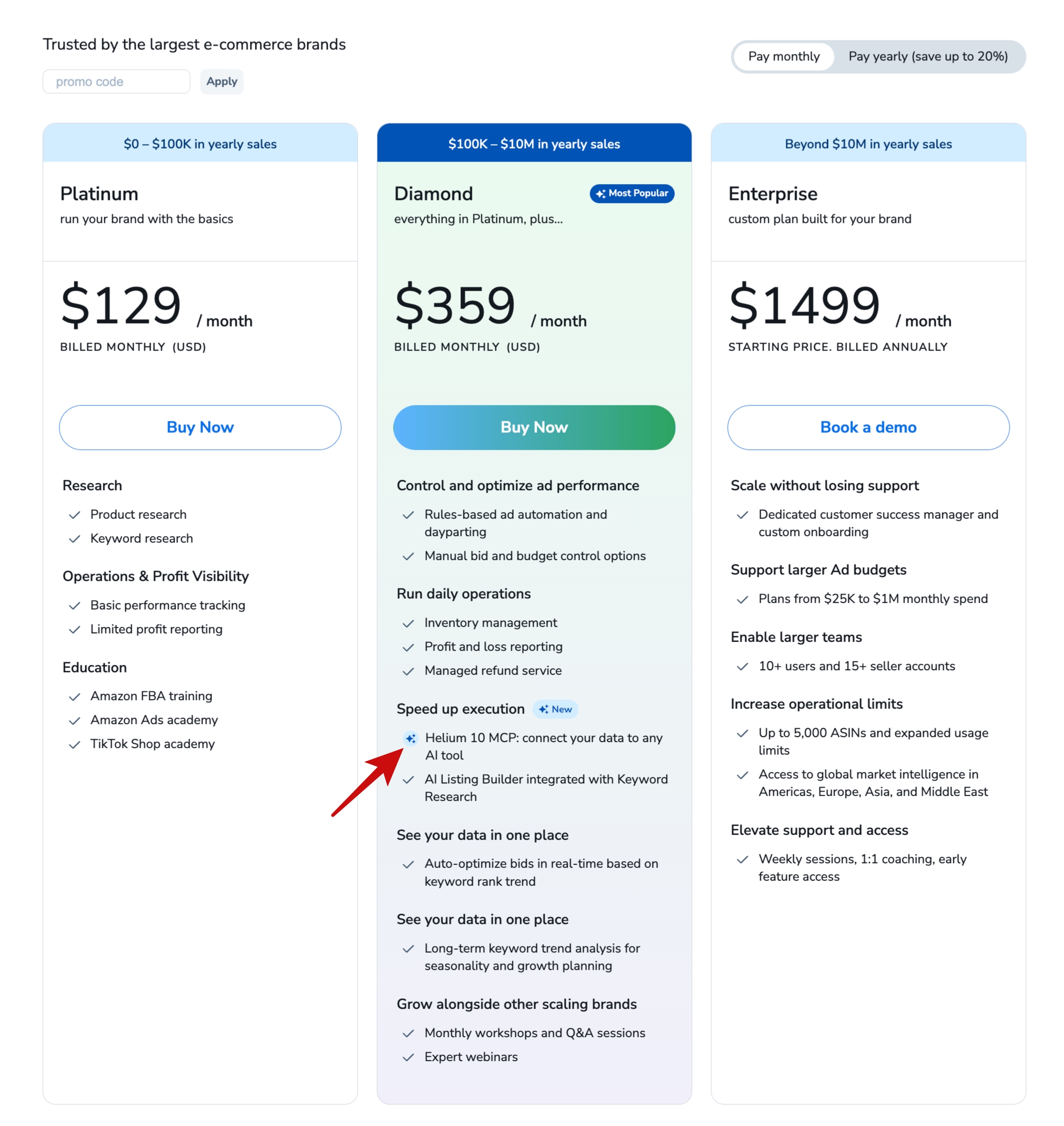
Helium 10 MCP is included with the Diamond plan at no additional cost.
Once you have a Diamond subscription, you can connect a supported AI assistant and begin asking questions about your Amazon business using your Helium 10 data. There’s no separate usage fee for the MCP connection itself.
If you’re currently on another Helium 10 plan, you’ll need to upgrade to Diamond to access this feature.
Frequently Asked Questions
What is Helium 10 MCP?
Helium 10 MCP is a secure connection that allows AI assistants like ChatGPT, Claude, Cursor, and Perplexity to access data from your Helium 10 account. This enables you to ask natural-language questions about your Amazon business and receive answers based on your keyword, listing, advertising, profitability, and inventory data.
Is Helium 10 MCP safe?
Yes. Helium 10 MCP uses a secure, read-only connection. Your AI assistant can access information from your account to answer questions, but it cannot make changes to your listings, campaigns, or account settings.
Does Helium 10 MCP work with ChatGPT?
Yes. ChatGPT is one of the supported AI assistants, along with Claude, Cursor, Perplexity, and other applications that support the Model Context Protocol.
Can I use Helium 10 MCP on the Platinum plan?
No. Helium 10 MCP is available with the Diamond plan.
Is Helium 10 MCP different from using ChatGPT by itself?
Yes. ChatGPT by itself can only answer using its general knowledge. Helium 10 MCP connects compatible AI assistants to your Helium 10 account, so they can use your Amazon business data to answer questions based on your sales, keywords, listings, PPC campaigns, and other marketplace insights.
Final Thoughts
The best Amazon sellers have always had one thing in common: they make decisions backed by data.
Helium 10 MCP doesn’t change that fundamental principle; it simply changes how fast you can get the insights you need to act on it.
As AI becomes a bigger part of every seller’s workflow, having trusted marketplace data available through natural conversations could become just as important as the tools themselves. Helium 10 MCP is an early look at what that future can feel like.
So, are you ready to see what Helium 10 MCP can do? Try it with your Helium 10 Diamond plan and start getting answers from your Amazon data inside ChatGPT, Claude, and other supported AI assistants.