Affiliate Disclosure: This article contains affiliate links. If you choose to sign up for Semrush through these links, I may earn a small commission at no additional cost to you.
Start Your FREE 7 Day Trial of Semrush
People search differently now. They use Google, ChatGPT, YouTube, TikTok, Reddit, and AI tools to find answers, compare products, and discover brands. If you want traffic, you need to know where you’re showing up and where you’re not.
A free Semrush account helps you do exactly that.
Without paying anything, you can check keyword rankings, analyze competitors, audit your website, monitor backlinks, and find content opportunities that could bring in more traffic. The free account does come with usage limits, but it still gives you enough data to understand your SEO performance and make smarter marketing decisions.
If you need deeper insights later, you can also unlock the full platform through Semrush’s free trial before paying for a subscription.
Free Semrush Account Key Features
Here’s what you can access with a free Semrush account and how each feature helps:
| Feature | Daily Limit | How it Helps You |
|---|---|---|
| Domain Overview | 10 searches | See any site’s total search traffic and AI visibility. |
| Keyword Research | 10 searches | Find the specific terms people use to find your business. |
| Competitor Research | 10 searches | Break down exactly where your rivals get their visitors. |
| Site Audit | 100 pages | Scan your website to find and fix technical errors. |
| Position Tracking | 10 keywords | Monitor your ranking for your most vital search terms. |
| Backlink Analysis | 10 searches | Discover which websites link to you or your competitors. |
| SEO Ideas | Limited | Get specific advice to improve your current pages. |
Who Should Use The Free Plan?
This plan works best if you fall into one of these categories:
- New Marketers: People starting their first SEO project.
- Small Business Owners: Owners who want to test the platform before buying.
- Independent Freelancers: Professionals who need to validate a niche.
- Content Creators: People focused on growing a single blog or site.
- The Curious: Anyone interested in competitor data or AI-driven search visibility.
If you need higher query limits or want to track more keywords, you’ll hit the ceiling fast. But for getting started and improving a site step by step, the free plan does the job.
How to Use Semrush for Free (and Where the Walls Are)
To create your free account, just enter an email and a password. You won’t need to hand over any credit card details. After you sign up, follow these steps to squeeze every bit of value from the tools:
1. Evaluate Your Brand’s Online Presence
People don’t rely on just Google anymore. They search across Google, ChatGPT, Gemini, Perplexity, and other AI platforms. If your brand doesn’t appear across these channels, you miss out on attention.
The Domain Overview tool in Semrush shows how your site performs across both traditional search and AI-driven results.
With the free plan, you get up to 10 searches per day. That’s enough to review your own site and a few competitors.
Enter your domain and hit “Search.”
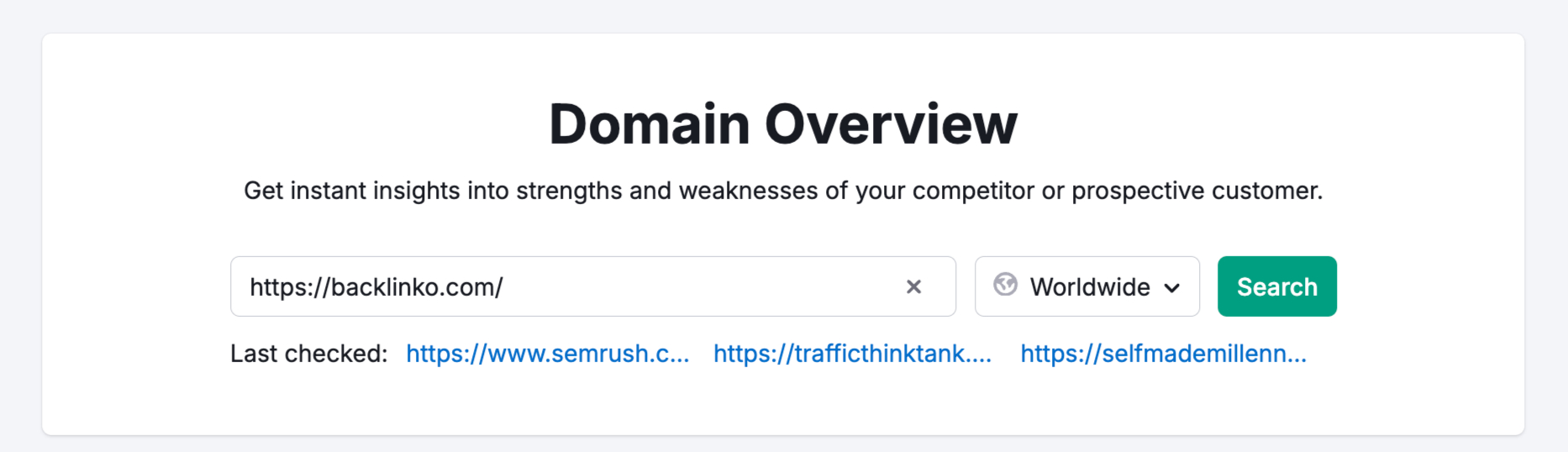
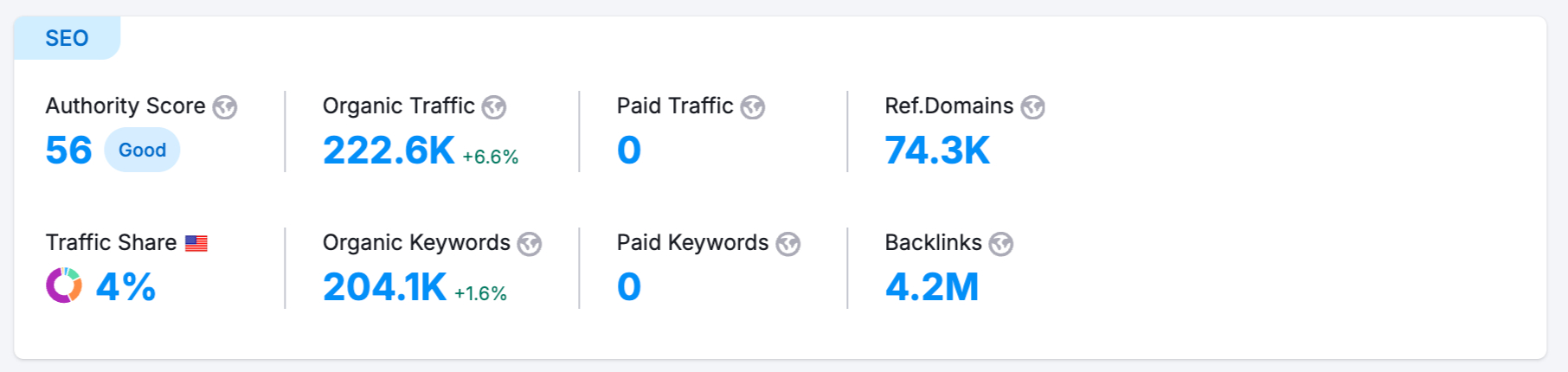
You’ll see key SEO metrics in one place:
- Authority Score: Measures your site’s credibility based on backlinks, traffic, and trust signals
- Organic Traffic: Estimated monthly visitors from search engines
- Organic Keywords: Total keywords your site ranks for
- Backlinks: Number of external sites linking to you
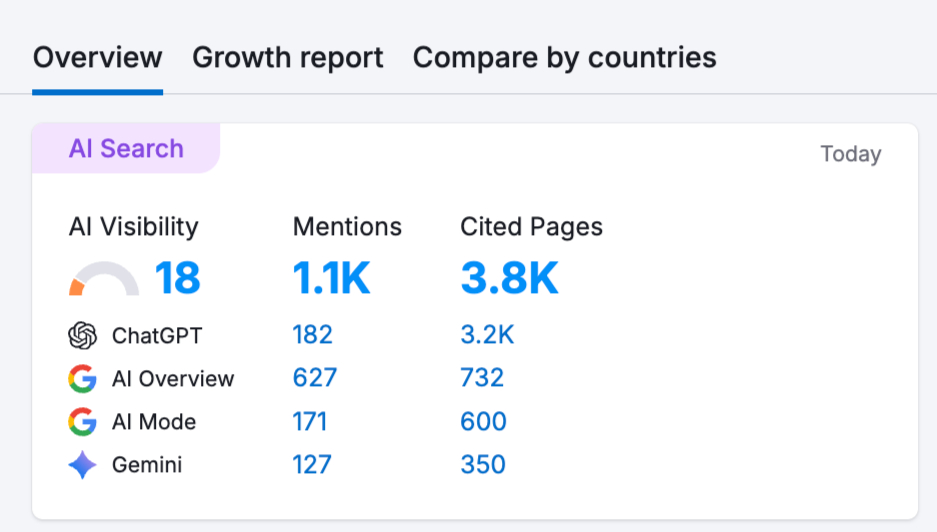
You’ll also see how your brand appears in AI-generated answers:
- AI Visibility Score: Shows how often your brand appears compared to competitors
- Mentions: Number of times your brand shows up in AI responses
- Cited Pages: URLs from your site referenced in AI answers
- Platform breakdown: Mentions across systems like ChatGPT, Google AI Overviews, and Gemini
You can run up to 10 Domain Overview searches per day. That’s enough to understand where you stand before deciding if you need more access.
2. Target the Best Keywords
You get 10 searches per day with a free Semrush account. That’s enough to explore ideas using tools like Semrush Keyword Magic Tool and Semrush Keyword Overview.
Start with a simple keyword related to your business and expand from there.
For example, if you run an online coffee store, type “AI tools” into Keyword Magic. You’ll see related terms such as “AI marketing tools” or “AI writing tools.” These are more specific and often easier to rank for while still bringing the right audience.
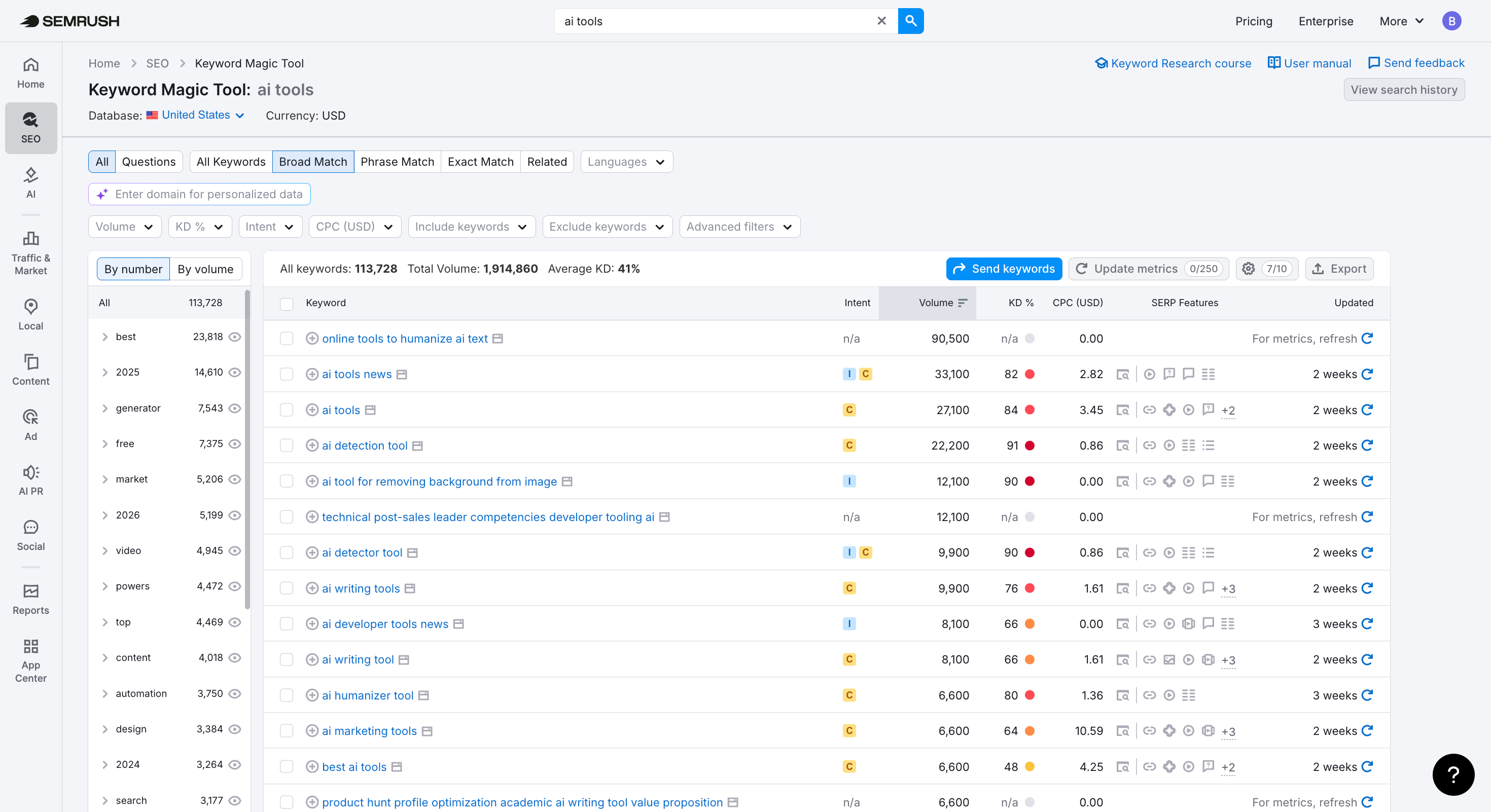
The upside can be significant. Ranking for a term like “AI marketing tools” can bring in around 6,600 visits per month.
Once you have a few ideas, check them in Keyword Overview. This helps you understand whether a keyword is worth targeting.
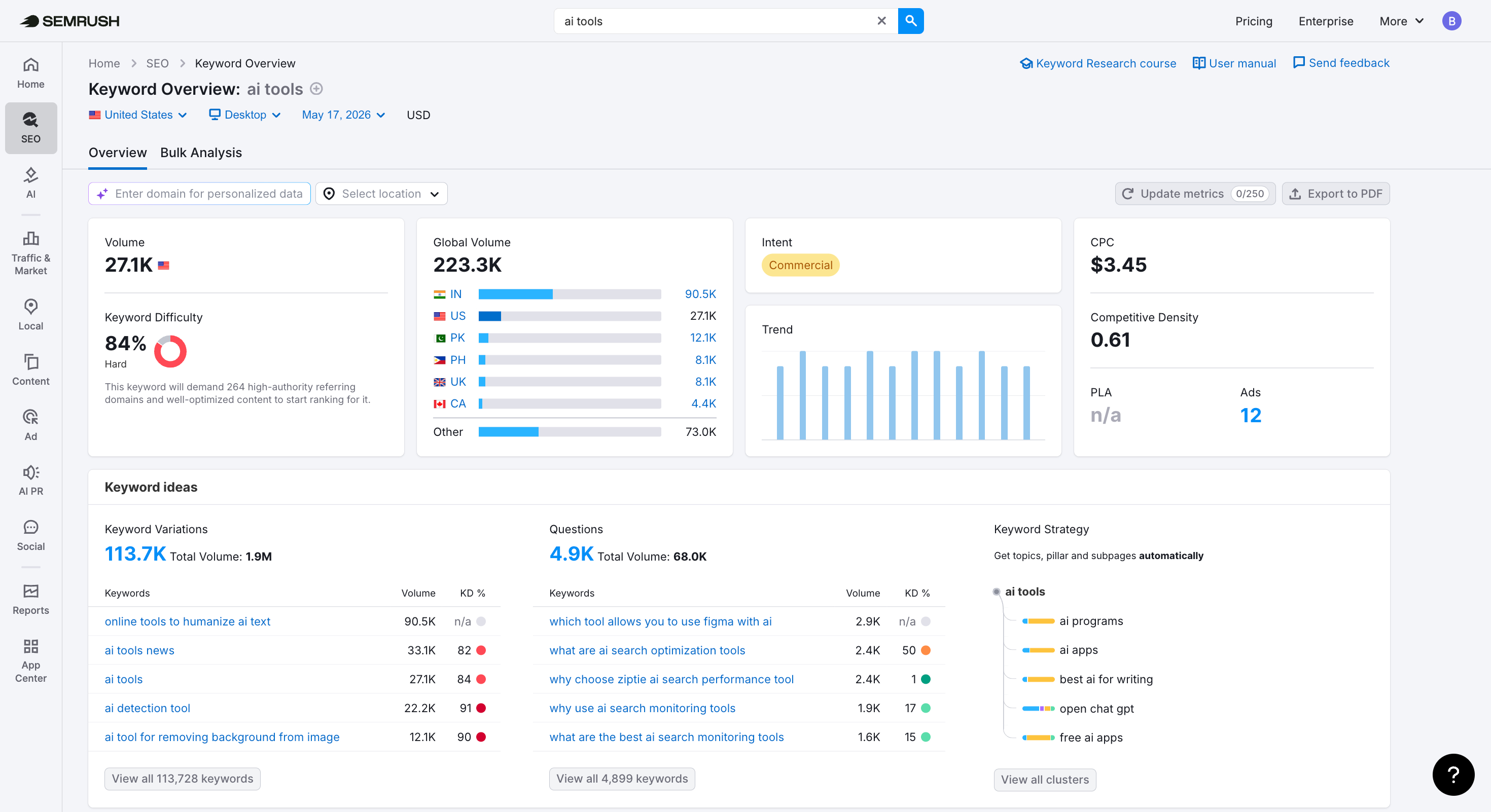
You’ll see data like:
- Monthly search volume: how many people search for it each month
- Keyword difficulty: how hard it is to rank
- Search intent: whether users want to buy, learn, or find a specific site
- SERP results: the pages currently ranking
If you’re focused on organic traffic, look for keywords that balance decent volume with lower difficulty and match what your audience wants.
Each search counts toward your daily limit, so think through what you want to check before you run it.
Start your free keyword research with Semrush Keyword Magic Tool ->
3. Audit Your Site for Better Visibility
Technical problems can quietly drag down your rankings and limit how often your content appears in AI-driven results.
Semrush’s Site Audit tool helps you find these issues early, so you can fix them before they affect traffic or user experience.
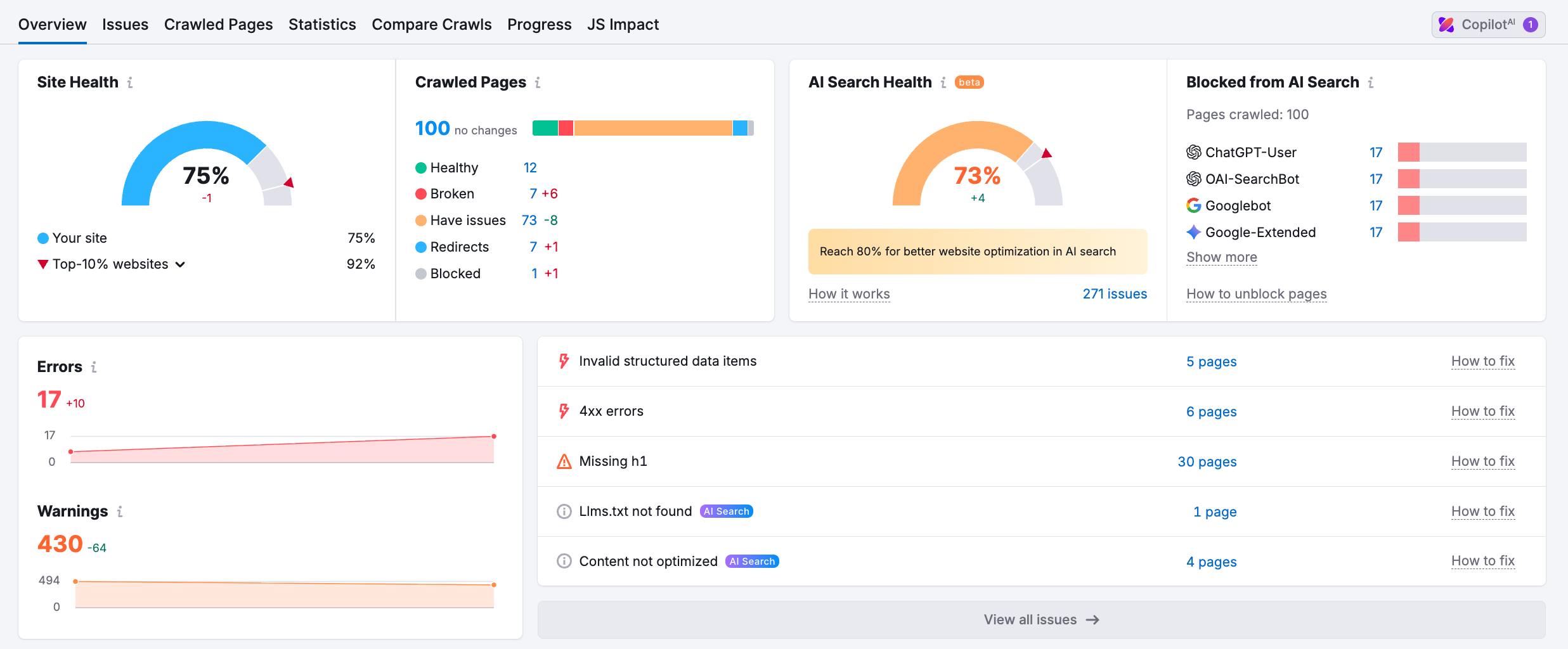
With the free plan, you can crawl up to 100 URLs per month. That’s enough to review your key pages and fix issues that have the biggest impact, such as:
- Indexing problems: See why search engines aren’t picking up important pages
- Page speed issues: Find what’s slowing your site and turning visitors away
- Broken links: Fix dead ends and orphan pages that disrupt navigation
- Security warnings: Resolve HTTPS issues that trigger “not secure” alerts
- AI visibility issues: Identify technical barriers that may reduce your presence in AI search
And more.
If you manage an e-commerce site, a quick audit might reveal missing product descriptions or slow checkout pages—problems that directly kill your conversion rates. The tool tells you exactly which pages have issues and provides the steps to fix them.
Success Story: BestSelf Co. used Site Audit to resolve technical debt and page speed issues. Within three months, they saw a 40% boost in organic traffic and 17% more leads.
Pro Tip
Use your 100-page limit wisely. Focus on your homepage, product pages, and top blog posts. These pages usually have the biggest impact on rankings and AI visibility.
If your site is large, 100 pages won’t cover everything. In that case, it’s worth trying a paid plan trial so you can audit the full site and get a complete list of issues.
Audit your entire website with a 7-day free trial of Semrush ->
4. Track Your Search Performance
To figure out if your SEO and AI visibility tactics actually pay off, you need to watch how your rankings shift over time. Semrush’s Position Tracking tool provides that exact insight.
The free plan lets you follow up to 10 keywords. This helps you stay locked in on the search terms that matter most to your brand.
Why use Position Tracking?
- Watch local rankings: Follow your performance down to specific ZIP codes—perfect for local shops.
- Size up the competition: Measure your rankings against other players in your market.
- Get daily data: Review daily shifts to catch trends before they pass.
- Measure your reach: Look at your total search presence rather than just single words.
- Find SERP features: Search for openings to grab high-profile spots like featured snippets or local packs.
This kind of data helps you understand what’s actually working. Whether it’s updating content, publishing new pages, or fixing technical issues, you’ll see which actions move your rankings.
How to set up Position Tracking
- Start a campaign by putting in your domain and location.
- Add your list of target keywords.
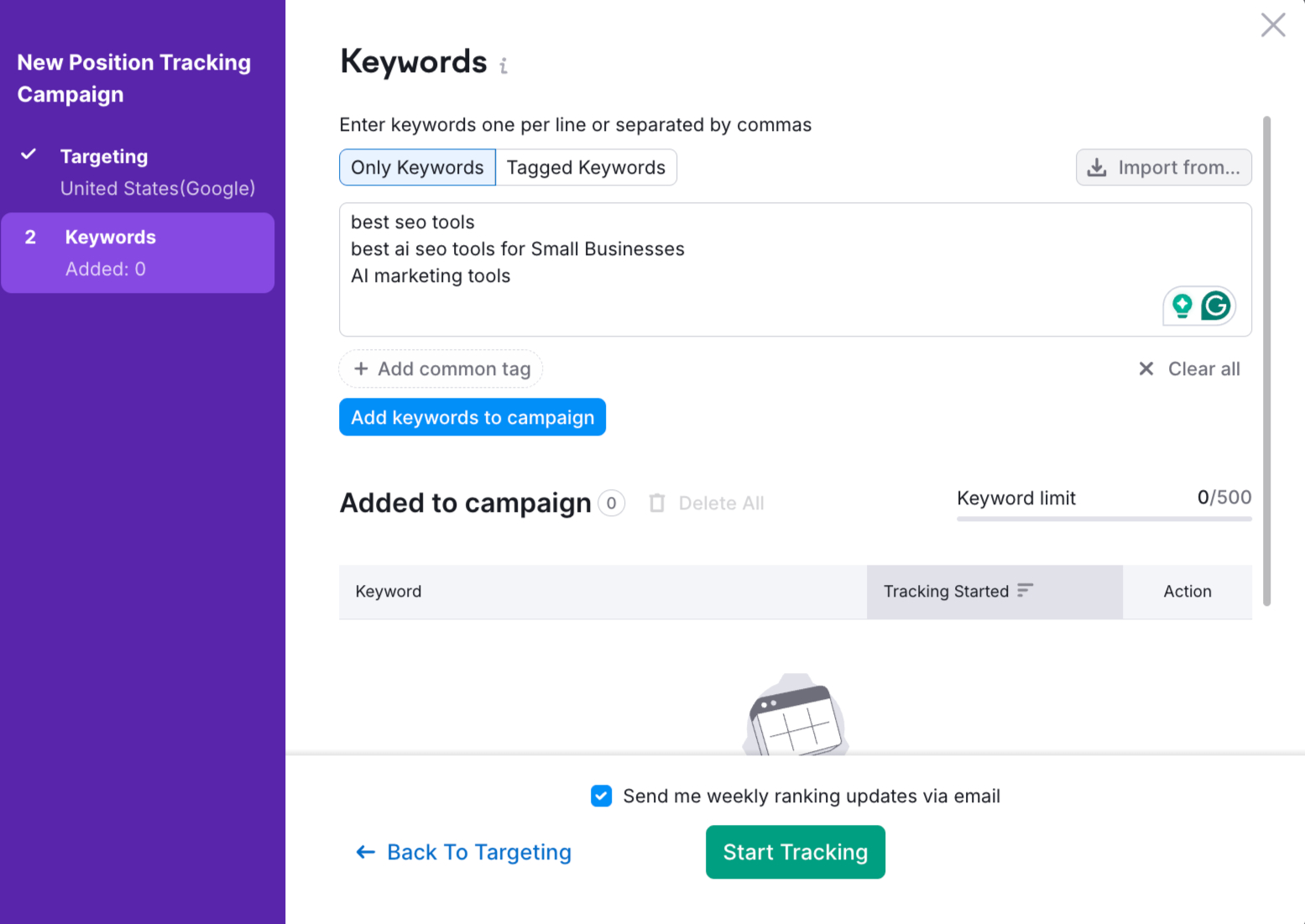
Note: Focus on keywords that drive sales and leads, not just the ones with the highest traffic numbers.
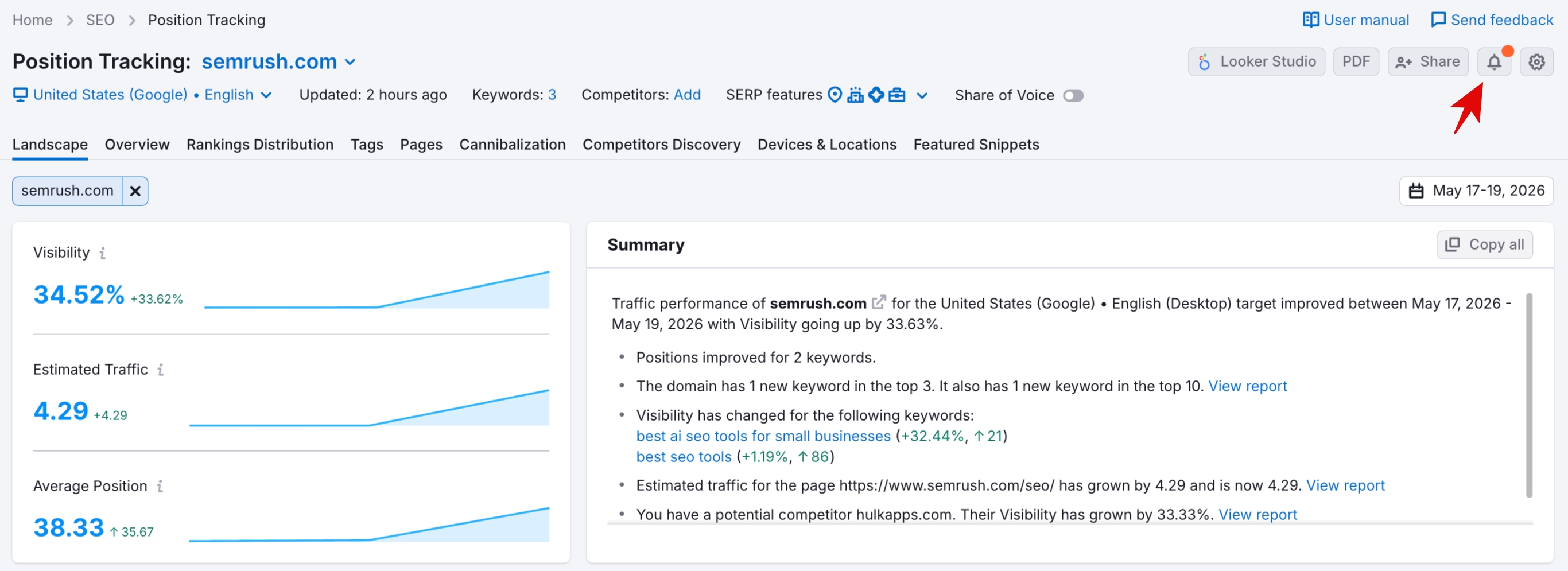
Once you finish the setup, your report fills with daily updates.
Expert Advice: Turn on notifications for ranking changes so you can jump on new opportunities or fix drops immediately.
The 10-keyword limit on the free plan works for smaller sites, but it feels restrictive if you manage several pages. If you start a trial, you can track:
- 500 keywords on the Starter plan.
- 1,500 keywords on the Pro+ plan.
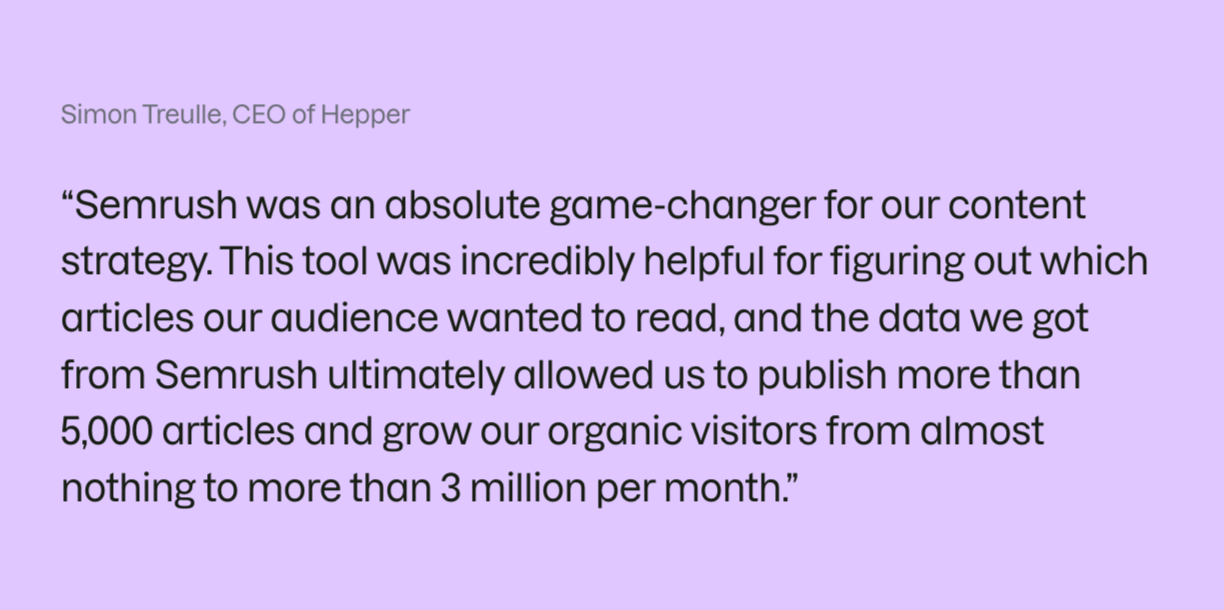
Hepper is a prime example of this in action; they used Semrush to scale their site to 3 million monthly organic visitors in nine months. Here is what they had to say:
5. Audit Your Backlink Profile
Backlinks—links from external sites to your own—play a major role in SEO. They act like endorsements, telling search engines that your content is credible and worth ranking.
They also affect how AI systems evaluate your site. A strong backlink profile strengthens your authority, which increases the chances of your content being referenced by large language models.
Semrush’s Backlink Analytics tool shows who links to your site, what context they use, and how your profile compares with competitors.
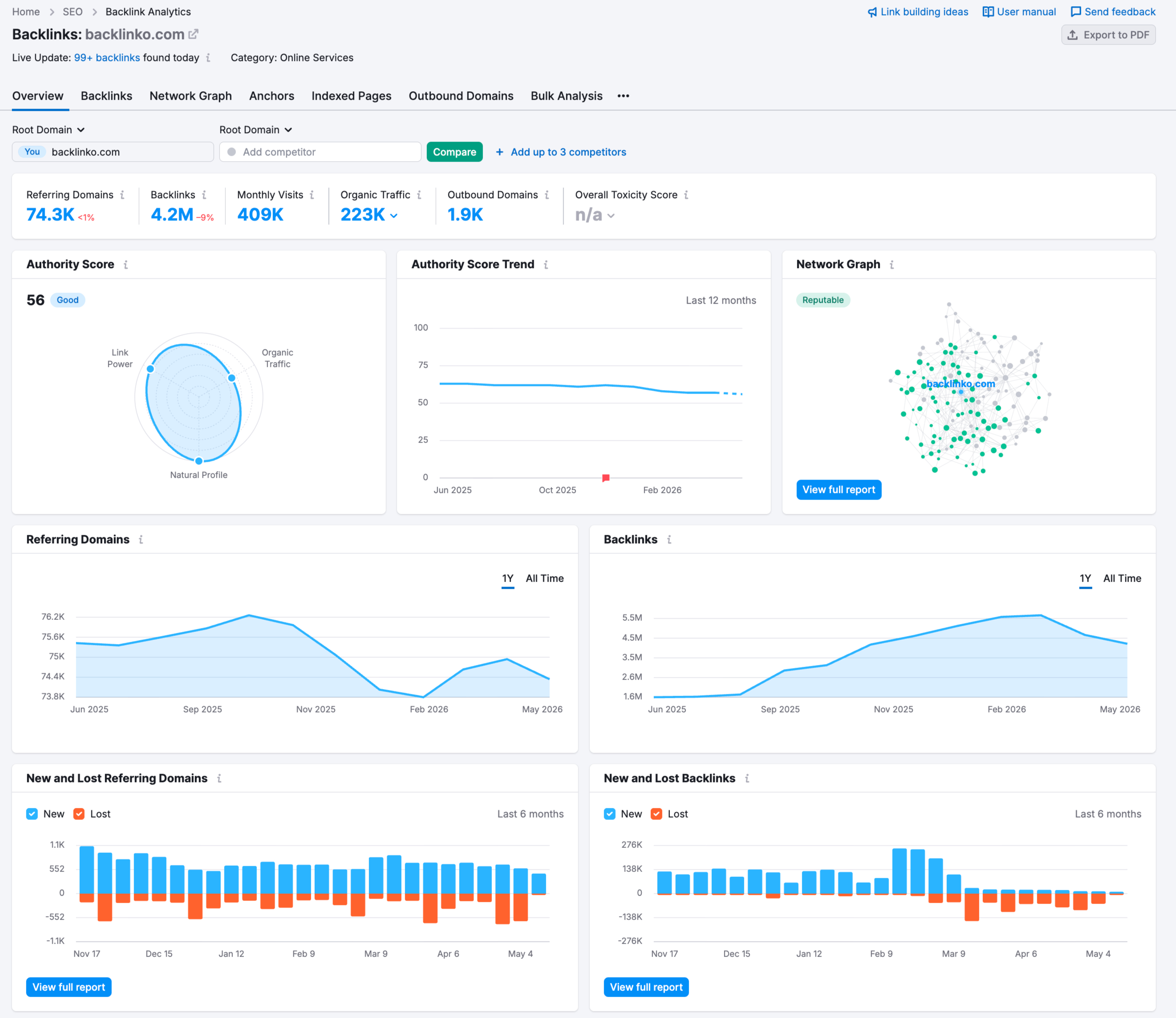
When you review your domain, you can uncover:
- Link quality: How reliable and authoritative your backlinks are
- Referring domains: Which sites mention and point to your content
- Top pages: The pages that attract the most backlinks
A free account allows 10 searches every day. You can use these credits to monitor your own growth or investigate where your rivals get their best links.
If you sell health-conscious coffee, for instance, you might notice a competitor’s article on “antioxidants in caffeine” earned dozens of mentions from medical journals. That discovery tells you exactly what kind of topics you should write about to capture that same audience.
6. Boost the Rankings of Your Most Valuable Pages
Even small updates to your key pages—like improving titles, fixing heading structure, or adding relevant keywords—can push your rankings higher and increase your chances of getting mentioned by AI platforms.
Semrush On Page SEO Checker shows you which changes will have the biggest impact on your most valuable pages.
With a free account, you can create one campaign to analyze up to 10 pages or keywords.
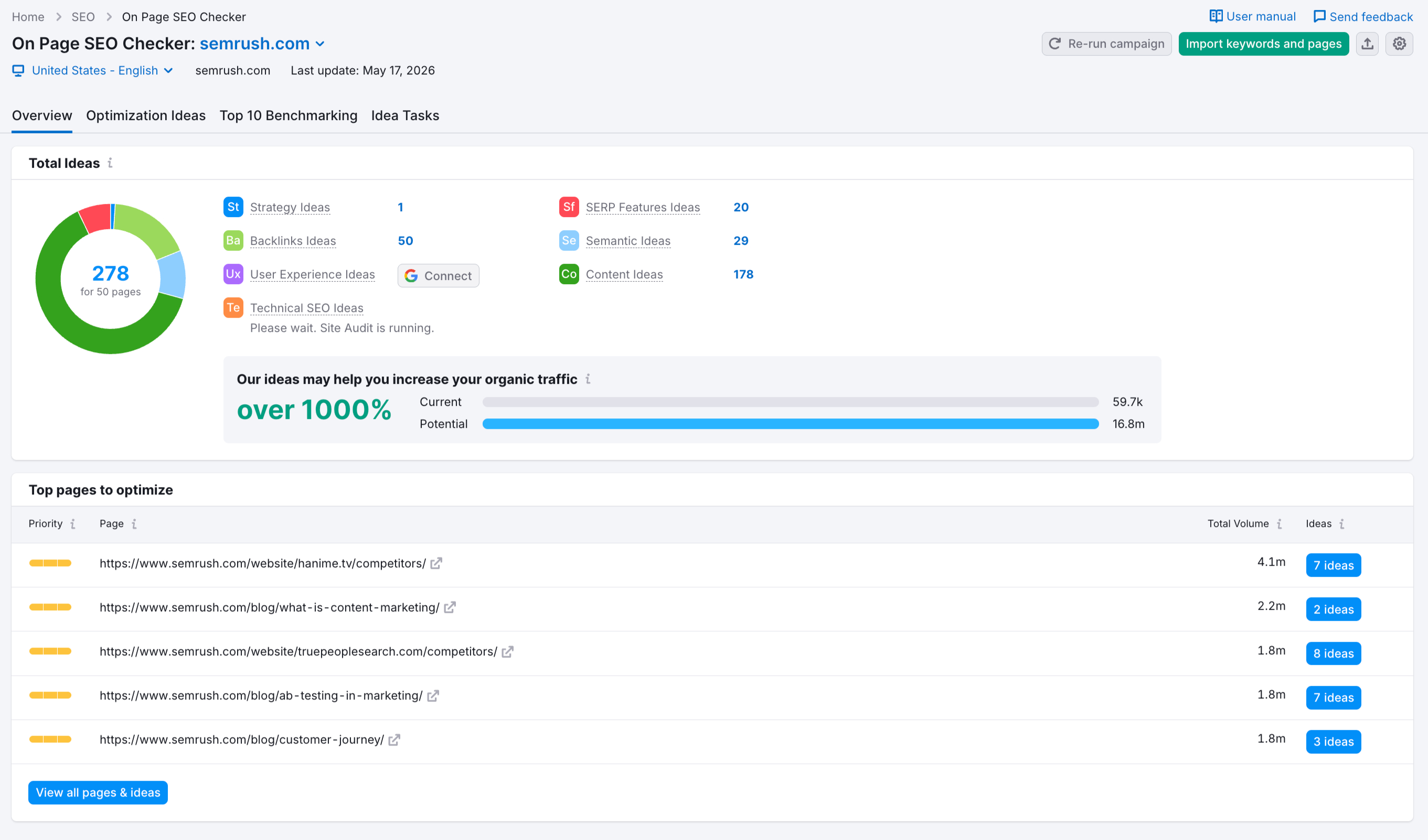
Here’s what you get in the free version:
- Content suggestions: Actionable ways to improve your body copy
- Title & meta description tips: Ways to write high-performing snippets
- Keyword usage guidance: Insights on how to use your target keywords more effectively
- Technical checks: Identification of issues that may affect page performance
- Competitor insights: A comparison of your page against top-ranking results
To get the most out of it, focus on pages that already get some traffic but haven’t reached their full potential. This usually includes your homepage, key product pages, or conversion-focused landing pages.
For example, improving a slow-loading product page with a stronger title and better meta description can lift both rankings and conversions.
If your website contains dozens of articles and products, a 10-page limit only scratches the surface. With a free trial, you can:
- Scan every single important page on your website.
- Receive automated content recommendations tailored to your specific industry.
- View tasks prioritized by how much traffic they will bring to your business.
- Monitor your search engine progress over time.
- Download comprehensive reports to share with your team.
7. Track Your Local SEO Performance
If you run a business with a physical location, showing up in local searches like “coffee shop near me” can bring in real customers from your area.
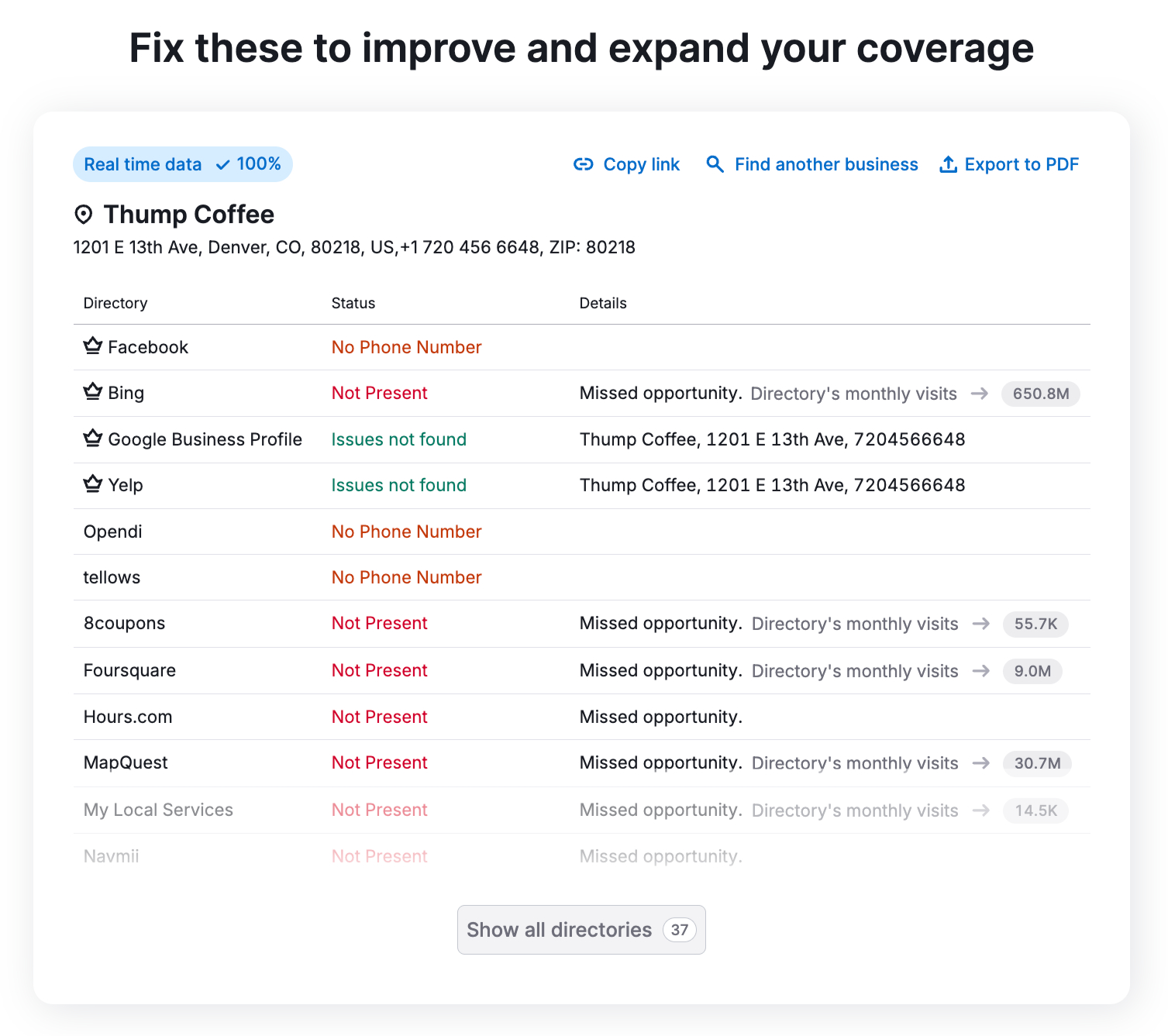
To make that happen, your business details need to stay consistent across the web. When your name, address, and phone number don’t match everywhere, it hurts your visibility.
Semrush’s Listing Management tool lets you check where your business appears online and whether your details are correct.
With the free plan, you can run a basic scan that shows:
- Your overall online presence score
- How many NAP (name, address, phone) listings need correction
- Your average star rating
- The total number of customer reviews
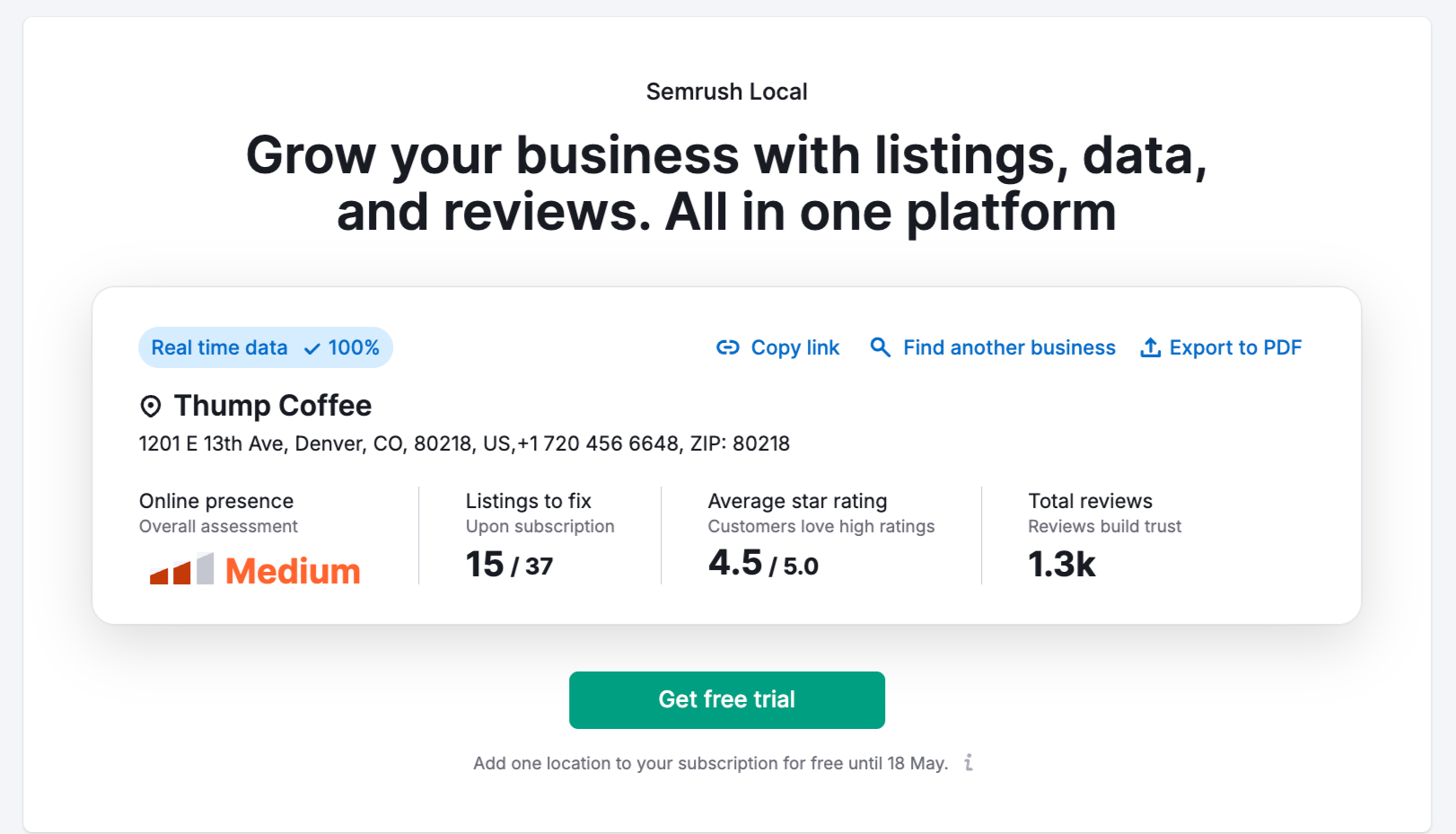
Start by fixing any incorrect or inconsistent business details and make sure your Google Business Profile is fully updated. This alone can improve your chances of showing up in local search results.
You can also try a few other free Semrush tools for local SEO:
- Map Rank Tracker: Track your Google Maps rankings with a visual heatmap (50 free credits per month)
- AI Business Description Generator: Write a better Google Business Profile description
- Review Link Generator: Create direct links to collect customer reviews
- Review QR Code Generator: Let customers leave reviews from your physical location
If you manage multiple locations or compete in a crowded local market, the free plan may feel limited after a while.
For example, BetterVet used Semrush to rank #1 for 1,900 keywords and grew organic traffic by 2,000% within a year. Their SEO manager shared that Semrush played a key role in improving both local and national visibility.
If you want more control over your local SEO, you can try the Semrush Local Toolkit. It includes features like automatic business listing distribution, review tracking, and detailed local ranking reports.
8. Create Content with Semrush AI Tools
If you get stuck coming up with ideas or organizing your content, Semrush’s free tools can help you move faster.
The SEO Writing Assistant helps you write content that works for both readers and search engines.
On the free plan, you can create or review one article at a time. Just paste your draft, and it scores your content based on SEO, tone, originality, and readability.
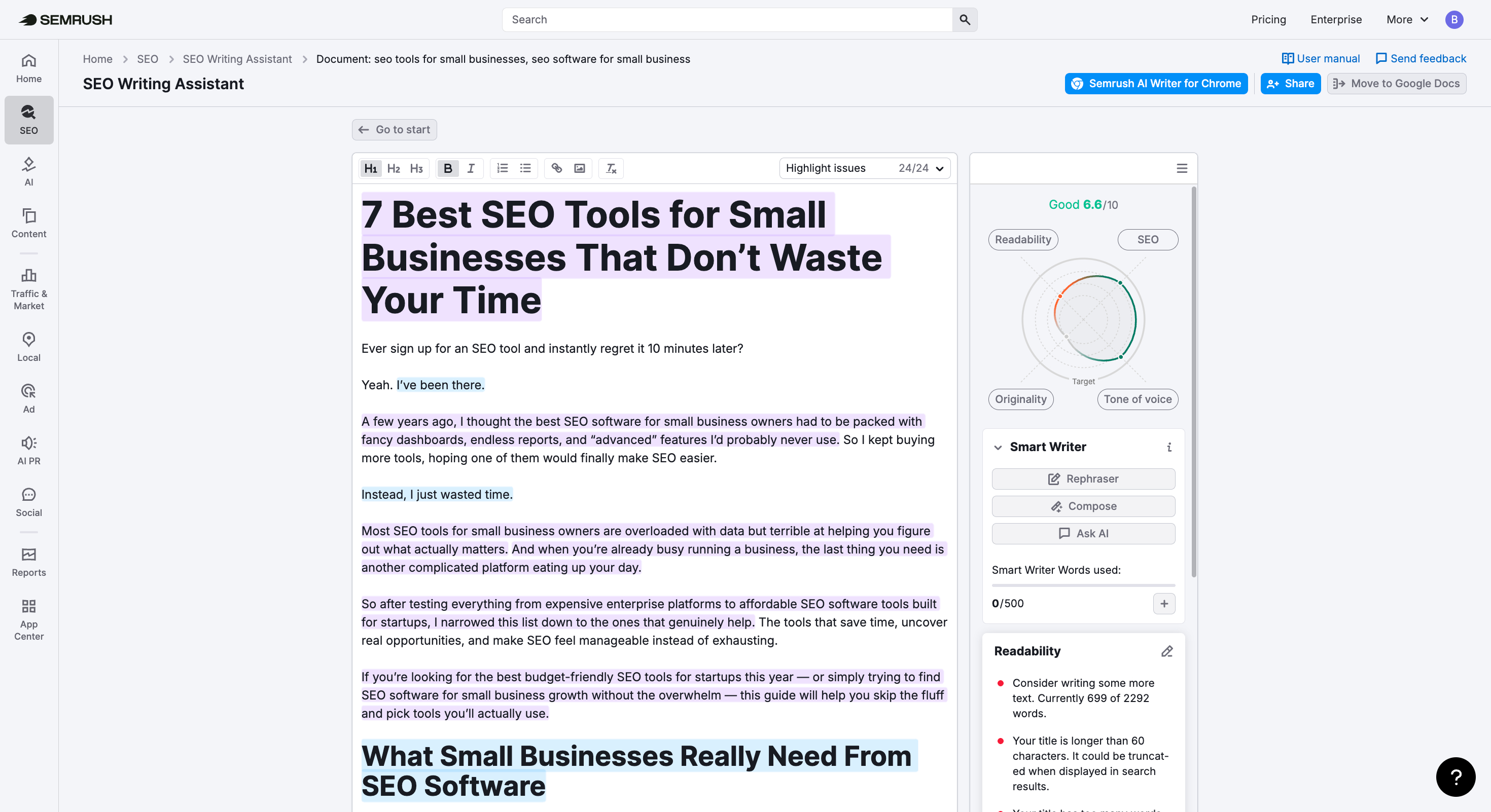
It also suggests ways to improve your content before you publish. You can use the browser extension to write directly inside Google Docs without switching tabs.
Semrush also offers a set of free AI writing tools that don’t require an account:
- Generate: Use tools like the AI Text Generator, Title Generator, and Summary Generator to come up with ideas, headlines, and short summaries.
- Rewrite: Improve your writing with the Paraphrasing Tool, Paragraph Rewriter, and Sentence Rewriter.
- Analyze: Check grammar, spelling, word count, and reading time with the Proofreader and Word Counter.
Each tool allows up to three uses per day and supports up to 300 words per request. That’s enough to draft and improve short pieces of content.
If you plan to publish regularly and hit those limits, the Semrush Content Toolkit unlocks more features and helps you produce more content without restrictions.
9. Crush Your Social Media Goals (Without Spending a Dime)
If you want to grow on social media, you need to understand what’s working and what’s not. That means looking at which posts your audience engages with and how your competitors are getting attention.
Semrush offers free tools that help you track performance and generate better content ideas without spending a dime.
You can start with the free version of Social Tracker from the Social Toolkit. It lets you:
- See performance data from the last 30 days
- Track follower growth and page likes
- Review posting activity and engagement levels
- Find your best-performing posts
- Compare your results with competitors
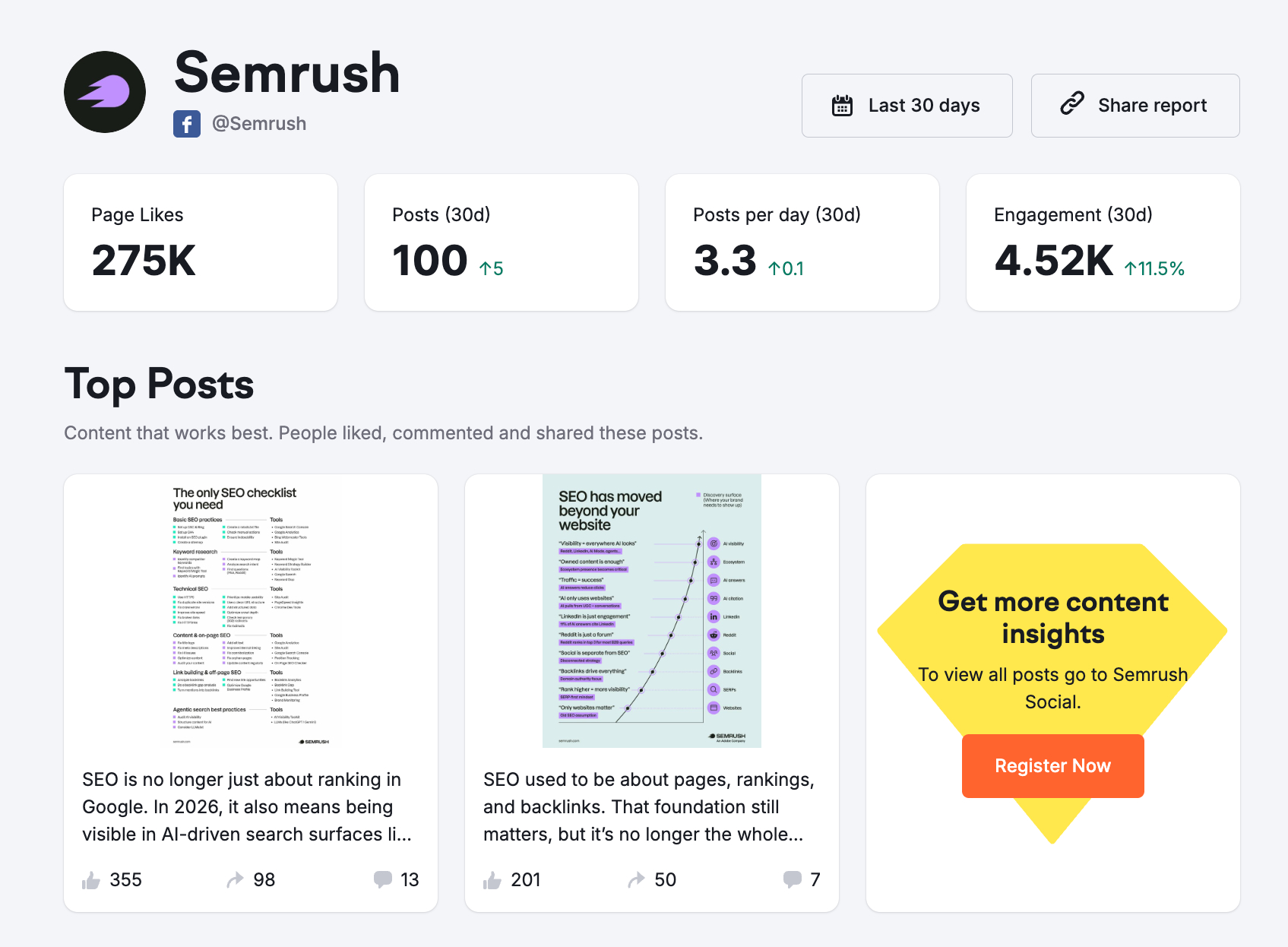
You can also use a limited version of Social Content AI to support your content planning. With it, you can:
- Get up to 27 content ideas based on your website or business
- Create captions ready to post
- Explore visual and video suggestions
- Discover ideas that match your niche
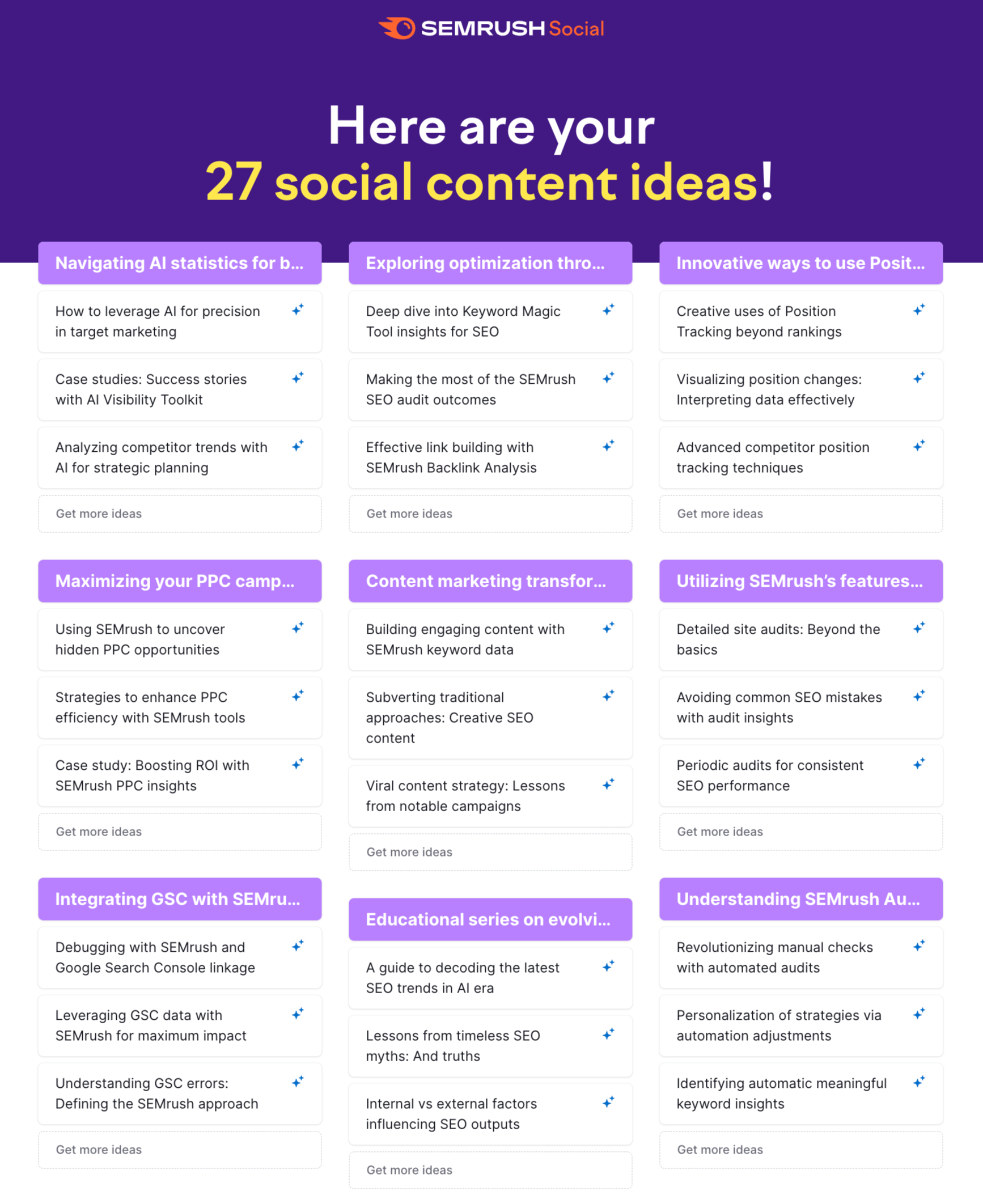
These tools help you understand what’s working and where you can improve, all without paying anything.
If you manage multiple social accounts or want deeper insights, you can try the full Semrush Social Toolkit. It includes a complete set of tools that help you manage and automate your social media marketing in one place.
10. Meet Your New SEO Partner: Semrush Copilot
SEO takes time. You’re constantly looking at keyword data, backlinks, and technical reports just to figure out what’s working and what’s not.
Semrush’s Copilot works like an SEO advisor inside your dashboard. It looks at your data and tells you what actually matters, along with practical suggestions based on your site.
Even with a free account, you can access basic Copilot features. As soon as you start using tools like Position Tracking or Site Audit, it begins sharing insights based on your performance and competitors.
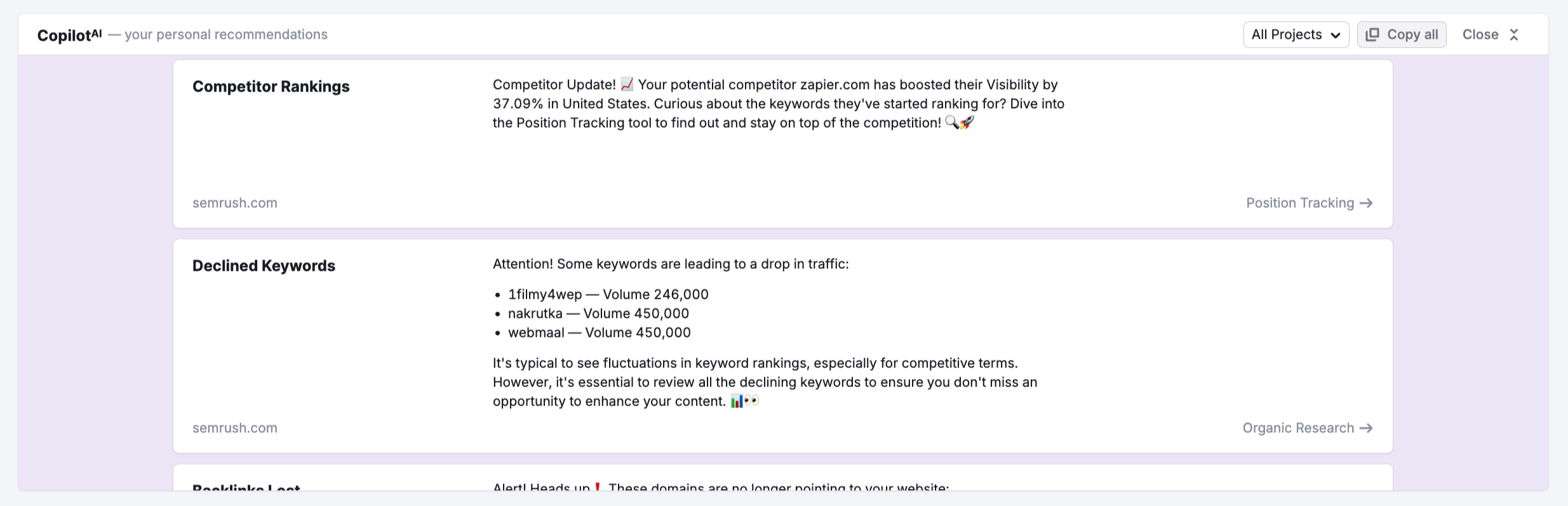
How Copilot helps:
- Breaks down SEO data into simple explanations you can act on
- Points out trends and changes across your reports
- Recommends which Semrush tools to use for specific tasks
- Reduces time spent going through multiple reports
For instance, Copilot might notify you about a sudden dip in specific rankings or point out a high-value keyword your competitors missed. This allows you to update your content plan with confidence and precision.
Ready to Upgrade? When to Start Your 7-Day Trial
A free Semrush account works well for basic visibility checks. However, as your projects expand, those initial restrictions often become a bottleneck.
Here is how to know you have outgrown the free version and should start the 7-day trial:
- You hit daily search caps: If you frequently use up your 10 daily searches and have to stop work until the next morning, the trial removes those interruptions.
- Your website exceeds 100 pages: The free Site Audit tool only reviews 100 URLs. To get a complete health report for larger domains, you need the expanded crawling capacity.
- You require detailed competitor data: When you need to deconstruct a rival’s entire marketing plan rather than just seeing a few top keywords, the paid tools provide the necessary depth.
- You are increasing content output: Basic keyword lookups are fine for one-off posts, but building a full editorial calendar requires the Keyword Strategy Builder and higher data limits.
- You need precise rank tracking: If you want to monitor more keywords or compare how you perform on mobile versus desktop across different cities, move to a Starter or Pro+ plan.
- You want AI-driven insights: The trial grants full access to the AI Visibility Toolkit. This allows you to track brand mentions, sentiment, and your “share of voice” within AI search models.
The 7-day trial provides full access to every feature without an immediate commitment. It is the most effective way to see which specific tools actually drive your growth before you pay for a subscription.
Semrush One Pricing Comparison: Free vs Starter vs Pro+
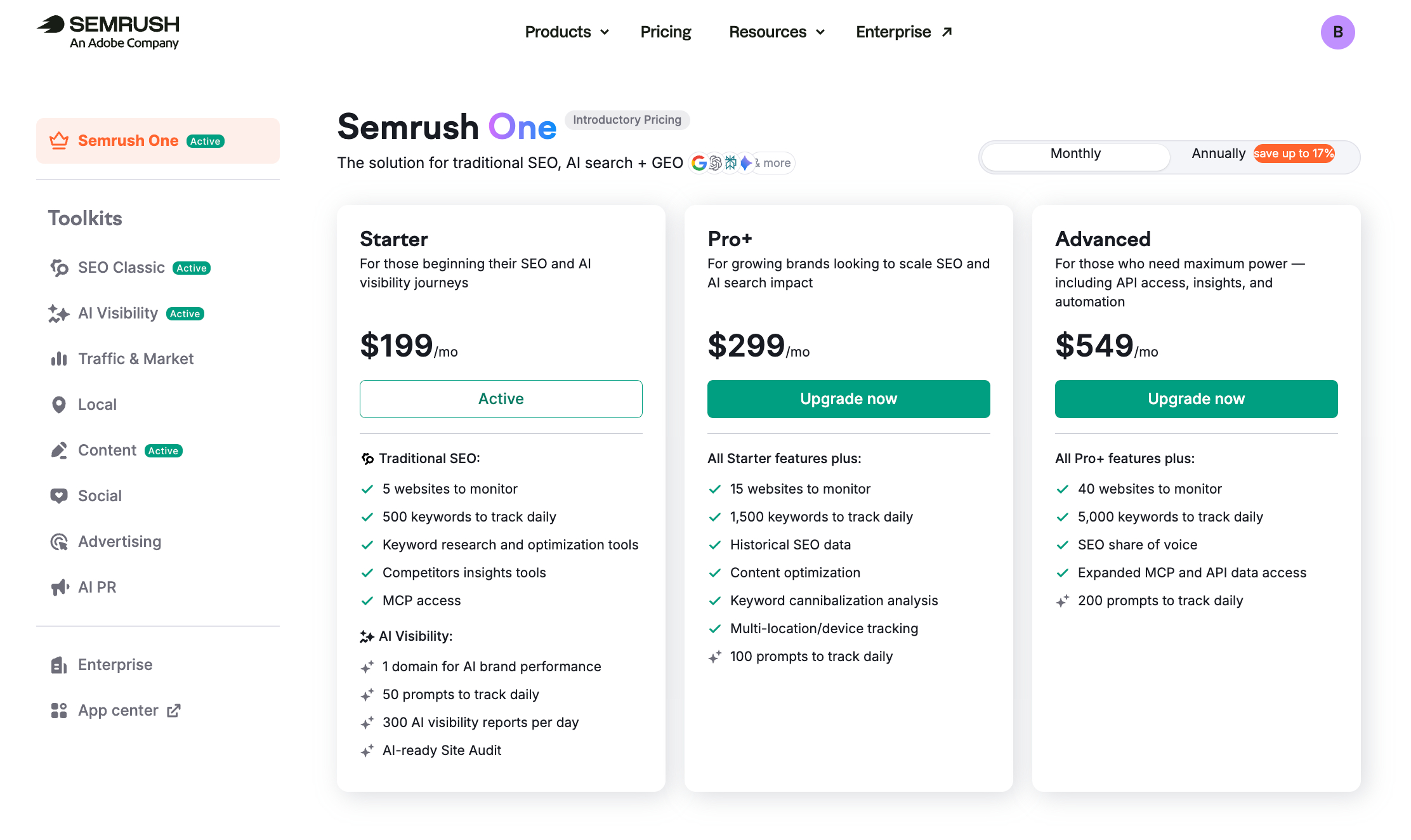
If you’re trying to decide which plan makes sense, here’s how they stack up.
Free plan ($0/month)
This works best if you’re just getting started and want to explore SEO and AI tools without paying upfront. You can monitor one website, track up to 10 keywords, and run limited research (10 queries per day). You’ll also get basic AI visibility data inside Domain Overview and can audit up to 100 pages per month.
Starter plan ($199/month)
This plan fits individuals and small teams who need more data and fewer limits. You can track 500 keywords, monitor 5 websites, and run full keyword research and competitor analysis without daily caps. It also includes AI visibility data, tracks up to 50 AI prompts, and supports site audits for up to 100,000 pages per month. You’ll also get access to AI Share of Voice and sentiment analysis for one domain.
Pro+ plan ($299/month)
This one works better for growing brands managing multiple projects. You can track 1,500 keywords and monitor up to 15 websites. It includes everything in Starter, plus multi-location and device tracking, historical SEO data, and support for 100 AI prompts. Site audit limits increase to 300,000 pages per month.
If you want to test everything before committing, the 7-day free trial unlocks all features across every toolkit so you can explore the platform without restrictions.
PRO TIP: Use Semrush Academy courses to learn the advanced features you’ve unlocked. They’ll help you get the most out of what you’re paying for.