Paid partnership with Mera Work.
Disclosure: This post contains affiliate links. If you sign up for Mera Work through my link, I earn a commission at no additional cost to you.
DeskTime is a popular employee monitoring and time-tracking tool. It helps businesses track working hours, monitor app usage, check productivity, and understand how employees spend their time.
But it might not be the right fit for every team.
Some of its useful features, such as screenshot monitoring, shift scheduling, and several integrations, are available only on higher-tier plans. This can increase the subscription cost as your team grows.
If you want more monitoring features without paying for multiple upgrades, Mera Work is worth considering.
Mera Work is an employee monitoring and productivity tracking platform that brings time tracking, screenshots, live screen monitoring, attendance, shift tracking, and productivity reports into one subscription.
But is it actually better than DeskTime?
In this article, I’ll compare Mera Work and DeskTime, including their features, pricing, monitoring capabilities, and key differences. This should help you decide which tool makes more sense for your business.
What Is Mera Work?
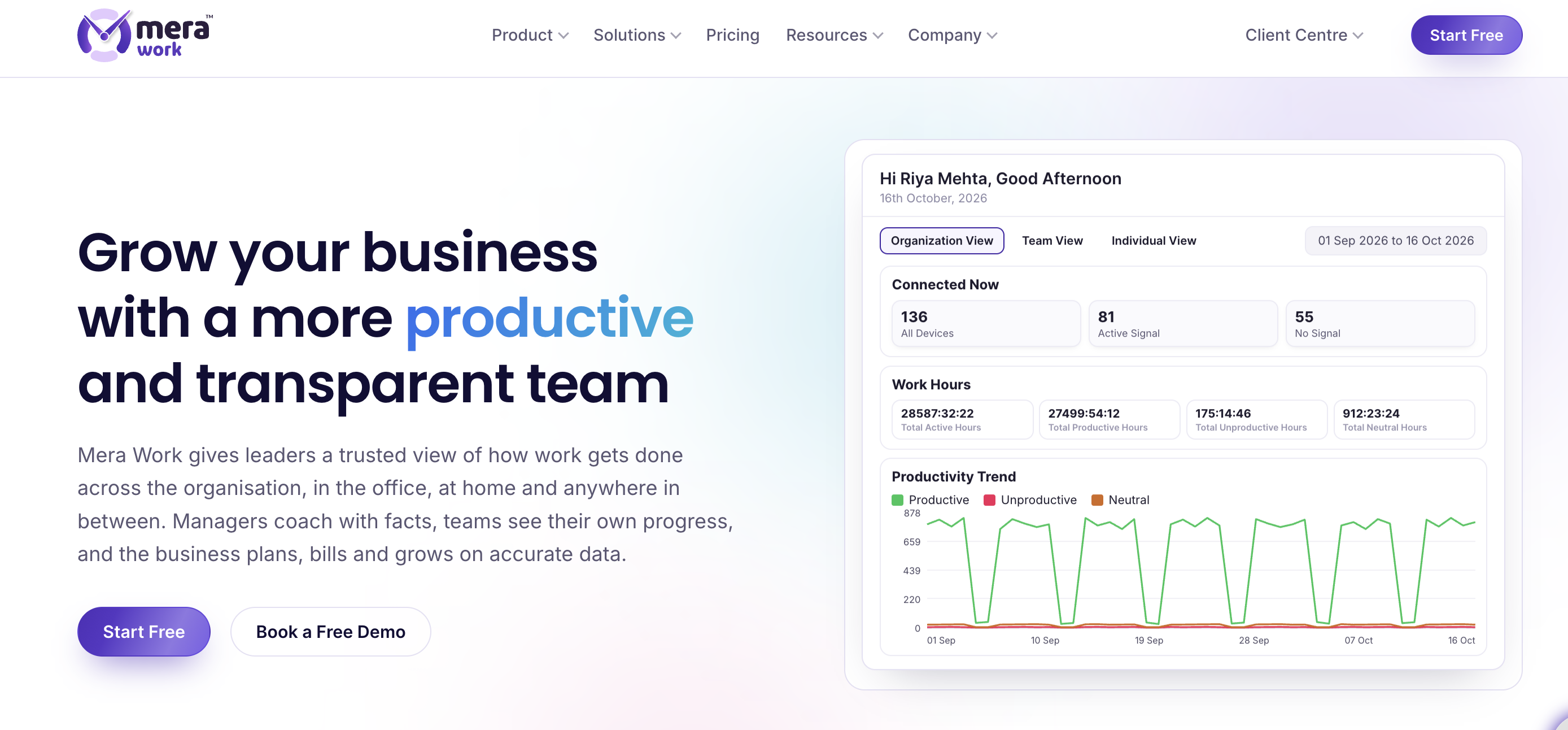
Mera Work is an employee monitoring and workforce productivity platform built for businesses with remote, hybrid, and office-based teams.
It helps managers understand how employees spend their working hours, which applications they use, how much time they spend on different tasks, and when they are active.
The platform combines several workforce management features in one place.
Here are some of its main features:
- Automatic Time Tracking: Records active, idle, away, and offline working time.
- Screenshot Monitoring: Captures employee screens at configurable intervals.
- Live Screen Monitoring: Allows authorised managers to view employee screens in real time.
- App and Website Monitoring: Tracks application and website usage and classifies activity as productive, unproductive, or neutral.
- Productivity Dashboard: Shows individual, team, and organisation-level productivity data.
- Attendance Tracking: Helps managers track attendance, breaks, shifts, and working hours.
- Project and Task Tracking: Compares estimated project hours with actual logged time.
- Productivity Reports: Provides reports that managers can use to understand team performance.
Mera Work also offers an AI-powered Anomaly Analysis report. It analyses time, activity, and screenshots to flag changes in employee work patterns. This feature is currently in beta.
Overall, Mera Work brings employee monitoring, time tracking, attendance, and productivity reporting together under one subscription.
Why Look for a DeskTime Alternative?
DeskTime works well for businesses that need automatic time tracking and employee productivity insights.
However, there are a few reasons why you might want to explore other options.
1. Important features require a higher plan
DeskTime offers Pro, Premium, and Enterprise plans. The Pro plan covers core time tracking and productivity monitoring, but features such as screenshots and shift scheduling require Premium or higher.
If you need more than basic time tracking, you’ll need to consider the higher subscription cost.
2. You want live screen monitoring
DeskTime captures screenshots at random times within a selected interval. However, it does not offer live screen streaming.
If your business needs real-time screen visibility, you may need another employee monitoring solution.
3. You want attendance and monitoring in one subscription
Some businesses need more than activity tracking. They also need attendance records, shift monitoring, time approvals, and productivity reports.
A tool that combines these features can make workforce management easier.
4. Your team needs a predictable subscription cost
Per-user pricing can become expensive as you add more employees. A flat plan with all features included can make it easier to estimate your monthly expenses.
This is where Mera Work becomes an interesting DeskTime alternative.
Mera Work vs. DeskTime: Feature Comparison
Both platforms offer automatic time tracking, app and website monitoring, and productivity insights.
However, they differ in how they handle screenshots, live monitoring, attendance, integrations, and pricing.
Here are the major differences.
1. Automatic Time Tracking
Both Mera Work and DeskTime offer automatic time tracking.
You don’t need to ask employees to start and stop timers every time they begin or finish a task.
Mera Work tracks active, idle, away, and offline time. Managers can use the dashboard to understand working patterns across individual employees and teams.
DeskTime also tracks working hours automatically through its desktop application. It includes idle time detection, offline time, and a browser timer for manual tracking.
DeskTime also offers mobile time tracking, which can be useful for teams that need to record working hours away from their computers.
My take: Both tools cover automatic time tracking well. However, DeskTime has an advantage if your employees need mobile and browser-based time tracking.
2. Screenshot Monitoring
Screenshots help managers understand what employees are working on during their scheduled hours.
Mera Work includes screenshot monitoring in its subscription. You can configure screenshot intervals from 1 to 30 minutes and control screenshot blur levels.
It also offers download approval controls.
DeskTime provides automatic screenshot monitoring on its Premium plan and above. Its Pro plan does not include screenshots.
This means you need to upgrade to DeskTime Premium if screenshot monitoring is important to your business.
My take: Mera Work is a better option if you want screenshot monitoring without upgrading to a higher subscription.
3. Live Screen Monitoring
This is one of the biggest differences between the two platforms.
Mera Work includes live screen monitoring. Authorised managers can view an employee’s screen while work is happening.
It also maintains an audit record of who viewed the screen.
DeskTime does not offer live screen streaming. It captures screenshots at random intervals within a selected time period.
So, if you want to see what is happening on an employee’s screen in real time, Mera Work has an advantage.
4. App and Website Monitoring
Both platforms track application and website usage.
Mera Work categorises applications and websites as productive, unproductive, or neutral. This helps managers understand how employees spend their computer time.
For example, a development team may spend most of its working hours in coding applications, while a marketing team may use analytics platforms, social media tools, and content management systems.
DeskTime also tracks application and website usage and calculates productivity based on activity categories.
It additionally offers document title tracking, which helps businesses understand which documents and work materials employees access.
My take: Both platforms offer useful activity monitoring. DeskTime’s document title tracking is worth considering if that feature matters to your workflow.
5. Productivity Dashboard and Reports
Collecting employee activity data is only useful when managers can understand it.
Mera Work offers individual, team, and organisation-level productivity dashboards.
You can review work patterns, monitor productivity trends, and access reports for better workforce planning.
It also offers 12 productivity reports, scheduled report delivery, and data exports.
One interesting addition is its AI-powered Anomaly Analysis report. It looks at time, activity, and screenshots together to identify changes in employee work patterns.
DeskTime also provides individual and team dashboards, productivity calculations, reports, and data exports.
Both tools can help managers understand how their teams spend working hours.
6. Attendance and Shift Tracking
Employee monitoring and attendance management often go hand in hand.
Mera Work includes attendance insights, shift monitoring, break tracking, and time claims with approval.
This allows managers to review attendance and working patterns from the same platform.
DeskTime also offers shift scheduling and absence management, but these features are available on its Premium plan and above.
If you need attendance and shift monitoring alongside employee activity tracking, Mera Work includes these features in its flat subscription.
7. Project and Task Tracking
Both platforms offer project-related time tracking.
Mera Work allows businesses to compare estimated project hours with actual logged working hours. It also supports bulk task uploads.
DeskTime provides project tracking to help teams monitor the time spent on different projects and tasks.
This can be useful for agencies, service businesses, and teams that bill clients based on working hours.
However, if you need extensive project management features, you may still need a dedicated project management platform.
8. Integrations and Mobile Apps
This is an area where DeskTime has an advantage.
DeskTime supports integrations with popular project management tools, including Jira, Asana, GitLab, and Trello. It also offers Zapier and calendar integrations.
It provides mobile apps for Android and iOS, along with a browser timer for manual time tracking.
Mera Work focuses more on desktop-based employee monitoring and workforce visibility. It also provides API access and supports Google, Microsoft, Apple, and LinkedIn sign-in.
My take: If your team depends on ready-made third-party integrations or mobile time tracking, DeskTime may be the better choice.
Mera Work vs. DeskTime: Pricing Comparison
Pricing is one of the biggest reasons to consider switching employee monitoring software.
Mera Work follows a flat pricing model, while DeskTime offers multiple subscription tiers.
Mera Work Pricing
Mera Work offers the following pricing:
- Yearly Plan: $3 per user per month, billed annually.
- Monthly Plan: $4 per user per month.
The main advantage is that all features are included in the plan.
You don’t need to upgrade to access screenshot monitoring, live screen monitoring, attendance tracking, or productivity reports.
Mera Work also offers a 14-day free trial with all features included. You don’t need to enter your credit card details to start.
DeskTime Pricing
DeskTime offers three plans:
- Pro: Core time tracking, app and website monitoring, productivity calculations, and calendar integrations.
- Premium: Adds screenshots, shift scheduling, integrations, and API access.
- Enterprise: Custom pricing for larger organisations.
DeskTime’s published US annual prices are $6.42 per user per month for Pro and $9.17 for Premium.
DeskTime also offers a 14-day free trial.
Which Is More Affordable?
Mera Work has a simple pricing advantage if you need advanced monitoring features.
For example, a business with 20 employees would pay:
- Mera Work yearly plan: $60 per month equivalent.
- Mera Work monthly plan: $80 per month.
With DeskTime, the total depends on the plan you select. If you need screenshots and shift scheduling, you’ll need Premium rather than Pro.
The important difference is that Mera Work includes its full feature set at one price, while DeskTime separates some features across subscription tiers.
Who Should Choose Mera Work?
Mera Work is good if:
- You manage a remote or hybrid team.
- You want employee screenshots and live screen monitoring.
- You need attendance and shift tracking.
- You want productivity reports for individuals and teams.
- You prefer one subscription with all features included.
- You want to monitor employee activity without purchasing multiple tools.
It can be particularly useful for IT companies, BPOs, agencies, finance teams, and businesses with distributed employees.
Who Should Choose DeskTime?
DeskTime may be a better fit if:
- You need mobile time tracking.
- You want a browser-based manual timer.
- Your team relies on integrations with Jira, Asana, GitLab, or Trello.
- You want document title tracking.
- You need meeting and video time counted as working time.
- You only need basic time tracking and don’t require screenshots.
DeskTime remains a capable employee time-tracking tool, particularly for teams that value its mobile apps and integration options.
How to Switch From DeskTime to Mera Work
If you decide to try Mera Work, getting started is fairly simple.
You can follow these steps:
Step 1: Create Your Workspace
Visit the Mera Work website and create your account. Configure your organisation settings from the admin dashboard.
Step 2: Add Your Team
Add employees individually or upload their details in bulk. You can assign names, email addresses, and user roles.
Step 3: Activate Employee Accounts
Send activation emails to your employees. They can use these emails to activate their accounts.
Step 4: Install the Desktop Agent
Employees need to install and activate the Mera Work agent on their computers.
Once the agent is active, the platform starts collecting work activity based on your configured settings.
Before enabling monitoring, make sure employees receive the required notice and that your monitoring practices comply with applicable privacy and employment laws.
You can start with the 14-day free trial and explore the dashboard before moving your entire team.
Mera Work vs. DeskTime: Summary
The table below highlights the key feature differences between Mera Work and DeskTime.
| Features | Mera Work | DeskTime |
|---|---|---|
| Annual pricing | $3 (single plan) | $6.42 / $9.17 (excluding VAT) |
| Monthly pricing | $4 | $7 / $10 |
| Free trial | 14 days, no credit card required | 14 days, no credit card required |
| Screenshot monitoring | Admin-configured intervals with optional blur | Premium plan only; random screenshots every 5–30 minutes, with blur |
| Screen recording / live viewing | Live screen streaming; sessions aren’t stored | Not available |
| Keyboard and mouse tracking | Tracks activity counts, not actual keystrokes | Tracks activity counts, not actual keystrokes |
| App and website tracking | Yes | Yes, including document title tracking |
| Idle time detection | Yes, with configurable settings | Yes, automatically stops tracking after 3 minutes of inactivity |
| Employee access to activity data | Depends on permissions assigned by the admin | Yes, every user can access their data |
| Employee screenshot deletion | Not specified | Not specified |
| Payroll and payments | Not available | Not available |
| Integrations | API and SSO; no named integrations listed | Jira, Asana, GitHub, Trello, and Zapier |
| Reports and analytics | Daily, weekly, and monthly reports, plus attendance and project reports | Productivity dashboard, data exports, and daily AI summaries |
| AI capabilities | AI-powered reporting label and support chatbot | Daily AI-generated summary |
| Data hosting | On-premises or private cloud at your facility; SaaS hosting in India and other jurisdictions | EU-based data centres in Germany and Ireland |
| Security certifications | No SaaS certification claimed; on-premises deployment allows organisations to apply their own GDPR or HIPAA controls | ISO 27001 |
| Supported platforms | Windows, macOS, Linux, iOS, and Android | Windows, macOS, Linux, iOS, Android, and web |
Final Verdict: Is Mera Work the Best DeskTime Alternative?
Both Mera Work and DeskTime are useful tools for businesses that want to track employee working hours and understand productivity.
However, they serve slightly different needs.
DeskTime is a good choice if you want mobile time tracking, browser timers, document title tracking, and ready-made integrations with popular business tools.
Mera Work makes more sense if you want employee monitoring, screenshots, live screen visibility, attendance tracking, and productivity reports under one flat subscription.
Its $3 per user monthly price with annual billing also makes it worth considering for businesses that need its full feature set.
My recommendation: If you’re currently using DeskTime and need more advanced employee monitoring without paying for a higher subscription tier, give Mera Work a try.
You can explore all its features through the 14-day free trial without providing a credit card.
Frequently Asked Questions
1. What is the best alternative to DeskTime?
Mera Work is one alternative worth considering. It offers automatic time tracking, screenshots, live screen monitoring, attendance tracking, and productivity reports under one subscription.
2. Is Mera Work cheaper than DeskTime?
Mera Work starts at $3 per user per month with annual billing, or $4 with monthly billing. All features are included.
DeskTime offers multiple plans, and its advanced monitoring features require the Premium plan. Your final cost depends on your location, billing period, and selected plan.
3. Does DeskTime offer live screen monitoring?
No. DeskTime captures screenshots at random intervals but does not record or stream employee screens in real time.
Mera Work includes live screen monitoring for authorised managers.
4. Does Mera Work take screenshots?
Yes. Mera Work includes screenshot monitoring with configurable intervals from 1 to 30 minutes. It also offers screenshot blur controls.
5. Does Mera Work track keystrokes?
No. Mera Work monitors keyboard and mouse activity levels, not the actual keys employees type. DeskTime also states that it does not log keystrokes.
6. Does DeskTime include screenshot monitoring in its Pro plan?
No. DeskTime offers screenshot monitoring on its Premium plan and above. Its Pro plan focuses on core time tracking and productivity monitoring.
7. Can I try Mera Work for free?
Yes. Mera Work offers a 14-day free trial with all features included. You don’t need a credit card to get started.
8. Is Mera Work suitable for remote teams?
Yes. Mera Work supports remote, hybrid, and office-based teams. It offers time tracking, employee activity monitoring, attendance insights, and productivity reports to help managers understand workforce activity.