Your marketing has enough busywork. You shouldn’t have to spend your day checking broken automations, staring at a blank email draft, or digging through reports just to figure out what’s working.
That’s the problem ActiveCampaign’s Active Intelligence 3.0: Wavelength is built to help solve.
From spotting automation issues to drafting campaigns and translating emails, it brings AI-powered assistance into the marketing work you already do. The real value, though, isn’t in having more AI features. It’s in knowing which tasks are worth handing over.
So, how do you use Active Intelligence 3.0: Wavelength in your day-to-day workflow?
Here are seven practical tasks to start with, what each one can do for you, and where human judgment still matters.
Let’s go.
Task 1: Catch Automation Issues Before They Hurt Your Marketing
A broken email automation can go unnoticed for days or even weeks. During that time, new subscribers might miss welcome emails, potential customers might never receive follow-ups, and important messages could fail to reach the right people.
The frustrating part? You might not notice anything is wrong until your campaign results start to drop.
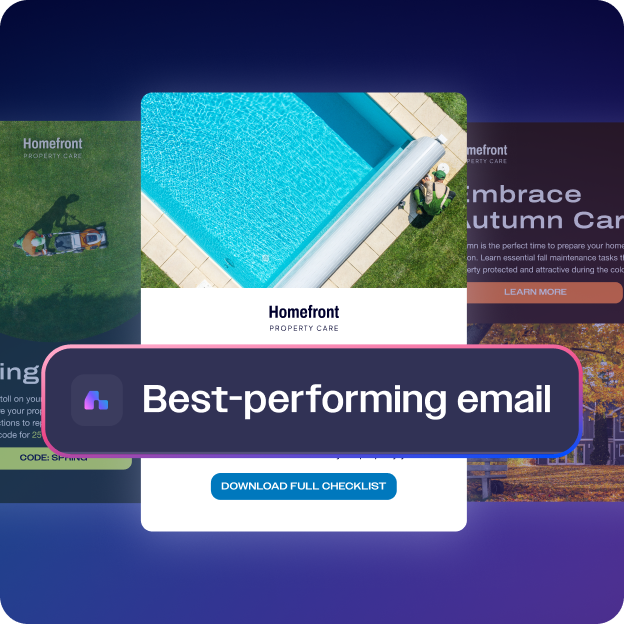
Active Intelligence 3.0: Wavelength offers Monitoring and Performance Recaps to help you keep track of automation performance and identify issues that need attention. This gives you a better chance of catching problems early and fixing them before they affect more of your marketing activities.
For businesses that rely on automated emails to nurture leads, welcome new customers, or follow up with prospects, keeping these workflows healthy is essential. A small technical issue can interrupt an entire sequence of messages and leave potential customers without the information they need.
How to get started
Begin by reviewing your automation monitoring and performance recaps. Check any flagged issues, investigate unusual changes, and inspect the affected workflows. Once you make the necessary fixes, verify that the automation is running as expected.
Keep in mind that monitoring does not guarantee every problem will be detected. Regular reviews still matter, especially for automations connected to sales, customer onboarding, and lead generation.
My recommendation: Start with your most important automations and make performance checks part of your regular routine. Catching a problem early can save you time, protect your customer experience, and help prevent missed opportunities.
<- Explore Active Intelligence 3.0: Wavelength ->
Task 2: Create Campaign Drafts Without Starting From a Blank Page
Writing a marketing email takes more than putting a few sentences together. You need a strong opening, a clear message, and a reason for readers to take action. When you have several campaigns to prepare, coming up with fresh ideas can quickly eat into your day.
Active Intelligence 3.0: Wavelength’s Proactive Drafts and Ideas capability is designed to help with that process. It can draw on information about your account and past campaign performance to suggest campaign ideas and create drafts you can build on.
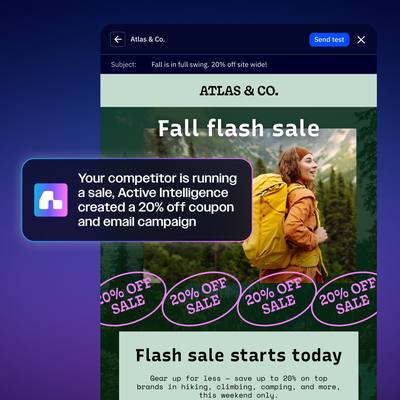
This gives you a starting point when you need to prepare a promotional email, announce a new product, or reconnect with subscribers. You can get past the blank page sooner and focus on shaping a message that speaks to your audience.
How to get started
Review the campaign drafts and ideas available in your account. Choose one that fits your current marketing goals, then edit the copy to match your brand voice, offer, and audience. Check every claim, link, and call to action before approving the campaign.
One thing worth remembering: a draft is not a finished campaign. AI-generated copy may miss important details about your customers, promotions, or business. Give it a proper review before anything goes out.
My recommendation: Try this feature the next time you need to write a campaign from scratch. Compare the time it takes to refine a suggested draft with your usual writing process. That will help you see whether it makes a meaningful difference to your workflow.
<- Explore Active Intelligence 3.0: Wavelength ->
Task 3: Schedule Performance Checkups and Stop Relying on Memory
Checking your marketing results once in a while isn’t enough. Campaign performance changes, customer behaviour shifts, and small problems can slip through when reports aren’t reviewed regularly.
The challenge is finding time to check everything consistently. You might plan to review your email metrics every Monday, only to get caught up in other work and forget about it for another week.
Active Intelligence 3.0: Wavelength’s Scheduled Tasks and Actions capability is designed to help you set up recurring tasks and actions, including regular performance checks and reports. This can make it easier to keep important marketing activities on schedule without having to remember every task yourself.
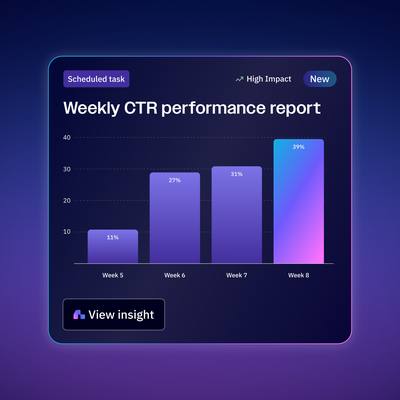
Regular checkups also help you spot patterns over time. You may notice that certain campaigns receive fewer clicks, that engagement changes from one week to the next, or that a particular email needs attention.
How to get started
Identify the marketing reports you need to review regularly. Set up a recurring task or action where the feature supports it, choose a suitable schedule, and review the results when they become available. Focus on the metrics that connect directly to your marketing goals.
Avoid tracking numbers just for the sake of it. A short, consistent review of meaningful metrics can be more useful than a long report you rarely have time to read.
My recommendation: Start with a weekly performance review. Pick a few important metrics, follow the same routine each week, and track how your results change over time. This will help you identify potential problems earlier and decide where your marketing efforts need more attention.
<- Explore Active Intelligence 3.0: Wavelength ->
Task 4: Translate Email Campaigns for New Markets Without Starting from Scratch
Launching email campaigns in different languages takes time. You may already have a campaign ready for one audience, but reaching customers in another country means translating the content, refining the wording, and checking every detail before sending it.
Active Intelligence 3.0: Wavelength’s AI Email Translations feature helps you create translated versions of existing email campaigns. You can use your original email as a starting point, saving time on the work involved in preparing separate versions for different markets.
This feature can be useful for businesses that serve customers in multiple countries. You can spend less time recreating the same campaign and more time making each message relevant to its intended audience.
However, translation still needs a human review. Some phrases may sound unnatural in another language, while cultural references, promotional offers, and calls to action may need changes to suit local customers.
How to get started
Open an existing email campaign and use the translation feature to create a version in your target language. Review the translated copy carefully, paying attention to the tone, links, offers, and calls to action. Make sure the message reads naturally and fits the expectations of your new audience.
For important sales campaigns, consider asking a fluent speaker to review the final version before sending it. This can help you catch awkward phrasing, cultural misunderstandings, and translation errors that could affect your results.
My recommendation: Start with a simple email that needs minimal changes for the new market. Compare the time it takes to prepare the translated version with your usual workflow. Once you understand how well the feature works for your campaigns, you can use it to support more multilingual email marketing.
<- Explore Active Intelligence 3.0: Wavelength ->
Task 5: Create On-Brand Images Without Switching Between Tools
Creating an email campaign often involves more than writing the copy. You also need visuals that catch people’s attention and fit your brand. If you have to leave your email platform, open a separate design tool, create an image, and bring it back into your campaign, even a small task can take longer than expected.
Active Intelligence 3.0: Wavelength’s AI Brand Image Generation capability aims to make this process easier by helping you create campaign visuals within your marketing workflow, using your brand context as a guide.
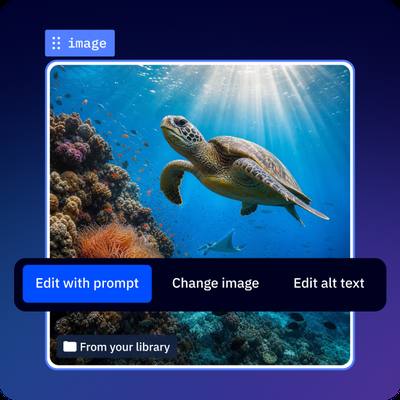
This can be handy when you’re putting together regular newsletters, promotional emails, or updates that need a suitable image but don’t require a full design project. You can spend less time moving between tools and more time getting your campaign ready.
That doesn’t mean every AI-generated image will be a perfect fit. You may still need to adjust the design, check that the visual matches your brand, and make sure it works well across different screen sizes.
How to get started
Start with an upcoming email that needs a simple visual. Use the image generation capability to create an option that fits your campaign, then review the result before adding it to your email. Check the colours, overall style, image quality, and how well it supports your message.
For major launches or high-profile campaigns, a designer may still be the right choice. Your regular emails, however, can be a good place to test whether AI-generated visuals save you time.
My recommendation: Try this feature on a few routine campaigns first. If the results match your brand and reduce the time you spend creating visuals, you can decide where it fits into your regular workflow.
<- Explore Active Intelligence 3.0: Wavelength ->
Task 6: See How Your Marketing Performance Compares With Industry Benchmarks
A 22% email open rate might look like a good result. But how does it compare with other businesses in your industry? The answer depends on your market, audience, and the type of emails you send.
Your campaign reports show how your results change over time, but they don’t always tell you how your performance compares with similar businesses. You need industry data to put those numbers into context.
Active Intelligence 3.0: Wavelength’s Industry Benchmarks capability helps you compare your marketing metrics with broader industry figures. This gives you another way to assess your results and identify areas that may need attention.
For example, if your email click rates fall below the relevant industry benchmark, you may want to review your email content, audience targeting, or calls to action. If your results are above the benchmark, you can look at what’s working and use those insights to guide future campaigns.
Just remember that benchmarks aren’t a universal scorecard. Your audience, campaign goals, list quality, and email frequency can all affect your results. A number that’s typical for one industry may not be a realistic target for another.
How to get started
Check the industry benchmarks available for your business and compare them with your recent campaign data. Review metrics such as email open rates and click rates where available, then identify any significant differences.
If a metric falls below the relevant benchmark, investigate the possible reasons. Review your subject lines, email content, audience segments, and calls to action before deciding what needs to change. Also, look at your past results to see whether the issue is new or part of a longer trend.
My recommendation: Don’t rely on industry benchmarks alone. Compare them with your own historical data to understand both how your campaigns perform against industry figures and how your results change over time. This will help you set realistic targets and focus on improvements that matter to your business.
<- Explore Active Intelligence 3.0: Wavelength ->
Task 7: Manage Multiple Client Accounts With Less Manual Work
Managing one marketing account requires regular attention. When you handle several client accounts, the workload grows. Every client has a different audience, brand voice, campaign history, and set of goals. Keeping track of all these details can be difficult when you’re responsible for multiple businesses.
Active Intelligence 3.0: Wavelength’s Cross-Account Intelligence helps agencies and marketers working across multiple accounts find useful insights. Features such as Adaptive Memory and Multi-Asset Analysis help the platform work with account information and marketing assets over time, supporting more informed recommendations.
For agencies, this can be valuable when reviewing campaign results, identifying patterns, and deciding which clients need more attention. Insights from similar campaigns can also help you find opportunities worth exploring for individual clients.
However, every client has different needs. A campaign strategy that works for one business may not deliver the same results for another. Always evaluate recommendations against each client’s audience, marketing goals, and brand guidelines before taking action.
How to get started
If you manage multiple ActiveCampaign accounts, start by exploring the Cross-Account Intelligence features available to you. Review the insights and recommendations the platform provides, then assess how useful they are for each client’s marketing activities.
Pay attention to the practical benefits. Does the feature help you identify campaign trends, uncover new opportunities, or spend less time reviewing account data? These are the results worth measuring when deciding whether it adds value to your agency’s workflow.
My recommendation: If you run a marketing agency, this feature deserves a closer look. Test it with your existing client workflows and evaluate the results over time. Focus on whether it improves your analysis, supports better client decisions, and reduces manual work. The real value comes from useful insights and measurable time savings, not simply the number of recommendations you receive.
<- Explore Active Intelligence 3.0: Wavelength ->
A Quick Note on What ActiveCampaign Wavelength Can’t Do on Its Own
ActiveCampaign’s Active Intelligence 3.0: Wavelength can support many marketing tasks, but it still has limitations. Knowing what it can and can’t handle will help you get more value from its AI features.
Features such as automation monitoring, email drafting, campaign translations, and performance insights can reduce manual work. However, AI-generated results still need your attention before you put them into practice.
For example, an AI-generated email may contain incorrect offer details. A translated campaign may need changes to sound natural to local customers. A performance report may highlight a drop in engagement without explaining the exact steps you should take to fix it.
This is where your judgment matters. You understand your customers, brand voice, and business goals. Wavelength can support your decisions, but you still need to review its output and decide what works for your marketing strategy.
What should you keep in mind?
Always review AI-generated content before publishing it. Verify important facts, check promotional details, and make sure recommendations suit your audience. You should also monitor your automations and campaign results to catch problems that need your attention.
Check ActiveCampaign’s official documentation to confirm which features your plan includes, how they work, and whether they meet your requirements.
My recommendation: Use Wavelength to reduce repetitive tasks and support your marketing decisions, but don’t rely on it to handle everything without supervision. Let AI take care of more routine work while you focus on campaign quality, customer needs, and the decisions that shape your results.
Finally: Start With One Task, Not All Seven
You don’t need to start using every Active Intelligence 3.0: Wavelength feature at once. Trying to change your entire marketing workflow in a single day will only add more work to your plate.
Start with the task that’s causing you the most trouble.
If you’re worried about broken automations, begin with monitoring and performance recaps. If writing emails takes up too much of your time, try campaign drafts. Running campaigns in multiple languages? Give AI Email Translations a try. And if you manage several client accounts, look into the cross-account capabilities.
The important thing is to see how each feature performs in your actual workflow. Give it time, review the results, and pay attention to whether it saves time or helps you do your marketing work more effectively.
You should also keep your expectations realistic. AI can help with repetitive tasks, but you’ll still need to review content, check campaign performance, and make decisions based on your business goals.
My recommendation: Choose one feature, test it over the next couple of weeks, and measure what changes. Once you’ve found something that genuinely helps, move on to the next task.
That’s a practical way to get started with ActiveCampaign’s Active Intelligence 3.0: Wavelength without overcomplicating your workflow.
Frequently Asked Questions
What is the easiest way to start using Active Intelligence 3.0: Wavelength?
Start with the feature that solves your biggest marketing headache. If you’re concerned about automation problems, look into Monitoring and Performance Recaps. If writing emails takes too much time, try Proactive Drafts and Ideas. Pick one task, learn how it works, and build from there.
Do I need to review the campaigns Active Intelligence 3.0: Wavelength creates?
Yes. AI-generated campaign drafts and images should be reviewed before you use them. Check the wording, accuracy, brand voice, links, and calls to action to make sure everything is right for your audience.
Is Active Intelligence 3.0: Wavelength useful for small businesses, or is it mainly for agencies?
It can be useful for both, depending on the features available to you and your marketing needs. Small businesses may benefit from campaign drafting and performance monitoring, while agencies managing several client accounts may find cross-account capabilities worth investigating.
Can Active Intelligence 3.0: Wavelength replace a translator or designer?
Not completely. Its translation and image generation capabilities can help reduce manual work, but important campaigns may still need a fluent speaker’s review or a designer’s input. The level of review depends on the campaign and the audience you’re trying to reach.
Can I stop checking my campaigns manually once Wavelength is set up?
No. Monitoring and automated tasks can help you keep track of your marketing, but they don’t remove the need for human oversight. You should still review performance reports, investigate potential problems, and check that your campaigns are working as intended.
<- See What Active Intelligence 3.0: Wavelength Can Do ->
<- Sign Up for a Free 14-Day Trial of ActiveCampaign (No Credit Card Required) ->