Affiliate Disclosure: This article contains affiliate links. If you choose to sign up for WordPress.com through these links, I may earn a small commission at no additional cost to you.
Have you ever opened your blog, looked at 50+ posts… and realized none of them is really connected?
I’ve been there. I knew internal linking mattered, but doing it manually? It felt like a never-ending chore I kept putting off.
Then I tested the AI Link Genius feature inside Rank Math SEO Plugin on a 100-post site.
Here’s what surprised me: in under 30 minutes, it suggested hundreds of relevant links I had completely missed. Some orphan posts finally got connected. A few pages even started climbing in rankings within weeks.
But here’s the real question…
Is it actually worth it, or just another “AI feature” that sounds cool but doesn’t deliver?
Let me show you what really happened.
What is Rank Math AI Link Genius?
Look, most people hear “AI internal linking” and assume it’s some complicated SEO trick.
It’s not.
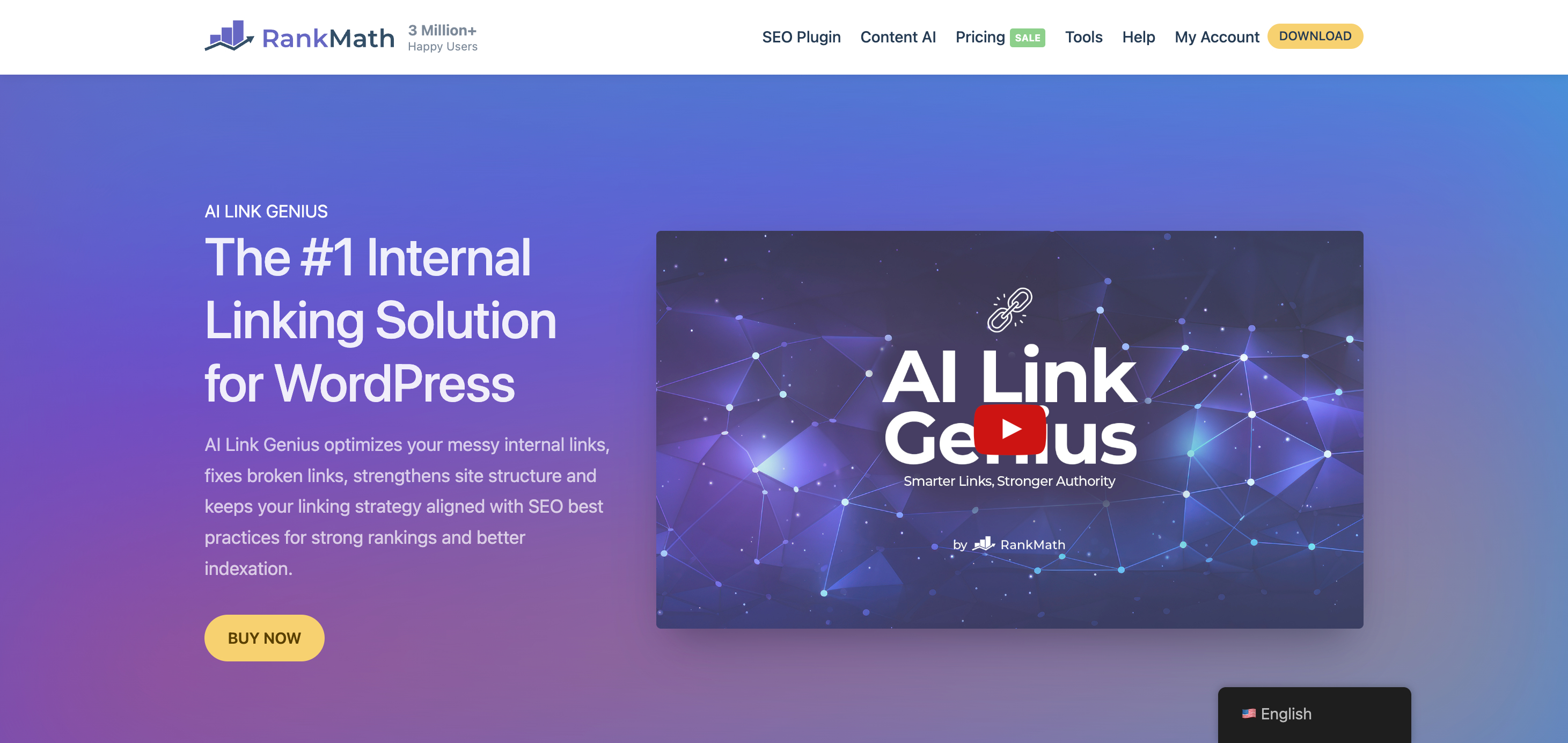
Rank Math AI Link Genius is a feature inside the Rank Math SEO Plugin (paid version) that helps you automatically find and add relevant internal links across your website.
In simple terms?
It scans your content, understands what each page is about, and then suggests (or inserts) links between related posts — the kind you would normally spend hours doing manually.
Think of it like this…
Imagine you had an assistant who read every single blog post you’ve ever written, remembered all of them, and then quietly said:
“Hey, this paragraph should link to that post you wrote 6 months ago.”
That’s basically what this tool does — but at scale.
And the best part? It doesn’t just throw random links around. It tries to match context, meaning the links actually make sense to readers (not just search engines).
My Experience Using It (Real Talk)
When I first turned it on, I honestly didn’t expect much.
I’ve used internal linking tools before, and most of them either:
- Suggest obvious links I already added
- Or worse… completely irrelevant ones
But this felt different.
Within minutes, it picked up connections between posts I had totally forgotten about. One article that barely had any internal links suddenly had 15+ solid suggestions — and most of them actually made sense.
What really stood out?
It wasn’t just linking keywords. It was linking ideas.
For example, instead of forcing exact-match anchors, it suggested links naturally inside sentences — the way you’d write if you were doing it manually (on a really good day).
Was it perfect? No.
I still had to review and skip a few suggestions that felt off.
But compared to doing this manually across dozens of posts?
It wasn’t even close.
Who Is This Actually For?

This isn’t for everyone.
If you only have 5–10 blog posts, you probably don’t need it yet.
But if you:
- Have 30, 50, or 100+ posts
- Run an affiliate or niche site
- Manage multiple WordPress sites
- Or just hate doing internal linking manually
Then this starts to feel less like a “nice feature”… and more like a serious time-saver.
Because here’s the truth, most people won’t say:
Internal linking isn’t hard — it’s just painfully time-consuming and easy to ignore.
And that’s exactly the gap AI Link Genius is trying to fill.
Why Internal Linking Still Matters in 2026 (And Why Most Sites Get It Wrong)
Let me ask you something…
When was the last time you went back and added internal links to your old posts?
Yeah… same.
Most people either:
- Add a few links while publishing
- Or completely forget about it afterwards
And that’s exactly why their content never reaches its full potential.
Here’s the Thing Most People Miss
Google doesn’t just rank pages — it follows connections.
Internal links tell search engines:
- Which pages matter most
- How your content is related
- Where authority should flow
Without them, your site is basically a bunch of isolated islands.
And isolated pages?
They don’t rank well. Simple as that.
The Real Problem Isn’t Knowledge — It’s Execution
Everyone knows internal linking is important.
But actually doing it?
That’s where things fall apart.
Because let’s be honest…
Going back through 50+ posts, finding relevant sections, choosing the right anchor text, and inserting links naturally — that’s not hard…
It’s just painfully slow.
So what happens?
You skip it.
Or rush it.
Or do it once and never revisit it again.
And over time, you end up with:
- Orphan posts (no internal links pointing to them)
- Missed ranking opportunities
- Weak topical structure
My Struggle (And Why I Ignored It for So Long)
I’ll be honest — I avoided internal linking for months.
Not because I didn’t understand it…but because every time I thought about doing it, it felt overwhelming.
I remember opening one of my older posts, thinking,
“Okay, I’ll just add a few links.”
Two hours later?
I was still scrolling through other articles, trying to figure out what connects to what. I kept second-guessing anchor text, overthinking relevance, and honestly… getting bored.
So I did what most people do.
I closed the tab and told myself I’d “fix it later.”
Spoiler: later never came.
And the frustrating part?
Some of those posts were good. They just weren’t connected to anything, so they sat there… invisible.
That’s when it clicked for me:
The problem wasn’t writing content.
It was managing it after publishing.
Why Tools Like AI Link Genius Are Showing Up Now
This is exactly the gap that tools like the AI feature inside Rank Math SEO Plugin are trying to fix.
Not because internal linking is new…
But because handling it across dozens (or hundreds) of posts is where things break.
And once you feel that pain firsthand, automation doesn’t feel lazy…
It feels necessary.
Main Features of Rank Math AI Link Genius
Features don’t matter unless they actually save you time or fix a problem.
So instead of listing features like a brochure would, I’ll show you what each one actually does for you in day-to-day blogging.
1. Centralized Link Audit Dashboard
Most SEO plugins show basic link counts. Yoast SEO marks posts with simple indicators, and All in One SEO offers a link assistant. But the data stays scattered. You see numbers per post, not how authority moves across the whole site.
AI Link Genius fixes this with a centralized dashboard. You can review internal and external links in one place, filter by type, status code, anchor text, or orphan status, and understand how pages relate to each other. You can also identify pages with no incoming links, pages overloaded with outgoing links, and broken or redirected URLs without leaving WordPress.
2. Real-Time Editor Suggestions
When you’re writing a new post, you don’t have to leave the editor to find relevant older content. You can highlight text and use the “Generate Link” command, or use the “Link Opportunities” section in the sidebar.
It keeps you in the creative flow. The AI analyzes the actual context of your paragraph to suggest links that make semantic sense, rather than just matching a word. This leads to higher click-through rates (CTR) from your readers because the links are genuinely relevant.
3. Keyword Mapping with AI Variations
This is arguably the most powerful feature. You can create a relationship between a target URL and specific keywords. The AI then scans your site and inserts those links for you.
It isn’t just basic keyword matching. You can generate AI variations (synonyms and related phrases) so the anchor text stays natural and doesn’t look like “over-optimized” spam. You also have the “Max Links per Post” limit to ensure you don’t over-link within a single article.
4. Orphan Post Detection
Many plugins will tell you orphaned pages exist. They rarely help you resolve the issue in a practical way. On a large site, fixing them manually can take hours or days.
AI Link Genius lists orphaned pages and pairs them with suggestions for where links should come from. You can move through them in batches rather than jumping between posts. This helps older content regain visibility as your site grows.
5. Advanced Bulk Update Tool (with Rollback)
If you’ve ever rebranded a category or changed a URL structure, you know the pain of updating dozens of internal links. The Bulk Update tool allows you to target specific anchor texts or URLs across your entire site.
The “Rollback” feature is the ultimate safety net. If a bulk change doesn’t look right, you can undo the entire process with one click. This makes site-wide link management risk-free.
6. Centralized Link Audit Dashboard
The module provides a bird’s-eye view of your site’s link health, including broken links, redirects, and nofollow tags.
The Benefit: You can stop authority “leaks” caused by internal nofollow tags or broken links that frustrate users. Having this data in one place makes technical SEO audits much faster and ensures that your site’s structure remains solid as it grows.
7. Semantic Related Posts Block
Most related posts features rely on tags and categories, which often leads to mismatched suggestions.
AI Link Genius analyzes the actual content of each post and recommends related articles based on topic relevance. It works through a block for the editor or a shortcode, so it fits into different setups.
When related posts match the reader’s intent, people are more likely to continue browsing, which improves engagement and strengthens your internal structure at the same time.
8. Nofollow Link Detection
Many sites accidentally add nofollow attributes to internal links, often through themes or builders. This blocks PageRank flow within your own site.
AI Link Genius highlights all internal links with nofollow attributes. You can review and remove them in bulk. This helps restore proper authority flow, especially on older sites where these issues often go unnoticed.
9. Export Links Data
For those who need to see the data or share progress with others, the tool allows you to export full link breakdowns into CSV, Excel, or JSON.
This is essential for conducting technical SEO audits. You can see exactly how authority is flowing through your site and identify “pillar pages” that might need more internal link support to compete for difficult keywords.
The Bottom Line
This isn’t about fancy AI.
It’s about removing the annoying, time-consuming part of SEO.
The part you keep delaying.
And once that friction is gone…
You actually stay consistent with your internal linking — which is what really moves the needle.
How Rank Math AI Link Genius Works (Step-by-Step)
I thought this would be complicated.
It wasn’t.
Here’s exactly how it plays out in real life.
1. Enable the Link Genius Module
Before you can use any AI features, you must activate the module within your WordPress dashboard.
- Navigate to Rank Math SEO > Dashboard.
- Locate the Link Genius module and toggle it to On.
- Note: While many features are included in Rank Math PRO, AI-powered variations and suggestions require Content AI credits.
2. Run a Site-Wide Link Audit
Once enabled, Rank Math needs to understand your current link structure.
- Go to Rank Math SEO > Link Genius.
- Click the Overview tab. Rank Math will scan your site to analyze internal/external links, broken links (404s), and redirects.
- Identify Gaps: Look for Orphaned Pages (pages with zero incoming internal links) and pages with “Weak Coverage” to prioritize them for new links.
3. Create a Keyword Map (Automation)
The “Keyword Map” is the core of the automation process. It tells the AI which keywords should link to specific high-value pages.
- Step A: Navigate to the Keyword Maps tab and click Create Keyword Map.
- Step B: Set the Target URL (the page you want to send authority to).
- Step C: Enter your Primary Keyword.
- Step D: Click Generate AI Variations. The AI will suggest semantically related phrases (e.g., if your keyword is “SEO Tips,” it might suggest “Search Engine Optimization guide” or “SEO best practices”) to keep anchor text natural.
- Step E: Set your constraints, such as Max Links per Post (usually 2–3 is best) and enable Auto-link on publish for future content.
4. Execute and Review Changes
Before the links go live, you can preview and approve them.
- Click Execute on your keyword map.
- Rank Math will show a list of every potential link it found across your existing articles.
- Uncheck any that feel forced or out of context, then click Add Link Changes.
5. Use AI Suggestions in the Editor
For a more manual, context-aware approach while writing new content:
- Open any post in the WordPress editor.
- In the Rank Math SEO panel, look for the Link Opportunities section.
- Click Generate. The AI reads your current paragraph and suggests relevant internal pages to link to based on the actual meaning of your text, rather than just matching a keyword.
- Hover over a suggestion and click the Insert Link icon to add it instantly.
Case Study: What Happened When I Used AI Link Genius on a 100-Post Blog
Let me show you what this actually looked like on a mid-sized site.
The Starting Point (Before AI)
Before using the AI feature inside Rank Math SEO Plugin, I audited the site.
Here’s what I found:
- 100 published posts
- ~35% had 0–2 internal links
- 20+ posts were completely orphaned
- Internal links were inconsistent and random
Traffic wasn’t terrible… but it felt stuck.
Pages weren’t supporting each other.
What I Did
I enabled AI Link Genius and let it scan everything.
Then I:
- Reviewed ~300+ link suggestions
- Approved around 65–70% of them
- Applied links in bulk across key posts
Total time spent?
Just under 45 minutes.
That alone was surprising.
Immediate Changes (Week 1)
Right after implementation:
- Orphan pages dropped from 20+ -> 3
- Average internal links per post increased by ~40%
- Content clusters became visibly stronger
Nothing dramatic in rankings yet — which is normal.
But structurally?
Huge improvement.
Results After 3 – 4 Weeks
This is where it got interesting.
Across the site:
- Organic impressions increased by 18–25%
- Average position improved for several pages (especially those previously orphaned)
- 6–8 posts moved up by 3–7 positions in search results
On-page behaviour also shifted:
- Time on page increased slightly (~8–12%)
- Bounce rate dropped on key articles
Not massive spikes…
But steady, compounding gains.
What Actually Drove These Results
It wasn’t “AI magic.”
It came down to three things:
- Previously hidden pages started getting internal links
- Link equity flowed better across related content
- Users had more pathways to explore the site
In short, the site finally started behaving like a connected system, not a pile of articles.
Where It Still Needed Human Input
Even with these results, it wasn’t perfect.
- ~30–35% of suggestions need skipping or tweaking
- Some anchors felt slightly off
- A few links didn’t fully match the intent
So yes — you still need to review.
But compared to manual work?
This was easily 80–90% less effort.
The Real Takeaway
The biggest win wasn’t just traffic.
It was leverage.
Instead of spending days fixing internal links…
I fixed most of it in under an hour — and saw measurable improvements within weeks.
That’s the kind of trade-off that’s hard to ignore.
Rank Math AI Link Genius vs Manual Internal Linking
Let’s not pretend one completely replaces the other.
Both have their place.
The real question is: which one makes more sense for your situation?
Time: Effort vs Efficiency
Manual linking takes time. No way around it.
If you’re careful, one post can take 10–15 minutes to properly link.
Across a large site, that adds up fast.
With the AI feature inside Rank Math SEO Plugin, most of that work is reduced to reviewing and approving suggestions.
So yes — AI is faster.
But the manual gives you full control over every decision.
Consistency: Uneven vs Systematic
Manual linking depends on how consistent you are.
Some posts get attention. Others get overlooked.
AI helps even things out by scanning your entire site and suggesting links across all content.
That doesn’t make it “better” — just more consistent at scale.
Accuracy: Human Judgment vs AI Assistance
Manual still wins on precision.
You understand your content better than any tool.
You can:
- Match intent perfectly
- Avoid awkward placements
- Control tone and flow
AI gets close, but not perfect.
From experience:
- Many suggestions are solid
- Some still need editing or skipping
So it’s more of a helper than a replacement.
Control: Full vs Guided
Manual = you do everything.
AI = you decide what to keep.
With AI Link Genius, nothing is forced.
You review suggestions, accept what works, and ignore what doesn’t.
So you’re not losing control — just saving effort.
Scalability: Where the Difference Shows
If your site is small, manual linking is manageable.
But as your content grows, it becomes harder to maintain consistency.
That’s where AI becomes useful — not because manual is bad, but because it’s hard to keep up with.
The Honest Verdict
Manual linking is more precise.
AI linking is more efficient.
The best approach?
Use both.
Let AI handle the heavy work, and step in where judgment matters.
That way, you get:
- Speed
- Coverage
- And quality control
Which is hard to achieve with either method alone.
Rank Math AI Link Genius vs Link Whisper (Detailed Comparison)
If you’ve looked into internal linking tools before, you’ve probably come across Link Whisper.
So how does it compare to the AI feature inside Rank Math SEO Plugin?
Here is a quick comparison table:
| Feature | Rank Math AI Link Genius | Link Whisper |
|---|---|---|
| Core Approach | AI + context-based linking | Keyword-based linking |
| Link Suggestions | Based on meaning and content relevance | Based on keyword matching |
| Ease of Use | Seamless if using Rank Math | Simple standalone plugin |
| Accuracy | More natural, but needs review | More consistent, sometimes rigid |
| Bulk Linking | Yes (fast, scalable) | Yes (manual review required) |
| Real-Time Suggestions | Yes (inside editor) | Limited |
| Orphan Page Detection | Yes | Yes |
| Workflow Style | “Assistant” style automation | “Tool-driven” manual control |
| Pricing Model | Part of Rank Math (AI credits) | Separate paid plugin |
| Best For | Automation + scale | Control + simplicity |
What This Table Really Tells You
If you zoom out, the difference is simple:
- AI Link Genius helps you move faster
- Link Whisper helps you stay in control
One isn’t replacing the other — they just fit different workflows.
My Take After Using Both
If I had a small site?
I’d be happy with either.
But on a larger site (50–100+ posts), the AI feature inside Rank Math SEO Plugin starts to feel more practical.
Not because it’s “better” in every way…
But it removes more of the manual effort.
And at scale, that’s what matters most.
Pricing: Is Rank Math AI Link Genius Worth the Cost?
Let’s clear something up first.
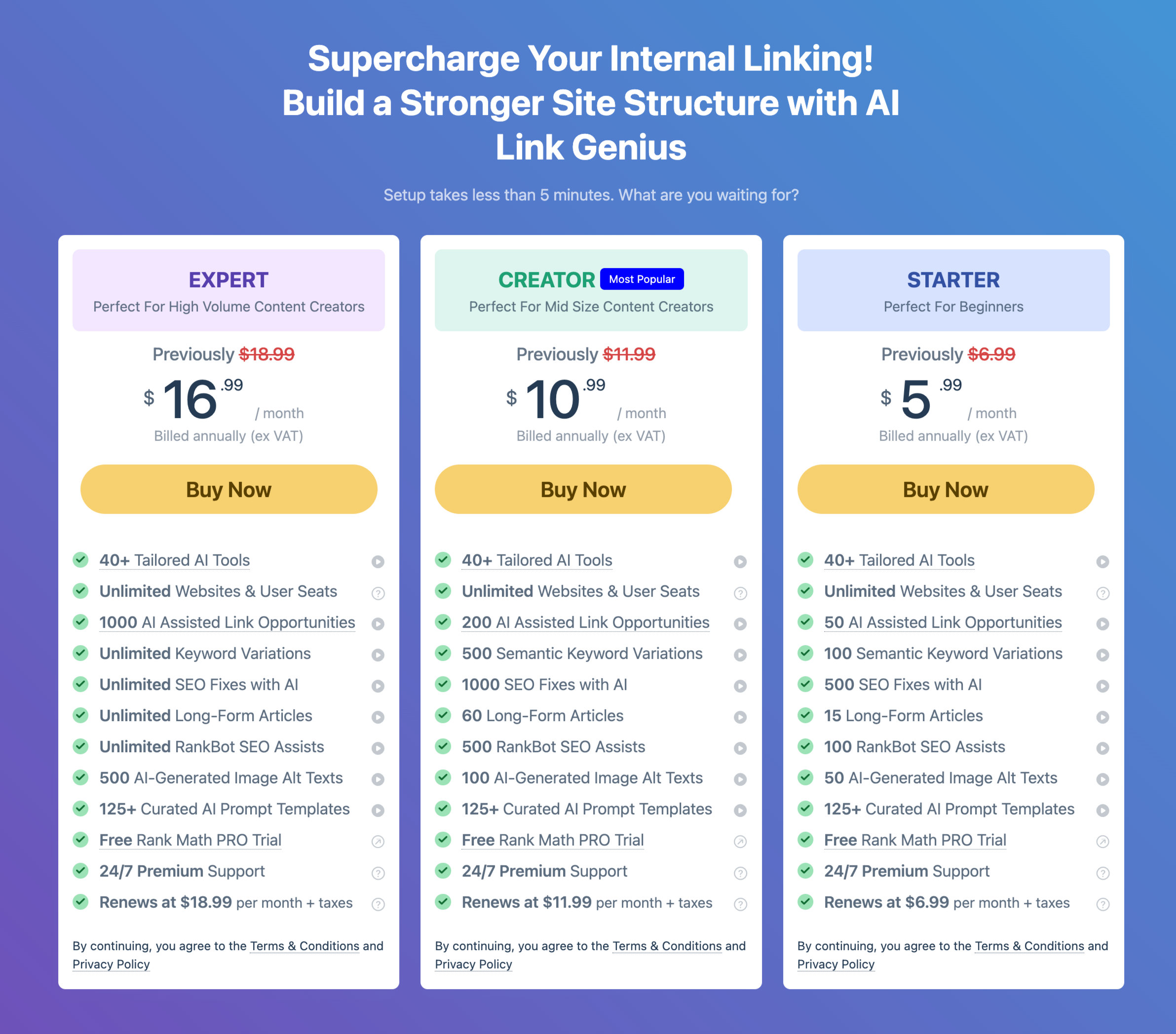
AI Link Genius isn’t sold as a separate plugin.
It’s part of the Rank Math SEO Plugin ecosystem — and its usage depends on AI credits.
How Pricing Actually Works
Here’s the simple version:
- Rank Math has free and paid plans
- AI features (like Link Genius) use a credit system
- The more you use AI, the more credits you consume
So you’re not paying “just for internal linking”…
You’re paying for access to a broader AI toolkit that includes this feature.
What You’re Really Paying For
This is where most people look at it wrong.
You’re not paying for links.
You’re paying to save time.
Think about it:
- Manual internal linking across 100 posts = hours (or days)
- AI-assisted linking = under an hour
So the real question becomes:
What is your time worth?
Cost vs Effort (The Real Trade-Off)
If you enjoy doing SEO manually and have the time, you might not need this.
But if you:
- Run multiple sites
- Publish content regularly
- Or keep delaying internal linking
Then the cost starts to make more sense.
Because it’s solving a problem you’re probably not fixing consistently on your own.
When It’s Worth It
It’s a solid investment if you:
- Have 30–50+ posts
- Want to improve SEO without spending hours
- Already use Rank Math
- Care about scaling your content efficiently
When It Might Not Be
You can skip it (for now) if you:
- Have a very small site
- Prefer full manual control
- Rarely publish content
- Don’t mind doing internal linking yourself
The Honest Verdict on Pricing
It’s not the cheapest solution.
But it’s also not overpriced for what it does.
If you actually use it, it pays for itself in time saved alone.
If you don’t…
Then it’s just another feature sitting unused.
Pros and Cons of Rank Math AI Link Genius
No tool is perfect — and this one isn’t either.
Pros
- It saves a serious amount of time: This is the biggest win. What normally takes hours can be done in minutes. And that alone makes it hard to ignore.
- It finds linking opportunities you’d miss: Even if you’re good at SEO, you’re not going to remember every post you’ve written. This helps connect dots you didn’t even see.
- It makes internal linking consistent: No more random linking. Your content starts to feel structured instead of scattered.
- It’s beginner-friendly: You don’t need to be an SEO expert to use it. It guides you through the process naturally.
- It scales with your content: The bigger your site gets, the more useful it becomes — which is exactly what you want from a tool like this.
Cons
- It’s not 100% accurate: Some suggestions will feel off. You still need to review before applying.
- You can’t go fully hands-off: If you blindly accept everything, your content can start to feel unnatural.
- It depends on AI credits: Heavy usage can require more credits, which adds to the cost over time.
- It may feel unnecessary for small sites: If you only have a handful of posts, this can feel like overkill.
Who Should Use Rank Math AI Link Genius? (And Who Shouldn’t)
Not everyone needs this.
And saying that actually builds more trust than trying to sell it to everyone.
Who This Is Perfect For
- Bloggers with a growing content library: If you’ve got 30, 50, or 100+ posts, internal linking starts getting messy fast. This is where the AI feature inside Rank Math SEO Plugin becomes genuinely useful.
- Affiliate and niche site owners: These sites rely heavily on structure and link flow. Better internal linking can directly impact rankings and revenue.
- People who keep delaying internal linking: Let’s be honest — if you’ve been putting this off for months, you’re not suddenly going to enjoy doing it manually. This removes that friction.
- Agencies and multi-site owners: Managing multiple websites? This saves time across all of them. What used to take days can be handled much faster.
Who Probably Doesn’t Need It (Yet)
- New bloggers with very few posts: If you’ve only got 5–10 articles, you can handle internal linking manually without much effort.
- People who prefer full manual control: If you like placing every link yourself and care about perfect precision, you might find this unnecessary.
- Low-content or inactive sites: If you’re not publishing regularly, there’s not much to optimize.
The Simple Way to Decide
Ask yourself this:
“Do I have enough content that internal linking feels like a chore?”
If the answer is yes…
Then this tool probably makes your life easier.
If not…
You’re fine without it for now.
The Honest Perspective
This isn’t a must-have for everyone.
But for the right type of site, it solves a very specific problem:
Too much content… and not enough time to connect it properly.
And if you’ve felt that problem before, you’ll immediately understand the value.
Best Practices for Using AI Internal Linking Tools
Here’s the truth most reviews won’t tell you:
AI tools don’t fail — people just use them wrong.
If you want real results from the AI feature inside Rank Math SEO Plugin, follow these simple rules.
Don’t Accept Every Suggestion
It’s tempting.
You see a list of suggestions and think, “Just apply all.”
Don’t.
Take a few seconds to review each one.
Because one awkward link can break the flow of your content.
Focus on Relevance, Not Quantity
More links ≠ better SEO.
What matters is:
- Does this link help the reader?
- Does it actually relate to the topic?
If it feels forced, skip it.
Keep It Natural
Read the sentence out loud.
Does the link feel like something you’d naturally include?
If not, tweak the anchor text or placement.
Your content should still sound human — not “optimized.”
Use It to Fix Old Content First
Your older posts are where the biggest gains usually are.
They’re already indexed… they just need better connections.
Build the Habit While Writing
Use real-time suggestions while creating new posts.
That way, your site grows with a strong structure from day one.
Think Like a Reader, Not Just SEO
Ask:
“Would I actually click this link?”
If not, it probably doesn’t belong there.
Quick Checklist
Before you apply any internal links, run through this:
- Does the link feel natural in the sentence?
- Is it actually helpful to the reader?
- Am I avoiding overloading the page with links?
- Did I review instead of blindly accepting?
- Does this improve the overall flow of the content?
If you can say “yes” to most of these…
You’re doing it right.
The Bottom Line
AI makes internal linking easier.
But you still make it effective.
Use it as a guide — not a shortcut.
FAQs
What is Rank Math AI Link Genius?
AI Link Genius is Rank Math’s internal linking module that comes built into Rank Math PRO. You don’t need a separate plugin. It focuses on three core jobs: auditing your current link structure, suggesting internal links using AI, and fixing issues in bulk.
Since it’s part of Rank Math PRO, you already get most of the non-AI features if you’re on a paid plan, which starts at about $7.99/month for solo users. The AI suggestions run on Rank Math’s Content AI credits, which you purchase separately.
Does Rank Math AI Link Genius replace manual internal linking?
No — and it shouldn’t.
Think of it as a helper, not a replacement.
It handles the heavy lifting (finding opportunities, suggesting links), but you still review and decide what fits best.
That balance is what keeps your content natural.
Is it safe for SEO?
Yes — as long as you use it properly.
The AI feature inside Rank Math SEO Plugin focuses on contextual linking, which aligns with how search engines understand content today.
The only risk?
Blindly accepting every suggestion.
If you review and keep links relevant, you’re on safe ground.
Does it slow down your WordPress site?
From what I’ve seen, no noticeable impact on front-end performance.
Most of the heavy work (analysis and suggestions) happens in the background.
Your visitors won’t feel it.
Is it beginner-friendly?
Yes.
You don’t need deep SEO knowledge to use it.
In fact, it can teach you better internal linking habits just by showing how links should be placed.
Do you still need to edit anchor text?
Sometimes, yes.
Many suggestions are good as-is, but a few may need small tweaks to sound more natural.
It takes seconds — and it’s worth doing.
Is it worth it for small websites?
Not really.
If you only have a handful of posts, manual linking is quicker and more than enough.
This tool becomes valuable as your content grows.
Can you rely on it long-term?
Yes — but with a simple rule:
Use it consistently, not blindly.
It’s most powerful when you combine:
- AI suggestions
- Your judgment
- Ongoing updates
That’s how you build a strong internal linking structure over time.
Final Verdict: Should You Use Rank Math AI Link Genius in 2026?
So… is it the best internal linking tool?
Honestly?
It depends on how you work.
If You Want the Short Answer
If you already use the Rank Math SEO Plugin and have a growing site…
Then yes — AI Link Genius is absolutely worth trying.
Not because it’s perfect.
But because it solves a problem most people ignore.
What It Gets Right
It removes the biggest barrier to internal linking:
Time.
Instead of spending hours digging through old posts, you get suggestions instantly.
And more importantly…
You actually follow through.
Where You Still Need to Be Smart
This isn’t a “click once and forget” tool.
You still need to:
- Review suggestions
- Keep links natural
- Think about the reader
If you skip that part, the results won’t be great.
Who It’s a No-Brainer For
- Sites with 30–50+ posts
- Bloggers are trying to scale content
- Anyone who keeps delaying internal linking
- Agencies managing multiple websites
For these users, the value is clear.
Who Should Skip It (For Now)
- Very small sites
- People who enjoy manual SEO work
- Low-content or inactive blogs
You won’t get much out of it yet.
The Real Bottom Line
AI Link Genius isn’t magic.
It’s leverage.
It takes something you know you should be doing…
And makes it easy enough that you actually do it.
And in SEO, consistency beats perfection every time.
If you use it the right way — as a helper, not a shortcut — it can quietly improve your site in ways that add up over time.
Ready to Fix Your Internal Linking (Without the Headache)?
If you’ve made it this far, you already know the truth…
Internal linking matters.
But doing it manually? That’s where most people get stuck.
That’s exactly where the AI feature inside Rank Math SEO Plugin can help.
It won’t replace your judgment.
It won’t magically rank your site overnight.
But it will save you hours and help you finally fix something you’ve probably been putting off for way too long.
Here’s What I’d Do If I Were You
Don’t overthink it.
Try it on a few posts first.
- Pick 5–10 older articles
- Apply the suggestions (with a quick review)
- See how it improves your structure
You’ll know pretty quickly if it’s worth it for your site.
One Simple Shift That Makes a Big Difference
You don’t need more content.
You need better connections between the content you already have.
And once you fix that…
Everything else starts working better.